Showing posts with label Non-profits. Show all posts

Wednesday, April 2, 2014

Top 5 Goals for Nonprofits on Social Media and Step One to Achieving Them


By now, most nonprofits have realized that using social media effectively can help them reach some of the primary goals of their organization.

In fact, according to a new HubSpot survey of just over 9,000 small-to-medium-sized nonprofits in the U.S. and Canada, 98% of them are already on Facebook, and 80% of them say the social network is their primary focus for social media.
Encouraging as it may be, some troubling statistics also arose from the study. According to HubSpot:
  • Most nonprofits do not have a documented social media strategy.
  • Goals are varied and diverse — about half are measuring their results.
Having a thought-out social media strategy that aligns with your goals and is measurable is key. Not only will you be able to tell if you are meeting or falling short of your goals, but you will be able to learn from measuring your social media and make changes in real-time to improve. So let’s talk about those goals, as collected and ranked by the study:
Click to enlarge.
  1. Sharing news about the organization
  2. Brand recognition
  3. Sharing news about the cause
  4. Fundraising
  5. Volunteer recruitment
These are very similar to the 6 Goals of Nonprofit Social Engagement that  identified in a post from late last year, but we think that organically building trust and relationships are something that social media is uniquely qualified to do, and shouldn’t be left out:
  1. Increase awareness
  2. Build trust
  3. Increase traffic
  4. Build relationships
  5. Drive donations
  6. Increase membership, volunteers
Before laying out an effective social media strategy to meet any of these goals, the first step of course is online listening. 44% of nonprofits say they have only one person monitoring social media. That may seem like a small number, but one person is better than zero, I suppose. Here are some tips for web and social media monitoring:
For your brand: Where are people talking about you online and what kind of language and sentiment is being used? Is your community of supporters and advocates united in any one spot or is there scattered chatter all over the web? How can you unite that conversation under your brand?

For your cause: Who’s talking about your cause? Are there partnerships to be forged among those people? Run some competitive intelligence on other charities that operate within your cause. Compare your online efforts. Where has your campaign succeeded/failed compared to theirs? What can you learn from this?
The single most disheartening statistic from the study is this one: “67% of nonprofits have no social media strategy, policies or goals documented.”
There are so many opportunities in social media for nonprofits to reach their goals. One of the challenges that sinks so many people right out of the gate is an inability to articulate how to reach those goals. That’s why having a solid listening plan in place before you formulate a strategy is essential.

Tuesday, March 11, 2014

3 Goals Every Facebook Manager Should Obsess Over


Image
For too long, organizations were told that Facebook was only for "building awareness."

Today, we all recognize how silly it is to think that awareness alone could somehow have a real impact on our mission. Impact is the result of action, whether it’s supporters lending their voice or time to a campaign or making a donation to support your cause. 
“Engagement” is the term used to describe action online these days and the evolution from “awareness" to “engagement" is a very positive one indeed. But engagement is a two way street. Engaging people requires action on your part, too.
So, how do you manage your Facebook page with an eye toward engagement? How do you track progress and know if you’re getting the most out of Facebook? 
Here are three big bucket goals that you should be working to improve upon no matter if your page has 3,000 fans or 3 million fans:
1. Reach
2. Engagement
3. Capturing Data
To succeed on Facebook (and get real value from it), you need to reach a worthwhile number of the right people, engage with them in meaningful ways that deepen your relationship, and capture data so that you can continue to cultivate your relationship over time.
Let’s dig a bit deeper into each of these three goals.
1. Reach
Reach is simply a measure of how many people your message is getting to.
Let’s look at an example:
As I was writing this, I popped in and took a look at two excellent Facebook pages to see what we can learn. Chose OurTime.org and DoSomething.org because they both do a wonderful job with their pages. They also happen to be relatively large pages, but the size of the pages isn’t what really matters in our example here, relative performance does.
At the time of writing, OurTime had 134,505 fans and DoSomething had 457,471 fans. If we look at fan count alone, DoSomething is putting OurTime to shame.
But not so fast!
You see, OurTime has over 600,000 people talking about them. This means they are reaching the equivalent of 4.5 times the number of Fans their page actually has.
OurTime FB Page Banner
That is not just fantastic reach, that’s insane! Nice job team OurTime!
Now let’s look back at DoSomething with their 425,000 fans.
Hmmm… it turns out that they currently have 77,000 people talking about them. This means that the equivalent of 16% of their fan base is talking about them on Facebook. 
DoSomething Facebook Banner
Now, don’t be fooled, that is a VERY solid reach. But it certainly doesn’t come close to what OurTime is doing.
Now I feel sort of bad that I chose OurTime to compare them to, because OurTime is out-performing many, if not most nonprofit pages today. Sorry team DoSomething. 
Which organization has greater reach?
Clearly, it’s OurTime.
And why are they reaching so many more people?
The answer is painfully obvious: OurTime is creating much more highly engaging, viral content than DoSomething.
Which leads us to our next key objective.
2. Engagement
So, how did OurTime earn a reach that’s 4.5 times the size of their Fan base?
They worked hard to post content that got people liking, commenting and sharing.
Engagement and Reach are tightly intertwined, but it’s important to measure both separately so you can know where and on what to focus your time and energy.
The truth is, no matter how large your page is, if people are not engaging with your content, your page will fail to provide a meaningful return on investment.
Furthermore, if people are not engaging with actions that further your mission, how can they possibly impact your work?
Facebook is constantly making changes to the algorithm that determines which of your posts show up on which of your Fan’s walls and on which of their friend’s walls.
This algorithm is called edgerank.  Edgerank has always been a source of frustration, but the most recent changes have made Facebook even less forgiving to pages that fail to post content that get people clicking.
However, as we can see from OurTime’s page performance, edgerank is not hurting everyone. In fact, edgerank can be your friend if you focus on engaging people on Facebook.
To put it bluntly, posting content that engages people on Facebook is the only way you can hope to succeed without spending a whole lot of money on Facebook ads.
And even if you do spend that money, without having engaging content, your ad dollars aren’t going to bring the return you hope for.
Let’s look at how you can measure engagement. This one is a little harder than reach.
Facebook gives us some good metrics that can help us measure the overall engagement of a page, but it can be hard to really see and learn how we’re doing on a post-by-post basis.
What we really want to measure is how many people on average are engaging with each of your posts and identify those that fell flat.
Understanding average engagement per post, and being able to quickly find your top performing content are the key steps to learn what’s working. Then you can make adjustments to the types of posts you share on your page. One quick and free way to do this is with our free Page Analyzer:http://engagement.actionsprout.com/inspire.
Let’s do a quick analysis on the DoSomething and OurTime‘s Facebook pages to see how well they’re each doing with engagement.
By running the tool to generate the report, we can see that over the past hundred or so Facebook posts, OurTime, on average, has engaged 9,134 people per post. Keeping in mind that their current fan count is 134,505, we give them an engagement score today of 679. This is nothing short of extraordinary.
OurTime Engagement Report
DoSomething also has excellent engagement (any score over 50 is good). With 457,471 fans, they have engaged 7,100 people on average per post they have pushed out. But given their larger fan base, their engagement score is lower than OurTime at 155.
DoSomething Engagement Report
Okay, so posting content that gets people clicking “like”, “share” and commenting is required in order to succeed on Facebook. Does that mean you should just post softball images of kids and kittens?
Of course not.
As one of our customers explained it to me, successful pages on Facebook do a good job of balancing the cheese and the broccoli. That is, you don't want a page that has nothing but cheap memes, however a page with nothing but on-message all-business posts will fail over time. The right mix is one that allows your page to continually grow while, at the same time, maximizing the quantity and quality of engagement you can drive from your Facebook page.
There are other important factors to be thinking about as you work to engage people on Facebook. These include:
  1.  Interacting with people in the comments stream.
  2. Giving people who are ready actions they can take that go beyond “like”, “comment” or “share”. This is, of course, what ActionSprout exists to do.
We’ll cover these two topics in a future post, because now we need to explore your third key objective that will bring you success as you manage your Facebook page and ensure that your efforts directly impact your mission.
3. Capturing Data
Different organizations value different kinds of data. Depending on what information you keep in your donor or supporter database, and on how you use email and advertising to support your work, you will be looking to capture different information from supporters on Facebook.
For most organizations, the most important pieces of data they can capture are names and email addresses so they can connect with their supporters directly via email.
I have written about the power of combining Facebook and email before as well as the power of cross channel promotion. Facebook can be a powerful tool for building your email list, and when coupled with your email strategy, can really help you take your donor cultivation to a new level.
Capturing data is, of course, tightly connected to your engagement efforts on Facebook. What you really need to be doing is capturing information about every person that completes an action on your behalf so you can find your biggest supporters, and then reach them directly when you need them.
I said above that Facebook’s edgerank is not the insurmountable problem some people make it out to be when it comes to reach. But edgerank does greatly impact your ability to reach your supporters on Facebook when you actually want to reach them to collect data.
I don’t know if or how DoSomething is capturing data from Facebook, but OurTime uses ActionSprout. They have given me permission to share some insights gleaned from what they are doing and the impact their actions are having. 
Each week OurTime publishes a few posts that include a call to action asking people to do something beyond “like”, “share” or “comment”. They use ActionSprout to do this, enabling them to keep action takers on Facebook so that Facebook does not punish them for driving traffic off site.  
OurTime Post
OurTime has been using ActionSprout for a few of months now. They’ve run 9 different actions, each of which has been included as calls to action on several posts.
In those months, OurTime has captured information, including the names and what action they cared about, on 149,000 people. Of those 149,000 people, 16,000 have opted in for email communications.
This means that in just a couple of months, OurTime has acquired email addresses for the equivalence of 10% of their Facebook fans.
Interestingly, of the 16,000 people that have opted in for email communication with OurTime on Facebook, only about 30% of those were current fans of their Facebook page.  The remaining 70% are new fans won through using engaging actions.
So there you have it. The formula for getting the most out of your Facebook efforts, include three complimentary, intertwined objectives:  Reach,  Engage and Collect data. 

Tuesday, January 21, 2014

Content Marketing Adoption Among Nonprofits [INFOGRAPHIC]


It's clear that content marketing has been widely adopted in the for-profit realm, but how far behind do nonprofits lag, if at all?
Recently, I surveyed Bloomerang's database of over 8,000 nonprofit organizations nationwide to gauge their content marketing efforts. The results of the survey can be found in the infographic below:Nonprofits and Content Marketing
The Data:
  • 86.23% of respondents are familiar with the term “content marketing.”
  • 76.62% of respondents consider content marketing valuable to their fundraising efforts.
    • 0.78% do not believe it is valuable
    • 22.60% aren't sure
  • 58.44% of respondents only have 1-2 staff members involved in creating content, and most spend 1-6 hours per week creating content.
  • Only 30.13% of respondents are measuring the success of their content marketing efforts.
  • 68.31% of respondents plan on increasing their content marketing activities in 2014.
Key Takeaways:
Email, print and social media are prevelant.
Most nonprofits surveyed seem to have no problem generating content in the form of status updates and tweets, while email newsletters and print material are ubiquitous. Considering the high costs of printing and postage, and diminishing organic visibility on Facebook, email might be the most effective channel with the widest adoption.
Blogging and video are gaining steam, but advanced content still elusive.
36.88% of respondents are blogging while 49.87% are producing videos of some kind. Very few, however are creating advanced content like infographics and eBooks.
Manpower, budget and direction are major barriers to entry.
Among those who aren't creating content, nearly 40% cited a lack of manpower as the reason. 23.57% don't have the budget and 20.97% aren't sure what to create content about. This is little surprise since nonprofits are typically understaffed and overworked. Perhaps the new LinkedIn Volunteer Marketplace could help alleviate these issues.
Measurement is lacking.
Almost 70% of respondents who are creating content aren't measuring its effectiveness. This is perhaps the most alarming statistic of the study. A lack of ROI doesn't seem to discourage, however, as nearly 70% plan on ramping up their content efforts this year.

Saturday, January 11, 2014

How Nonprofits Can Produce and Measure Effective Digital Campaigns


There have never been more digital tools available to nonprofits than there are today. Email, social media and digital content allow for creative and cost-effective forms of fundraising, but pulling off an effective campaign can be challenging. Here is a simple guide to producing and measuring an effective digital campaign:
Step 0: Define Your Offer
Without an offer, there is no campaign. It should be clear what it is you’re promoting, whether it’s a capital campaign, one-off event, call for volunteers or #GivingTuesday outreach. Everything starts with your offer! 
White Board Brainstorm
Step 1: Set Goals
Before doing anything, it’s important to know what your goals for the campaign are. Ask yourself at least three questions:
  • Who am I trying to reach? (target audience)
  • What do I want them to do? (desired behavior)
  • What does success look like?
Clear goals are essential not only to campaign measurement, but also to ensuring the campaign is produced in an appropriate manner.
For example, a campaign goal set should look something like this:
  • Target audience: major gift donors
  • Desired behavior: buy a ticket to a fundraising gala
  • Objective: sell out 10 tables
Defining a goal set such as this will also allow you to decide on the appropriate channel(s) to distribute your campaign. Using the example above, direct mail, email and telephone may be appropriate. Social media may not be, unless you know that several of your major gift donors follow you on Twitter or Facebook.
Don’t feel limited to just one target audience. Keep in mind, though, that the content and distribution method of the communications should be tailored to the individual target audience.
Step 2: Create/Deploy Campaign
Once you’ve defined your offer and your goals for the campaign, it’s time to deploy the digital assets. Depending on your target audience, a multi-pronged approach may be necessary. You don’t have to limit yourself to just one email or one social media updates.  For example, if you’re promoting a fundraising event, consider sending several emails in the weeks leading up to the registration deadline. Persistency in posting on social media may also be prudent, but try to avoid looking spammy. One update every other day or so should work well.
Step 3: Measure
Now that the campaign has been deployed, it’s time to measure it’s effectiveness. Depending on the channels you used, you may have to pull in data from several sources in order to draw any conclusions. The main key performance indicators (KPIs) I look for are:
  • Email Open Rates (who opened an email)
  • Email Click-Through Rates (who opened an email and clicked a link)
  • Social Engagement (retweets, shares, likes, etc.)
  • Website Visits
  • Website Conversions (who filled out a form on your website)
  • Conversion Rate (website visits / conversions)
  • Cost per Acquisition (cost of the campaign / conversions)
  • Purchases (who bought a ticket to the event, who donated, etc.)
  • Attendance (who followed through on the purchase and attended, who volunteered, etc.)
If you’re using Google Analytics, you can get a lot of the website visit data easily. Even if you aren’t using a social media management tool, social engagement can be tallied manually. Some email tools come with reporting that will let you know how many recipients opened and interacted with your emails.
Gather up your data and be prepared to dig in.
Step 4: Debrief
Once you’ve compared actual performance versus your KPIs, it’s time to debrief. Did you hit your goals? Why or why not? Don’t be afraid to gather input from other staff members on what worked, what didn’t, and why.
Step 5: Adjust and Repeat
If you followed the steps above, you should be well-equipped for your next campaign. Be sure to discard anything that you know didn’t work, test things you aren’t sure about, and continue doing the things that you know work. Within time, your campaigns will become well-oiled machines!

Tuesday, December 24, 2013

The New Facebook 'Donate' Button: What You Need To Know


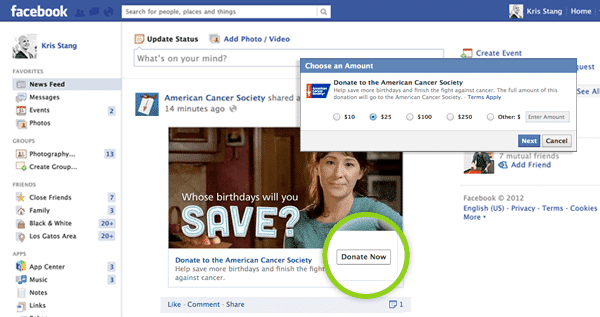
On December 15th, Facebook announced a new feature: the “Donate Now” button, which allows donors to contribute directly to a nonprofit without ever leaving Facebook.com.
The button will be visible on posts  from the nonprofit in a user’s News Feed, as well as at the top of the nonprofit’s Facebook page. Users can pay via a debit or credit card, or a PayPal account.
Currently, this feature is only available to 18 or so nonprofit partners, although Facebook expects to roll it out globally sometime in the near future. Nonprofits who are interested in using the “Donate Now” button can fill out an interest form here.
Facebook Donate Now

Game Changer?

Nonprofits with a strong Facebook presence will be able to quickly take advantage of this new feature, especially if they were already soliciting donations via a third-party app. Those who haven’t put Facebook near or at at the top of their outreach efforts may struggle to generate a lot of donations through this new feature, in light of recent data showing that Facebook brand pages have suffered a 44% decline in reach since December 1st, 2013. Promoted posts and other paid ads on Facebook may be the only way to get your “Donate Now” button seen widely.

Wednesday, November 13, 2013

5 Things Nonprofits Need to Know About Facebook Before 2014


As September draws to a close, it’s a good time to recap what was a busy summer of news, updates and changes out of Facebook. Social marketers and fundraisers will need to understand what it takes to get the highest engagement and the best results out of their Facebook posts, especially as they pursue end-of-year appeals. Let’s dig right in.
Facebook Like
1. EdgeRank is Dead. Long live EdgeRank!

Have you ever wondered you see some updates from friends and brands, but not others? It all has to do with EdgeRank, an invisible score attributed to all users and pages. The higher your EdgeRank, the more likely it is that users see your updates.
In August, Facebook announced that EdgeRank had been replaced by a new algorithm. The new “News Feed algorithm” operates in a similar manner as EdgeRank, with “100,000 individual weights” dictating what is seen and not seen. Principal within the algorithm are two factors: Story Bumping and Last Actor.
Story Bumping means that users will not only see new updatesbut also older updates that are new to that specific user.
Last Actor tracks the last 50 interactions a user makes on Facebook and uses those as signals to rank content in their feed.
So what does that mean for you? Essentially, things just got harder for nonprofits who are competing against for-profit brands. The algorithm is more complicated and sophisticated than ever. To rise above the noise, you’ll need to offer the most relevant and engaging content.
2. You Can Now Run a Contest Without a Third-Party App
Contests on Facebook via brand pages have long been a point of frustration for social marketers. An unusually strict guideline prohibited administrators from using a “like” as a way of entering a contestwithout using a third-party app, which typically charge a fee. Most brand pages broke this rule anyway, with a few getting shut down for their transgression.
In August, Facebook lifted this guideline. This means that if you want to give away tickets to a fundraising gala on Facebook, you can use a “like” as an entry fee. This is a great way to drive new page likes and post visibility (generally, the more “likes” a post has, the more likely it is to show up in a user’s news feed). Consider obtaining an underwriter-donated item that can be given away in a contest.
3. Hashtags Don’t Do Much
On June 12th, 2013 Facebook released support for hashtags, a feature most associated with Twitter. Hashtags allow you to place a # symbol in front of a word or phrase in order to categorize a Tweet or Facebook update. Users can click the hashtag to see what others are saying about that topic.
If you’ve felt bad about not using hashtags or thought you might be missing out, fret no more. Analytics firm Simply Measured reports that “hashtags are not resulting in any additional engagement.” If you did create an original hashtag for your recent fundraising campaign or event, you might just ditch it.
4. Don’t Sleep on Weekends
The best date and time to post to Facebook is as elusive as it is hotly debated.
Buddy Media reports that most updates occur on weekdays, with the most engagement recorded on Thursday and Friday. This means that if you post early on during the week, you might be competing for eyeballs and missing out on engagement.
Dan Zarrella of HubSpot contends that Saturdays are the best day, with Noon being the best time of day.
Your results may vary, of course, based on your individual community of followers – but if you’ve been ignoring the later half of the week and weekends, why not give it a try? Your donors might be more active then.
Regardless of when you post, it’s been reported that the average life-span of an update is only 5 hours, so you better make an impression quick!
5. Mobile Is King
If you post something on Facebook, it’s likely going to be seen on a mobile device.
In April, Flurry Analytics reported that American smartphone users spend 18% of their time spent on smartphones on Facebook. Facebook itself has reported that their global mobile daily active user count increased 10.3% from 425 million to 469 million from Q1 to Q2 2013. In June 2013 alone, Facebook boasted 819 million total monthly active mobile users, up 51 percent over last year.
Facebook Mobile
This means that if you’re posting content to Facebook that links to your website, it better look good and function on a mobile device (especially donation landing pages and forms).