Showing posts with label Monitoring Tools. Show all posts

Friday, June 6, 2014

How to Kick Start Your Conversion Rate Optimization Campaign

conversion rate
What is Conversion Rate Optimization?
In the most technical terms, conversion rate is the percentage of website visitors who perform a desired action during their visit.  Conversion rate is typically related to the number of sales per user visits, but, in recent years, it has grown to include other types of actions like email subscriptions and divulgence of personal or financial information.  These kinds of conversions may not produce an immediate sale, but often lay the foundation for future sales.

Conversion Rate Optimization (CRO) are the array of methods used which elevate the number of conversions through your internet marketing efforts. It isn’t difficult to see why conversion rate optimization is a major objective for most online businesses.   The more conversions, the greater the number of sales and loyal customers which translate into heightened brand visibility.  According to the 2014 State of Marketing report, almost 47 percent of marketers list CRO as a major objective in 2014.
In order to optimize the conversion rate, marketers rely on market research which provides insights into consumer behavior.  In the State of Marketing report, almost 29 percent of marketers prioritized collecting, analyzing and using behavior based data in CRO efforts.  Another 21 percent said that testing and CRO were very important.
What Role Does Testing and Research Play in Conversion Rate Optimization?
It is important to recognize that a conversion typically involves a number of steps.  The number and nature of these steps is dependent upon the business, but is generally referred to as the sales funnel.  The initial stage of the funnel is when a consumer finds an ad or reference (e.g. through a Google search page) to your company.  Once the user arrives on your landing page, there are often a series of actions which are required to complete the sale, acquire their personal information or secure their commitment to future communications.
The reason this funnel is conceptually important is that a potential conversion can be disrupted at any of these steps.  To identify the particular point which is stifling conversion requires research.  This research is usually in the form of A/B testing and analytics. 
Data Analytics
One of the most popular methods of determining user behavior is through data analytics.  There are many reliable analytical tools like Paditrack.com or Kissmetrics.com but among the most popular is Google Analytics.  This powerful tool from Google allows webmasters to observe aggregate actions of visitors.  To utilize this free application, merely visit the Google Analytics website and open an account.  Then enter a personalized script into your website’s code. Over time, this script will monitor visitor activity and provide data to your Google Dashboard.
Google Analytics will provide information about the following:
  • Visitors—including number, geographical origin, browser and repeated visitation.
  • Traffic sources—you can learn where your visitors are coming from, e.g. Google search engine optimization, Facebook pages.
  • Page analysis—this monitors the actions taken on each page of your site, allowing you to determine how users navigate, what Calls-to-Actions are most effective, and which pages lead to site exits.
  • Ecommerce—you can learn how various products are performing.
The value of Google Analytics is that it helps you identify the weakest performing parts of your website.  Unfortunately, Google Analytics doesn’t provide a complete picture.
In order to maximize the value of analytics, there are a number of companies which provide additional tools.
  • Click Tale—is a highly praised analytical tool that produces a comprehensive, visual model of visitor behavior.
  • MouseFlow—generates heatmaps of websites which display user activity.
A/B Testing
While analytics can help you pinpoint pages that are underperforming, they do not usually give you the reason why. You may need to build or re-code your site (if it is a structural issue), choose a different product to sell, or implement more effective calls to action.   In order to determine what particular feature of a page is curtailing conversion, you will need to employ a form of testing. 
One of the most popular methods of determining the efficacy of a funnel stage is to utilize A/B testing.  The concept of A/B testing is simple.  You merely tweak a feature of a page and upload it to the web.  You then compare the success of both versions. 
This type of variant testing can help you improve your conversion rate, but you often need a burst of insight to know what part of the page needs to be modified.  It is often necessary to have the advice of an experienced marketer who can offer suggestions. 
Friction Points
With the help of analytics, you can quite easily focus in on underperforming pages, and A/B testing can help you improve those pages.  If there are, however, more global issues with your website, you may need to employ other research techniques. These issues or friction points may require additional methods for identification.
Among the most popular is to directly ask visitors about their site experience.  This kind of interaction usually takes the form of surveys and exit polls.  These questionnaires are typically in the form of multiple choice questions, which may ask about many aspects of the site or merely a specific topic.  The value of surveys is that they can identify more global issues that page analysis is incapable of identifying.  For example, your conversion funnel may involve too many steps, or your website may be aesthetically unpleasing.
Cycling Through the CRO Process
Unless you have a 100 percent conversion rate, there is always something that can be improved on your website.  CRO involves constant attention to your visitors’ behavior, analysis, and testing.  With each successful repetition of this cycle, you can be confident that you are getting closer to the truly ideal website conversion funnel, but you should recognize that your competitors are likely employing a similar methodology.
CRO is a complex process that is in large part science, but also owes a great deal to marketing creativity. CRO specialists can often provide the insights that shift your program in a new, more fruitful direction, but you shouldn’t rely solely on the suggestions of a single “expert” or firm; shop other sites and seek advice from other knowledgeable marketers to learn about emerging CRO techniques.

Friday, May 23, 2014

SEO for Dummies: Learn SEO in 10 Simple Steps


If you are anything like most people, SEO can seem like the unwanted elephant in the room. You know your business needs to deal with it, but you don’t want to be the one responsible for this task. When most people think SEO, they assume difficult, complex, and time consuming, but it doesn’t have to be any of those things. In fact, you can learn SEO in 10 simple steps. All you need to do is lean in, listen, and apply the information you are given. While no two businesses operate the same, SEO is flexible enough to accommodate any need, desire, or shortcoming. Remove the elephant in the room and take your business to the next level!
Teaching SEO
Step 1: Setup
During the initial setup stage, you should prepare yourself for success. Just as a house needs a solid foundation before the framing goes up, so does your SEO strategy. The foundation in this case consists of tools like Google Analytics, Google AdWords, and Google Webmaster Tools.
  • Google Analytics will play a major role in tracking and analyzing how visitors interact with your site. Because it is free of charge and relatively intuitive, it is a necessity for every SEO campaign. In addition to creating an account and adding it to your website, you will want to read up on the features it offers.
  • Google AdWords is particularly useful as it pertains to SEO for its keyword research capabilities. This incredibly valuable tool allows you to find out what users are searching for so you can cater to their needs, wants, and desires.
  • Google Webmaster Tools allows you to gain the most out of your SEO efforts by letting you view your site through the eyes of Google. This toolset gives you keen insight into how pages are performing, which links are pointing to it, keywords that are working, and aspects that need to be fixed. You will find it useful to read through Google Webmaster Guidelines.
Step 2: Site Audit
If you have an existing site, you will want to perform a site audit when starting your SEO. With each passing month, Google is becoming more stringent with its penalties, and rules are becoming increasingly cut and dried. The best way to ensure your site is in compliance is to perform a detailed site audit.
One helpful site audit tool is the Moz Site Audit Checklist. As a reliable source, this detailed checklist is great for examining everything from content and accessibility to site architecture and internal linking. Another good option is WooRank. This helpful website audit tool automatically checks and analyzes many items on the Moz checklist. While a site audit may take significant time and energy, it is completely necessary to SEO. Penalties for preexisting violations can be harsh and eventually undo much of the hard work you put into your site.
Step 3: WWW or Without
Surprisingly enough, a very important part of SEO depends on those three “w’s” you see in front of your site’s web address. If you aren’t careful, you could make a costly mistake regarding these letters. People often think this determines whether someone can arrive at your website by typing www.domain.com or domain.com, which is not quite the case. At its core, this is about how the search engines view your website and how links pointing to your site are treated. You can choose to go with the ‘www’ or without it, but it is important to choose just one. If you choose both, the search engines will view your website as two separate sites, which can badly damage your rankings and link quality.
Step 4: Keyword Research
Keyword Research
Some experts go as far as to say keyword research is the most important part of SEO. It’s hard to argue with that statement, as there are plenty of statistics to back it up. If you are serious about SEO, you need to invest heavily in keyword research. For your site to stand out against the more than 100 billion Google search queries per month, you must appropriately optimize. That starts with keyword research. Everything else falls into place after you gain an understanding of what your audience is searching for. Here is a sampling of useful tools you can use to get started:
Step 5: Navigation
Navigation, as it relates to SEO, is important on two ends. First, it is imperative for visitors to be able to navigate smoothly and quickly through your site’s pages. Second, search engines need to find clear connections between individual links and pages.
To accomplish both of these goals simultaneously, you need to build a universal navigation. Do this by identifying why visitors come to your site, what your top exit pages are, and what search terms are used on site. Next, you should divide your products and key pages into categories with useful names. Finally, put those categories in the universal navigation and keep things simple. If you use drop down menus, they need to be in HTML in order for the search engines to read them. If your product pages have more than 20 items on a page, consider adding a filter for visitors to narrow their search.
Step 6: On-Page Content
On-Page Content
While there is significant behind the scenes work that goes into SEO, you still need quality content for visitors to read and view. Google’s newest algorithm is putting a major emphasis on useful, high-quality writing instead of heavy keyword usage. Avoid keyword stuffing and instead use calculated, well-placed keywords. It is best to target one keyword phrase per page. As for the structure, each page should have a distinct arrangement and headings.
Step 7: Meta Tags
In order to understand the value of meta tags, you must think about things through the eyes of search engine users. When you search for something, how do you determine which result to click? You most likely analyze the first few results and read a few words from the title and accompanying description. As a site, you only have a limited string of characters to persuade a user to click on your result over millions of others available. That descriptive sentence is known as a meta tag.
Your site will see a noticeable improvement if you are able to properly attack meta tags. Each meta description should be around 160 characters and should include natural keyword phrases. It is also crucial that you include some sort of call to action. This can be difficult to accomplish in only a few words and requires careful planning and thinking. If you’ve done your keyword research and organized site content in an effective manner, it should all fall into place.
Step 8: Coding
Coding Robot Text Meta
Coding can be a difficult part of SEO for those unfamiliar with the topic. While you will probably need to find someone well-educated in coding to perform detailed actions, there is one area you should understand: robots.txt.
In simple terms, robots.txt is a text file that you put on your site to tell search engines which pages they are allowed to visit. While this code is not mandatory, it is very helpful in cases where you have pages you wish for search robots to avoid. Think of it like a “Do Not Disturb” sign on the door. Thieves can still get in if they like, but most folks will leave you alone. It is important to make sure your robots.txt file is in the main directory of your site and is structured appropriately.
Step 9: Sitemap
You can have a beautiful, properly structured site, but unless people can view it, your hard work doesn’t mean anything. To get the maximum amount of traffic and visibility, your site must be indexed by search engines and directories, like DMOZ. Otherwise, the big guys, like Google, Yahoo! and Bing, are unlikely to find the most relevant page on your site to display (if your site is found at all).
Many techniques and tools promise to get your site indexed by search engines. However, the least time consuming and most reliable way to lead search engines and visitors through your site’s content is by creating a sitemap. With an HTML sitemap, visitors can quickly navigate the contents of your site and head to the most relevant area. Similarly, an XML sitemap is read by search engines to ensure the most relevant page of your site is displayed.
Step 10: Off-Page
Backlinks
In addition to the work you put into your site, you’ll need to spend some effort working off of your page. Focus on link building through content marketing, blog writing, guest blogging, infographics, site directories, and other tools that allow you to leave online footprints leading back to your site. Off-page efforts also include social media marketing. When properly used, sites like Facebook, Twitter, Pinterest, and Instagram can be helpful tools in acquiring site traffic. Whatever you do, avoid black hat SEO techniques when it comes to off-page efforts.

Thursday, May 8, 2014

Why All Brands Should be Monitoring Social Media


monitoring twitter facebook linkedin
Amongst the various debates around social media’s effectiveness as a business tool, one aspect that is undisputable is the value of social listening. After many years working in media monitoring - where clients pay a premium to track as many mentions as they can - it’s surprising to me that with so much of this data now freely available, more businesses are not listening in. It’s a great starting point for any brand looking to establish a presence in social media - if you’re not convinced social media is for you, set up basic keyword tracking and confirm one way or another. The data is there, the conversations are happening. I’m yet to see a case where a business has tried some level of keyword monitoring and come away saying there’s nothing it in for them.
One of the reasons listening is such a great starting point is that it makes it all about your business. This is not someone trying to convince you of the benefits or lauding the importance of future proofing - it’s about your brand, right now, relevant conversations are right there in front of you, ticking over in real-time. Not only does this highlight the immediate relevance, but it can also open your mind to the extended possibilities of social media marketing. With consumer reliance on social media increasing, and the means for listening readily available, there’s no reason why businesses shouldn’t, at the least, be making themselves aware of the conversations around their niche.  
What’s Being Said?
The first step of establishing a social media monitoring process is to establish your target keywords. Start by establishing a list of possible key terms, the most common words or combinations of words people would use when searching for your products and services. You want to get down as many possible options as you can - we’ll refine them in the next stage. A few notes to keep in mind:
  • Think of possible slang terms people might use for your brand and common mis-spellings of your key terms – ensure those are also included
  • If you’re using numbers, ensure you list both the numerics and actual words
  • Include competitor names and key terms also, you can list them on a separate competitor tab
  • Important that you’re also tracking their mentions to get a full overview, whilst also highlighting possible opportunities
  • Include a negative mentions listing – Brand AND fail, Brand AND bad, etc. These ones you really need to know about
Extra tip: A good way of connecting with people is by thanking them for sharing your content, but often when people share a blog, they only include the blog title with no reference to the author or source (other than the link). It’s worth setting up search streams for blog titles after you’ve posted them, enabling you to locate any shares of your content and reach out to those who’ve done so.
Refining Keywords
Once you have a listing of possible key terms, you’ll need to refine it down. Most people don’t have time to sort through thousands of mentions every day - the more specific you can get, the better. You can test your keywords in Topsy to get an understanding of how popular they are – if one of your terms is getting 30k hits per day, probably not going to be very helpful as you’ll never get through them all (it you’re brand name is getting that many hits, first, congratulations, second, it’s gonna’ take some work to stay on top of it). If a term is too broad, add in a qualifier to narrow it down:
                Instead of: Social Media
                Try: Social Media AND Consulting
Topsy will show you how popular each term is and has been over the past hour, past day, past week, etc. This will enable you to target your terms more specifically, reducing the noise so you can track your mentions in the most productive manner.
Topsy search
Extra Tip: Topsy only searches Twitter, which is generally a solid indicative measure, but if you need data from Facebook or Google+, apps like MentionSocial Mention and even  Google+ search itself will provide info to help solidify your keyword choices. You can also use Google Trends to see what people are searching for in relation to your terms, with the option to narrow it down to your region.
Putting Keywords into Action
Once you have a list, set yourself up with a social media management tool like HootSuite so you can track the conversations on all the major networks on one platform. HootSuite’s basic offering is free and allows you to establish up to 200 streams, each of which can be dedicated to a different keyword search combination, if required. This is relatively easy to setup - an experienced user will be able to put a basic monitoring system in place in less than 30 minutes. You can check it once an hour, once a day - whatever works best for you. This will introduce you to keyword tracking and highlight the potential benefits.
Extra Tip: You should prioritise your keyword lists to ensure the most important streams are checked more regularly – negative mentions, for example, will be higher priority than others.
Tracking Conversations = Blog Fuel
One of the major benefits of tracking conversations around your industry is you can get a better understanding of what questions your audience are asking. What are people concerned about? What are the common issues raised? Each of these can be noted down and expanded upon in blog posts on your website. Seeing things from your audience’s perspective is basically blog fuel. If you’re ever unsure of what to write about, a collection of suggestions and prompts will be flowing through your keyword monitoring streams, ready to be fished out anytime you need.
Geographic Targeting and Sentiment
One feature worth investigating is the ability to search for mentions within particular geographic regions. Sure, you can put in [city name], [keyword] as a search string (for most networks this is the only way to narrow down geographic mentions, though that may soon change), but for Twitter searches, you can also utilise ‘geocoding’ to search all tweets within whatever geographic range you desire. HootSuite has this built-in with a simple target icon, so you can set up the stream, click on the target, and there it is, all tweets mentioning your chosen keyword/s within the immediate vicinity (the default range is within 25km of your location).
HootSuite GeoCode option
You can also manually enter location co-ordinates to track a specific region – say, you wanted to track mentions around one of your offices in another town – you can look up the latitude and longitude details of the target site (easy to find in Google Maps or itouchmap.com) and enter them into the search string:
[search term] geocode:[latitude],[longitude],25km
You can change the range from 25km to whatever you want, miles (mi) or kilometres (km). This is a great way to filter your results and target key prospects.
Here’s a simple example of geo search in practise - a hamburger shop might set up a search string for all mentions of ‘burger’ within 10km. A person tweets ‘where’s the best place to get a burger in Sunnyside?’ The store could respond with ‘Come visit us, here’s a link to our menu, 10% off if you order via Twitter.’ While direct selling like this is not always advisable, this type of interaction would benefit the customer and the business and may help differentiate you from the crowd.
Twitter’s advanced search functionality also lets you track positive (‘[Subject] :)’) and negative (‘[Subject] :(‘) mentions. While the accuracy of automated sentiment detection is debateable (Ben Donkor wrote this excellent piece on the limitations of automated sentiment analysis), it’s worth testing to see what results you get, looking at what’s being said about your brand and your competitors.
Extra tip: There’s no way to focus geocoded searches to a specific country, but there's a way around this. By locating the central point of the desired nation and using that as the geocode base (lat + long), you can then set a search range of half the length or width of the entire nation - whichever is greater – to track all mentions within that region. So, for example, Australia’s central point is near Alice Springs and the nation is 4000km wide. I’d use:
[search term] geocode:[lat of Alice Springs],[long of Alice Springs],2000km
That code would return all matches for my term/s across Australia. You might get some overlap into neighbouring regions, but I’ve found this to be the more accurate than using the ‘Near this place’ advanced search operand in Twitter.
A Little Information Goes a Long Way
Basic keyword tracking is great for finding conversations where potential customers are looking for your product or service – these people are essentially one-step away from conversion - but what about those that are two steps away? What if you could, based on your understanding of your business, locate conversations where people were engaging in activity which was likely to lead them to becoming target customers? For example, let’s say you’re a local electronics retailer. You know, based on experience, that people who buy a Thermomix are time poor but earn a better than average income. What if you targeted graduates moving into highly paid jobs, people working in, say, medicine, who are likely to be concerned about their health, well paid, but extremely busy. You could add them to a list and track their interactions – you don’t want to go in guns blazing, telling them they’ll be seeking products from you shortly like some sort of creepy Nostradamus, but maybe you can track those potential customers who are two-steps away, ‘Favourite’ some of their tweets, interact with them in some form. Those brand awareness efforts could pay off when the time comes for them to make a purchase – who do you think they’ll go to if you’ve been able to make a connection with them ahead of time, maybe even been able to offer help on another problem at some stage? Think about the stepping stones that lead to people seeking out your products, what are the common discussions or life changes that might help you find them before they even think about coming to you.
Utilising Intelligent Data Tracking to Establish Brand Authority
The more time you spend monitoring, the more you’ll be able to track and utilise client-relevant data. This is how the social networks already market their advertising products, through the value of targeted audiences. Tracking keywords yourself allows you to locate your target groups in a more controlled and cost-effective way. What’s more, as you branch further into monitoring and learn what works and what doesn’t, you’ll be able to better establish your brand authority by making yourself part of the conversation before your services are needed. The more people are aware of your brand, the more you’re able to build trust and create lasting relationships with your target audience. The possibilities are only limited by your own creative thinking around how best to track the data. It takes time to master, but you know why people come to your company, you know the common factors that lead them to your door – you’ve been mentally tracking this data through your daily business interactions for years. Now you just need to work out how to best use it.
It takes a time to gather the necessary insights, but the value of social media monitoring will increase as you gain more information and refine the data. If you build each element, understand what people need from your business, you’ll not only set-up an excellent process for gaining insight, but you’ll also put yourself in the right frame of mind to be of best benefit to your target audience through improved comprehension of how they use your products and services. It all starts with listening, taking it in, and seeing where you can be of most benefit.  

Monday, April 28, 2014

The Definitive Guide To Free Social Selling Tools

social selling tools

 It’s no secret that social selling reps are exceeding their counterparts and each day new tools are coming out to help sales teams embrace social selling. Today I will look specifically at tools that are free of charge. Stay tuned for my evaluation of premium social selling tools this week.
LinkedIn
LinkedIn is the social network with the highest age, income, education and most importantly decision makers. Every sales rep and member of the organization should be on LinkedIn, which is precisely why it’s such a great sales tool. It allows you to find target prospects and connect with them. It also provides great insight into mutual relationships to get a recommendation, to show your value to prospective decision makers, and to be a thought leader by publishing posts and being active in groups.
HootSuite
The ultimate social media aggregator and platform. This is my personal social selling command center which allows me to listen, publish, and schedule messages across all of my social networks from one place. I set up all of my Twitter lists here and LinkedIn groups and have a superhuman ability to listen and engage in one view. The free version allows you to add up to 5 networks before you need to upgrade.
Twitter
Twitter is a the second most important social network to LinkedIn with regards to B2B social selling. It provides access into the personal life of a prospect, it allows you to be thought leader by sharing relevant content, provides competitive intelligence opportunities, and gives you a chance to emotionally connect with your prospect before and during the sales cycle begins.
Trendspottr
Trendspottr is my favorite content curation platform. Why I like it is because it brings in content that is trending and provides me a real-time trending score which tells me which content has the most potential of virality in my area of expertise. It really promotes thought leadership by getting you the content first and enables you to engage with others that have engaged with the post. It plugs to HootSuite via their app directory for a great in HootSuite experience.

Wednesday, April 16, 2014

SMToolbox: Grow Your Google Plus Engagement with Steady Demand


smtoolbox
Data is great, but insights that allow you to improve your performance are much more valuable. In my view, successful tools have to give you more than simple data. This week in SMToolbox, we review Steady Demand Pro, a good example of a tool that goes beyond data monitoring to provide practical insights and constant prompts to help you improve your performance on Google Plus.
Why Google Plus Matters
Google Plus is far more than a social network. It is part of a much bigger ecosystem that involves search, authorship and authority. There is already clear evidence that Google Plus will improve your SEO. These benefits are driving an increase in Google Plus users, as there are now over 300m active users. The increasing adoption of Google Plus creates a virtuous circle: as the network becomes more valuable, the more people use it, and the more people use it, the more valuable it becomes. 
However, Google Plus has never been the easiest of platforms, and it took me some time to get my head around things. Hence, I was very keen this week to review Steady Demand Pro, which is a tool designed to make it easy to manage one's Google Plus page. Last week, Steady Demand founder and serial entrepreneur Ben Fisher gave me a tour of the new tool.
Ben and the team wanted to develop a tool that is easy to use and which provides practical insights to help people improve their performance on Google Plus. I am pleased to say they have succeeded on both counts, as Steady Demand Pro takes the management of Google Plus pages to a new level.
Monitoring Your Google Plus Page
Steady Demand Pro provides all the the monitoring data you would expect from a social analytics tool. When you first load your profile, the tool automatically pulls in the last year's worth of posts. I have briefly outlined below some examples of the monitoring data provided by the tool: monitoring engagement by post type, engagement by time posted and top sharers. You can also review this data both for your own page or your competitors' pages.
Understanding the tabs is important. Connections relate to a page level, whereas Engagement is at the post level. This helps you see what posts caused a rise (or fall) in connections or engagement. Below is the monitoring report for your Google Plus Page’s engagement by post type.
engagement_post_type.jpg
You can see quickly how well your different post types are performing and the relative proportion of plus ones, shares and comments. What Steady Demand also does is provide useful information such as the signal to post ratio. In this case, you can see that Photos have a much higher signal to post ratio than Articles. 
Below is the monitoring report for engagement by time period.
engagement_time.jpg
This report clearly shows you the peak time periods for engagement and the top 5 hours. It also provides you with a complete table for each hour of the day and the signal to post ratio. The audience for the Google page here is on the west coast of the US, whereas I am in London; hence you can see that the highest post to signal rate is 3am UK time.
Below is a monitoring report highlighting the top sharers of your posts.top_sharers.jpg
The tool allows you to report on comparative time periods. Thus you can compare this month to last month, but also compare the last three months to the previous three months. All reports are available as HTML and as PDFs, so it makes reporting on Google Plus page a breeze. You can also share reports by providing read-only access via email to your clients or others on your team.  
Actionable Insights To Improve Your Performance
The real aim of the Steady Demand team is to ensure you are doing well and making the most of your Google Plus page. This is where Steady Demand Pro excels as a tool. It reviews your activity, then recommends various ways you can improve your performance.
The team at Steady Demand have developed a model of a perfect Google Plus post. This has three factors: the length of a post, the use of hashtags, and the use of mentions. Steady Demand’s research has found that you get more engagement on Google Plus if you include all three of these elements in a post.
Steady Demand Pro mechanically assesses each of your posts for these elements and gives each post a score from 0 to 3. To prove the improved performance of a perfect post is not just a hunch or supposition; Steady Demand provide a live feed of all the posts for your Page, showing the average number of signals per post and their mechanical score. See the example below.
score_relationship.jpg
Thus you can see clearly that in this case, perfect posts gain twice as many signals as a post without any of the three elements.
Steady Demand Pro analyses all of your posts for a specified time period and provides you with a useful summary, as shown below. The great thing about Google Plus is that you have a few days to go back and edit your posts, so you can try to improve them using the insights from Steady Demand Pro.
score.jpg
One of the features I like about Steady Demand Pro is the way it provides you with alerts. For example, if you have low engagement on a post it will alert you and recommend some changes you can try to improve engagement.
Steady Demand Pro also alerts you about questions you are asked on Google Plus. Sometimes I can get lost in Google Plus. I may see a notification, but if I don’t deal with it immediately it disappears and I don’t always remember to find it again. Thus I can miss things and forget to reply to people. The great thing about Steady Demand Pro is the reminders. There is a nicely named ‘lonely comments’ feature: if there is a comment on the thread that has not been responded to, it will remind you with an alert. It will also prompt and encourage you if you have not posted in the last 72 hours.
Free Steady Demand Audit
Steady Demand is keen to give back to the community and provides a free audit tool. You can type in your Google Plus page address and the audit tool will run checks on your page; it will also check if you have a +1 button on your web page (in Pro this is a constant check; if your button disappears through a web update you will be notified automatically). The audit also reviews the quality of your recent posts against the three mechanical checks. Following these checks, Steady Demand provides you with a free audit report. 
Summary
If you are serious about improving the performance of your Google Plus page, then Steady Demand Pro is the tool for you. The key benefits from my perspective are ease of use, clear monitoring reports and actionable insights and recommendations.
The personal plan is $12 a month for two profiles, and the business plan is $24 a month for 5 profiles. The Steady Demand Pro personal plan is for small businesses that can’t afford an agency, while the business plan is ideal for agencies who want to manage up to 5 Google Plus pages.

Thursday, March 27, 2014

Five Useful Google Chrome Extensions for Social Media Marketers

One aspect sometimes overlooked when talking social media strategy is browser extensions. There are numerous blogs on the topic, if you go looking, but it’s one of those things that the people who know, know, and those who don’t might miss out if they don’t ask. Extensions are a valuable time saver, and it’s worth ensuring these are noted when offering advice to any business or person looking to increase their social media profile. And with that, here are five Google Chrome extensions that I’ve found highly beneficial as I go about my daily social media interactions.
Pinterest Pin It
1. Pinterest’s ‘Pin It’ Button – This is a pretty basic tool, but one which is a great help in ensuring you remain active on Pinterest. The Pin-It button gives you the ability to pin any image to your Pinterest page quickly and easily. This is great for pinning relevant pieces to your Pinterest pages as you search and read, but more importantly, it makes it incredibly easy to pin your own images and blogs straight to Pinterest – and having the Pinterest logo constantly present on your browser screen always keeps it front of mind as you go about posting and sharing. Pinterest is sometimes under-valued as a marketing platform, so anything to help keep it active, keep you pinning and engaging with the site, is well worth utilising. Make sure you customise the text when you post, adding relevant hashtags for each pin.
Hootsuite Hootet
2. Hootsuite’s ‘Hootlet’ – I’m a big fan of Hootsuite and Hootlet is an excellent addition. Hootlet allows you to share content via your Hootsuite account direct from the page as you search. It gives you access to all the regular Hootsuite functionality, with options to choose the network/s you share to, ability to create and edit messages and scheduling selections. Hootlet will also automatically shorten the link for the piece before adding it into the message window. As a regular Hootsuite user, this comes in handy, as any content I add is sent to my schedule in Hootsuite, so I can go back and check when it’s set to go in amongst any other planned tweets and posts. Another great aspect of Hootlet is the addition of Twitter search results to compliment Google searches. Just type your terms into Google, get your search results on screen and then click on the Hootlet pop-out , peeking out from the right-hand side of the screen. The pop-out will expand to show all Twitter matches for the search term/s you’ve entered – a great addition to your research capabilities.
(Note: The Buffer Chrome extension has similar, if not better, content scheduling functionality to Hootlet, but as a Hootsuite user, the integration of the browser and the Hootsuite dashboard, and the social search capability, puts Hootlet ahead. If you’re a Buffer user, the Buffer extension is a must)
CircleCount
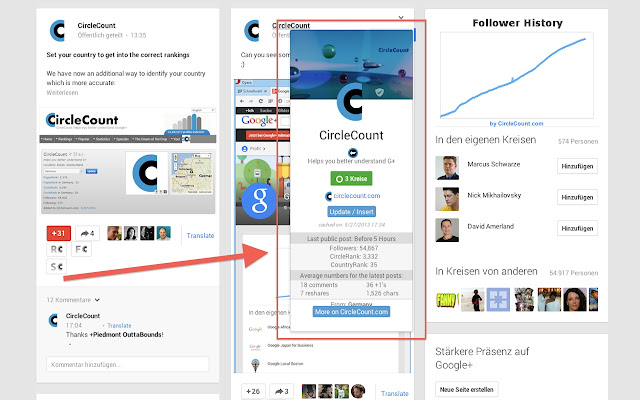
3. CircleCount – Google+ still holds many mysteries for a lot of users. While the learning curve is quite steep, the platform has some great functionality and passionate communities that make it worth the time it takes to familiarise yourself with the network. One way of getting more integrated with Google+ is by using the CircleCount extension. A click on the CircleCount icon opens up a new page of Google+ data on any blog post you’re reading, including info on public Google+ pages that have shared the piece, how it’s spread through the network (through crossover links in a bubble graph) and influencers who’ve interacted with the content. This is a great way to monitor the reach of your own content and engage with users who’ve read your stuff, as you can use the overview to click through to each individual who’s shared your content. From there, you can thank the user for sharing the piece or initiate a conversation based on the content, a stepping stone to further relationships. When you’re in Google+, CircleCount gives you access to further data about each individual post and user, including ‘Ripples’ for each post and options to add it to a shared circle or to your favourite posts via CircleCount. The CircleCount extension a useful addition to have, especially if you’re trying to get more involved with your Google+ communities.
Klout Chrome (Beta)
4. Klout (beta) – Some don’t care about Klout, some do – either way, influence metrics are going to become more important, and Klout is the current leader of the pack - it's worth making yourself aware of it, even if you don’t feel it’s highly relevant. The Klout extension adds every user’s Klout score to their profile image in Twitter, giving you a measure of each person’s influence. This is important for locating industry influencers and ensuring you establish connections with them where possible. It’s an extra data point to use in your interactions – it’s not to say that anyone should be addressed any differently because of it, but if someone’s Klout score is in the 80s and they re-Tweet one of your posts, you definitely want to be aware of it. Influence metrics are important, and can pay a big part in spreading your message to a wider audience. Being aware of who you’re interacting with can be of major benefit – and any additional data you can get on this front is worth having.
RiteTag Chrome
5. RiteTag – Rite Tag helps you find the best hashtags to use to maximise the reach of your message. The system takes into account how often a hashtag is used then assigns a colour code to each based on that data – a red hashtag is overused and it’s likely your message will get lost in the flood of other posts using the same one, a blue hashtag is under-used and your content’s potential to be found will be limited because fewer people are looking for it, and a green hashtag is just right. You can also run a hashtag audit on your profile, or anyone else’s, in one click, which will show how good your hashtag use is overall. There are always queries about hashtags, and there are various tools available to help you work out which to use to achieve best reach, but having that info right there, within your message, is a great help. The overused info is particularly useful – most hashtag apps will show you the most popular tags, which in itself is great, but understanding overuse, and how that can be detrimental to reach, this detail is good to know as you're putting together your posts.
There are a heap of other extensions available in the Chrome Store, access to streams of additional data that may be of significant benefit to your day-to-day tasks. It’s worth spending some time going throughto see what’s there - there might be something that saves you major amounts of time and/or uncertainty, helping you work smarter not only for yourself, but also for your clients.   

Tuesday, March 18, 2014

SMToolbox: Gain a Competitive Edge with Insights from Rival IQ

social media tools Rival iq

Tracking competitor activity is a key part of any competitive strategy. However, keeping track of such activity, especially over many different social media channels, can be complex and time consuming. Rival IQ is a tool that makes it easy for you to monitor your competitors and to analyze comparative data. This week in SMToolbox we take a look at how Rival IQ helps you gain an edge by helping you understand your competitive landscape.
Rival IQ is relatively new tool. They recently raised almost $1m in seed funding from a number of high profile investors, including Paul Allen’s Vulcan, Seattle angel Rudy Gadre, David Cohen of Techstars and marketing guru Jay Baer. The tool aims to provide useful intelligence about the digital activities and successes of competitor companies quickly and easily.
The Rival IQ Competitor Landscape Model
Rival IQ allows you to create what it calls competitor landscapes. You simply start by adding your company and then adding the companies you compete with. The tool does assume you know your market well enough to be able to add your main competitors. If you need help, there is a feature that allows you to find similar companies; but when I tried this it didn’t work that well in identifying competitor companies, at least for me. However, most people will know their main competitors, so this shouldn't pose a big issue. 
Once you have set up your landscape, Rival IQ will crawl the competitor sites, accounts and bios to pull in relevant website and social media data from Twitter, Google+, Facebook and LinkedIn accounts. Rival IQ then provides you with tools and reports that allow you to analyze your competitive landscape.
For the examples in this review, I set up a competitive landscape for the elearning company Kineo and listed a number of their competitors.
Rival IQ Reports and Tools
rival iq menu
The reports and tools in Rival IQ are grouped under the menu headings above. I have highlighted below a number of the key reports available with example screenshots.
Competitive Landscape Overview
The landscape overview reports provide an overview of your social media performance relative to the competitive landscape you have identified. The report below shows how Kineo compares to the average of the competitors that I added.
rival iq reach
Top Social Content
The top social content reports, which enable you to analyze the top 50 posts on your social media channels across your competitor landscape, are very useful. Below is the top social content report for Kineo for Twitter. I have blanked out the names of the competitors, but you can see how competitor A had 34 of the top 50 tweets, and Kineo had 5 of the top 20 tweets, and the highest ranking Kineo tweet was 6th.
rival iq twitter
You can run different social content reports, such as the top 50 most commented Facebook posts or top 50 most shared posts across your competitor landscape.
Market Positioning
The positioning reports allow you to quickly do side-by-side comparisons with your competitors. You can see how your competitors optimize their websites and their keywords in the homepage title, meta description, and keyword tags. Below is a comparison of homepage meta descriptions.
rival iq description
Whilst this is publicly available information, you would have to collate it from various sources. Rival IQ makes it easy to do comparisons of content copy and meta tags. You can also quickly compare competitor social bios from Twitter, Facebook, LinkedIn and Google+ social accounts. Using these comparison tables you can develop your understanding and insights about how each company positions itself. 
You can also produce a number of other comparison tables to compare, say, domain authority, numbers of followers, and so forth.
Monitoring Competitor Changes 
One of the nice features of Rival IQ is the way it keeps track of changes, which you can receive in a weekly email. This will alert you, for example, to changes in a competitor’s meta description or Twitter bio. Below is an example.
rival iq change
You can set up parameters within Rival IQ so that if something significant happens, such as an increase in followers or an increase in engagement, you get notified automatically. So you don't have to worry about missing your competitors' significant social media moments.
Summary
Rival IQ gives you a good overview of your competitor landscape quickly and easily. It provides very useful reporting on social media activity in particular. The tool provides you with information and analysis tools that help you draw insights from the data. I suspect for many people the change notification and monitoring reports will be particularly useful.
I think the tool could provide more value by going beyond the information that is currently included; for example, to look at the most shared content or the influencers that share and amplify a competitor’s content. However, if you want to keep an eye on your competitor activity; compare your performance and positioning; and see when they change their messaging or run significant campaigns, Rival IQ is a great competitive analysis tool.