Showing posts with label Analytics. Show all posts

Monday, August 4, 2014

Google Analytics Helps You Filter Spider and Bot Traffic

Google Analytics Hacks
Ever wonder how much of your traffic was actual human visitors and how much of your traffic was really scrapers, bots, and other web spiders? Google Analytics will now help you discern just that.
On their official Google+ page, the Google Analytics team has announced a new filter to help site owners identify "real" traffic from that of bots and other spiders.
By setting a checkbox in a filter, Google Analytics will filter out all the traffic from known bots. This list of known bots will be pulled from the IAB/ABC International spiders & Bots List, a list the Interactive Advertising Bureau has been maintaining since 2006. The list of spiders and bots typically costs $14,000, though IAB members receive a discount.

How to Filter Bots in Google Analytics

To filter bot and spider traffic from Google Analytics, go to your Admin settings. Under the Viewpanel, you'll find View Settings. Toward the bottom of the options, just before Site Search Settings, you'll find a small heading for Bot Filtering with a checkbox that reads: Exclude all hits from known bots and spiders. Check it, and you'll automatically filter the known bots and spiders from your Analytics collecting.
ga-bot-filtering
Because of how this is implemented (and the cost of the list of bots), you won't know which bots are actually hitting your site, nor will you be able to filter specific bots. But, by selecting to filter them out, you'll see a significant difference in your traffic patterns that just might help you better understand your website visitors.
Some numbers suggest that on average, over one-third of all web traffic to a given site is an automated bot. While the filters list is updated regularly, it can't possibly know about all the bots. You will still potentially have some bot traffic coming to your site.
If you enable the option to filter bots, you will very likely see a drop, possibly a significant drop, in traffic to your site, but your numbers will be more accurate for measuring.
(via)

Wednesday, June 25, 2014

Five Reasons to A/B Test Your Email Marketing Campaigns


a/b testing for email marketing
When you want to reach out to your lead and customer base with email marketing campaigns, A/B testing is an effective way to determine which email is most effective in promoting engagement and interest. It's amazing how many people will A/B test their landing pages or other aspects of their marketing campaigns and yet not apply the same principles to email marketing. After all, if your subject headline doesn't get the person opening the email, then nothing else matters — nothing.

When you take two versions of the same email, send one to half your email list (A, the control group), and send the other half to the other list (B, the variant group), then use marketing automation technology to gather data on how many people open each email, click through to the landing page, or purchase your product as a result of receiving the email. Compare numbers, and you will see which email is more effective in generating engagement with content and profit for your business.
Among the several reasons to A/B test your email marketing campaigns, the following are the top five.
A/B Testing is Easy
Marketing automation email tools like MailChimp, Saleforce's Pardot or Marketo make A/B testing easy as you can assign different contacts to each list and test various aspects of your email marketing campaignsuch as subject line, email body, call-to-action, sender name, and time to see how it impacts your email opens, clicks, and conversions.
Aside from sending out emails and automatically tracking how contacts engage with your email with the right marketing automation technology you'll be able to tracks what happens when visitors land on a specified landing page or social media accounts they may reach through either of the emails you send.
Once you compare data for content engagement from each email, you can quickly see which email will maintain lead and customer interest and boost sales, and why.
A/B Testing Saves Money
Manually tracking how many people open the email for the A list or open the email for the B list as well as how they interact with content in the email or which email results in the most purchases would require a lot of extra staff time and money out of your pocket, or even a completely new social media team. Marketing automation technology provides you with this data automatically. You can then use your saved money to support other aspects of your business and make sure your employees are using their time in the most useful and efficient ways possible.
A/B Testing Turns Leads into Customers
If you set up your campaign properly you'll be able to improve things like your open rate and click rates. Your open and click rates, among other things, can help with gathering customer insight and figuring out exactly what features your leads are responding to.
For example, let's say you're selling blenders and you have three common selling points that you use in your marketing materials.  Your blenders will save your customers money because of their versatility to do the task of several home gadgets such as a coffee grinder and vegetable chopper, they take up less space because they have a smaller base, and they are quieter so that you won’t bother your family or wake up your spouse. As you email your list, you can rotate which of the benefits you extol and observe the response. You might think that your customers care more about saving money, but after comparing open rates and clicks, you may find that customers actually care more about the fact that your blenders are quiet.
When you have insight on what kind of content leads to an email being opened more often and the lead clicking through to your landing page, you can continue to provide that kind of content for other email campaigns helping you to increase conversions from your email marketing campaign. 
A/B Testing Helps You Keep Up With Competitors
When you know what works in your email campaigns to pique the interest of leads and keep your customers engaged, you have a competitive edge over other companies selling a product similar to yours, because people will buy your product more often than the competitor’s product. Since A/B Testing is so easy, you can conduct as many email campaigns and A/B testing rounds as you need to discover the key qualities of a successful email campaign, and you will gain a reputation as a popular and successful business.
A/B Testing Helps You Plan Other Online Marketing Campaigns
When you see what works and what doesn’t work in your email campaigns, you can take that insight and apply it to your website and social media platforms to promote even more engagement in those areas. For example, you may see that leads and customers respond with more engagement when you send the email at a certain time of day. You can then apply the same strategy on your Facebook or Twitter by making posts at optimal times. Leads and customers may also click through to your landing page more often when you use images in the email, so it follows that they would also engage with social media content more when you incorporate more images there. Leads and customers may also respond different ways depending on the tone you use in the body of each email, whether it is a personal tone or a more formal tone. Take note of which tone causes more leads and customers to click through to your landing page, and you can adopt that tone more often in other areas where you have an online presence. You can learn a lot by simply tracking lead and customer activity when they interact with different kinds of emails you send them.

Wednesday, June 18, 2014

Why The Decline in Facebook Reach is Good For Brands

facebook fall of reach

There has been a lot written about the decline in organic reach on Facebook. The data has been poured over, conspiracy theories have been written, and the overall conclusion has been that Facebook is stealing hard earned reach from page owners, leading many to look for a new area of focus away from Facebook. However, we believe the decline in organic reach on Facebook offers an opportunity for brands, and here’s why.
Before organic reach began its steep decline, all Facebook pages were in a slightly strange position. They had organic reach, generally of around 20-35% of their audience, and were involved in a battle to optimise this to make minor improvements. There was a lot of hoping involved, particularly when it came to the reach of pieces of content that had been expensive to create.
Facebook has naturally seen a decline in organic reach due to the fact that there are more pages than ever before, users on average like more pages, and those pages are creating more content than ever. This leads to a highly competitive space, with pages competing for attention in the News Feed space of their users alongside content from friends, families, groups and events.
In the balance of fairness, it’s also important to mention that not all pages are seeing a big decline in organic reach. In fact some are actually growing. We have a number of clients where organic reach is improving month on month and year on year. There are no tricks involved in this, this just comes from an understanding of the audience, a data led content strategy, and a programme of consistent content optimisation. By applying data to your Facebook content you can see strong improvements, as discussed in our social content eBook recently here.
But for those where organic reach is decreasing, this isn’t necessarily the end of the world. In today’s Facebook, brands and professional marketers have an advantage that they never had before.  Brands are able to promote their content to new audiences, ensure that their best content receives more reach, and specify which audiences see their content based on real life data. The decrease in organic reach has led Facebook to advance their ad product at a fast rate, enabling new targeting options and new ad formats that are highly effective for advertisers.
Previously, brands were competing with all sorts of poorly run pages, some of which were solely concentrated on gaming the Facebook algorithm to get as much reach as possible. Now, brands are in control of their own destiny. Whilst it’s worth optimising and using data to improve your organic reach amongst your fanbase, the key to success now really lies in effective promotion of content through the ads platform.
A large amount of page owners are not serious enough about Facebook marketing to spend budget, and many of the rest are unsure as to how to best promote their content. For brands, this gives a great opportunity to achieve high levels of reach at relatively cost effective levels. With competition still not particularly high, brands can really dominate and achieve fantastic results at low levels of spend.
If you haven’t got involved yet, now is the time. Set a goal for your content, understand your audience, and promote your best posts effectively by using the full range of targeting options in order to succeed.
Don’t see the decline in organic reach as the end of your Facebook marketing. Take the opportunity to grow your reach in a controlled way, amongst the people who you want to see your content.

Thursday, June 12, 2014

The True Value of Online Conversation

So your brand has taken off on social media. You’ve got 120,000 Twitter followers, a whopping 20 million Facebook likes, a solid Instagram presence, and are generating buzz on forums and blogs across the web. 
In the last month your brand earned over 40,000 mentions – considerably more than your main competitor.
You’re living by the book and the book says you’re winning.
While the numbers don’t lie, volume of mentions will never tell the whole story.
As any decent social analytics tool will quickly reveal, not all mentions are created equal. There are some conversations that are simply more valuable and meaningful to your brand than others.
So then how do you really evaluate how strong your online presence is?

What social channel do you actually use?
Let’s take a look at an example of a brand that garners more volume but potentially less quality of conversation. The chart below, taken from Brandwatch’s report on Household & Personal Care Goods, shows the volume of conversation across channels for different laundry detergent brands.
Brandwatch: Detergent Brands Conversation Volume Across Channels
Yes, Purex has the greatest volume, but do they really have a larger presence? To answer that question, there are a few things you’ll need to consider.
1. Not all mentions have the same life span. According to a bitly study, the average half life of a Tweet is 2.8 hours as compared to 3.2 hours for Facebook posts or 7.4 hours for a YouTube comment. We can expect that the shelf life for blogs, forums and news would be even longer.
2. The reach and demographics differ across channels. The graph below shows how Facebook still dominates Twitter in volume of users, especially among the elderly. What demographics are laundry detergents really targeting?
Comparing Age Demographics on Twitter and Facebook
Taking another look at the detergent graph, Tide has far more mentions across every channel except Twitter and their social media allocation seems to be much more evenly distributed.
Considering the lifespan, reach and demographics across channels Tide’s social presence seems to be a clear winner here.

What are we even talking about?
While sentiment analysis does its best to differentiate between the positive and negative mentions, the truth is these mentions lie on a very large spectrum of human emotion.
Lumping a mention into ‘positive’ or ‘negative’ categories cannot paint an accurate picture – it’s never quite that easy.
A mention that either passionately lauds or vehemently derides a product, cannot be weighted equally with mentions commenting on how funny a brand’s advertisement is.
Just take a look at advertising powerhouse Old Spice.
Old Spice Conversation Categories
The majority of conversation surrounds their creative, unconventional and slightly outlandish advertisements.
Perhaps it was the brand’s intention, but their mentions have far less to do with the actual product than they do with the brand’s advertisments.
While this works for Old Spice, other brands could value conversation surrounding their products far more than those relating to their advertisements.
Yet, either way, it’s important for brands to understand where these conversations are happening in order to evaluate their social media performance.
In a similar vein, let’s take a look at toothpaste brands.
Consumer Conversation Interests Among Toothpaste Brands
Here we see toothpaste brands’ marketing strategies in action. Crest and Colgate dominate conversation around ‘whitening’, Sensodyne and Colgate capture ‘sensitivity’ chatter, and again Crest is the leader in ‘health.’
If Arm & Hammer is looking to establish itself as the ‘healthiest’ toothpaste, it will value these mentions more than others. 

So why does this matter?
The aim of social media should not be to simply generate as much conversation as possible.
That’s not to discredit the 40,000 mentions you earned last month.
Yet before you lean back and declare yourself the social media leader of your industry, you should take a closer look at the true value behind the conversations out there.

Big Data and Social: The Key to Sentiment Analysis?


Image
In today’s world where social media plays such a central role for so many people, it’s only natural that companies would want to get in on the action. With big data in the cloud and analytics tools such as Hadoop Hive, it’s easier for companies to use social media to their immediate advantage.

There are many different reasons for wanting to use social media to enhance your business, but one especially important reason is to monitor and analyze customer sentiment.
Additionally, when you consider the sheer size of social media users, you get an idea of the enormous potential this has for businesses. Generally our minds gravitate toward Facebook and Twitter and then Instagram and Pinterest. These, however, are just a part of the overall social media picture. There are places like Tumblr and Google+, but there are also sites in different countries that are enormously popular too. Truly, social media is a gold mine for businesses.
There is, perhaps, no other medium where people are more straightforward and honest (especially when they’re frustrated) than social media. For some reason people put things on there that they wouldn’t put anywhere else. While this doesn’t always bode well for the individual, it’s great for companies because individuals are honest about what they like and dislike with products and services. By monitoring these sentiments, companies can quickly and accurately make changes and improvements to their services.
And that’s the most important reason for using big data to monitor customer sentiment via social media — to find out where you are succeeding and where you are failing. Companies never really know if a product is going to be successful or not until it gets out in public. They may think it’s the best idea in the world, but if the public doesn’t think so, then they’re going to fail. Social media monitoring solves a problem that has puzzled executives for years — how to quickly pinpoint failings and fix them without losing substantial dollars. Or, put another way, how to get quick, insightful feedback.
The possibilities are truly endless, especially in a global e-commerce society. Because companies are often trying to cater to individuals across the entire country or sometimes across the globe, there are numerous factors that have to be considered including: price, names, build, materials, etc. It’s hard to get everything right the first time for everyone. Social media gives companies the capabilities to pinpoint problem areas across the country or across the globe. Maybe the price for a product in in one part of the country receives positive responses while that same price brings outrage in another area. Maybe, an app designed in English and then translated into other languages is working fine in one language but has bugs in another. That’s easy to pinpoint when you have people from similar geographic regions making those same complaints through social media.
On the flip side social media is a great tool for finding out what’s really working for your company. An open dialog through social media is important, but using big data to monitor millions and billions of posts, tweets and likes gives extreme clarity to the situation. Too many times companies have implemented new products that are void of the features that customers enjoyed the most in past products. Monitoring social media can help your company avoid that same mistake.
Another important reason to use social media is to size up the competition. Companies are at their best when they are listening intentively to what consumers have to say and then using that input to improve products. It doesn’t mean they do everything the consumers say they should, but they’re at least listening. By monitoring social media, companies can get a great idea of what consumers are saying about competitors. This is crucial information for companies going forward.
There are no drawbacks to using big data and social media to gather and analyze consumer sentiment. It gives your company a clearer picture of what it’s doing right and what it’s doing wrong and it allows you to get an insight into what your competitors are doing. Successful businesses change and evolve and this type of monitoring allows you to do that. Now, more than ever, it’s accessible to the public through big data in the cloud.


Saturday, May 31, 2014

Putting Metrics to Work: Selecting the Actionable Data from Facebook Insights

Facebook metrics

Comb through any business magazine or marketing website today and you’ll come across the buzzwords “big data” and “benchmarks for ROI”. As a local business owner, these buzz words translate to understanding your customers and making strategic decisions in regards to marketing and sales. With social media, we can now collect customer data from reporting tools like Facebook Insights. We sifted through Insights to find the easiest ways to convert this information to boost your bottom line. Here are our top 3 metrics to watch:
1. Look for the area that displays your Total Reach. This shows you exactly how many people are seeing anything to do with your company on Facebook. It includes your posts, posts by other people, mentions and check-ins, in other words “Organic” content. The “Paid” reach specifically refers to the affect the content you create has on your Facebook fans strictly through the use of paid advertising.
Action: Use this information to understand how many people are getting your message and create a marketing plan accordingly.
2. External Referrers: places on the web that are driving traffic to your Facebook page. This data helps you understand the flow of your customers.
Action: Track how many visitors come from your website to Facebook. This helps you understand if your other online channels are effective at helping customers engage with your brand and company. Customers should feel compelled to move through your businesses online channels and ultimately end up converting to a sale.
3. In the People tab of Facebook Insights is a veritable cornucopia of customer data. This portion of Insights shares exactly who your audience is on Facebook. It’s marketing gold! There are two ways to use this data. One is to use the data to create offline initiatives in-store or through traditional mediums like print and radio. The second is to look at your online audience and make changes according to what you see in-store.
Action: Ensure you are speaking to the correct audience on all channels.
Facebook Insights provides a great way to measure your page performance. See it as a tool to better engage with your audience in more meaningful and impactful ways by measuring what posts interest them most. Use this valuable marketing data to create compelling content that drives your followers to like and share. 

Thursday, May 29, 2014

Manage Social Media Across Platforms With Spredfast Engage


Do you use more than one social media tool? It's a bit like asking "do you use more than one internet-connected device?" Of course you do: no single tool or internet-connected device does everything you want, right? The team at Spredfast recognize that businesses use multiple applications and have developed a neat way to allow their customers to use Spredfast across these multiple applications. Here's a look at the Spredfast Engage Button, which has launched today.
The Complexity of Using Multiple Tools and Platforms
If you manage social media in an organization you will know how quickly it can become chaotic. Tools like Spredfast help by putting in place rules, processes, approvals, audit trails and reporting. Such tools are great for creating a more coherent approach to social media management, but often that doesn’t go far enough.
Businesses typically use many tools to help them in their marketing in areas such as content curation, social listening, influencer marketing and social analytics. Often a user may find content that they want to share from within another tool or application. The quick way is to share it directly, but that means the sharing is done outside the processes, audit and reporting set up in Spredfast. In order to stay within the process, it is necessary for the user to move back to Spredfast to find and share the content, which is inconvenient and can be time consuming in a fast moving social media world.
Enter the Spredfast Engage Button
spredfast
Spredfast have developed an Engage Button that can reside within any application and allow a user to share content directly from within the application. However, any content shared using the Engage Button will be effectively shared from within Spredfast and be subject to the same workflow and approval processes, the same audit trails, tagging processes and the same performance reporting. The aim of the Engage Button is to deliver convenience whilst maintaining the controls present within Spredfast. Rod Favaron, CEO of Spredfast commented "Brands are having to adapt to the acceleration of consumer engagement in the social age.  Our customers don’t want to have to sacrifice brand control for speed and with the Engage Button, we are helping them to meet that need with our open platform. Our thesis of engagement continues to be realized as we offer this latest solution for our enterprise customers.”

The Spredfast Engage Button is being launched with five partners today: Brandwatch, Crimson Hexagon, Synthesio, Sysomos, and Visible Technologies. This partner program will be extended over time along with the Spredfast partner program.
The new feature has already been well received by beta users. Monica Womack Peterson, Director of Social Media for Toyota commented: "Social media gives us a compelling way to engage with and inspire our customers every day… However, as marketers we are challenged with ensuring that each conversation is timely and authentic. The Spredfast Engage Button allows our team to interact with our social community in a prompt and brand-appropriate manner, regardless of the social platform that they are logged into."

Friday, May 23, 2014

SEO for Dummies: Learn SEO in 10 Simple Steps


If you are anything like most people, SEO can seem like the unwanted elephant in the room. You know your business needs to deal with it, but you don’t want to be the one responsible for this task. When most people think SEO, they assume difficult, complex, and time consuming, but it doesn’t have to be any of those things. In fact, you can learn SEO in 10 simple steps. All you need to do is lean in, listen, and apply the information you are given. While no two businesses operate the same, SEO is flexible enough to accommodate any need, desire, or shortcoming. Remove the elephant in the room and take your business to the next level!
Teaching SEO
Step 1: Setup
During the initial setup stage, you should prepare yourself for success. Just as a house needs a solid foundation before the framing goes up, so does your SEO strategy. The foundation in this case consists of tools like Google Analytics, Google AdWords, and Google Webmaster Tools.
  • Google Analytics will play a major role in tracking and analyzing how visitors interact with your site. Because it is free of charge and relatively intuitive, it is a necessity for every SEO campaign. In addition to creating an account and adding it to your website, you will want to read up on the features it offers.
  • Google AdWords is particularly useful as it pertains to SEO for its keyword research capabilities. This incredibly valuable tool allows you to find out what users are searching for so you can cater to their needs, wants, and desires.
  • Google Webmaster Tools allows you to gain the most out of your SEO efforts by letting you view your site through the eyes of Google. This toolset gives you keen insight into how pages are performing, which links are pointing to it, keywords that are working, and aspects that need to be fixed. You will find it useful to read through Google Webmaster Guidelines.
Step 2: Site Audit
If you have an existing site, you will want to perform a site audit when starting your SEO. With each passing month, Google is becoming more stringent with its penalties, and rules are becoming increasingly cut and dried. The best way to ensure your site is in compliance is to perform a detailed site audit.
One helpful site audit tool is the Moz Site Audit Checklist. As a reliable source, this detailed checklist is great for examining everything from content and accessibility to site architecture and internal linking. Another good option is WooRank. This helpful website audit tool automatically checks and analyzes many items on the Moz checklist. While a site audit may take significant time and energy, it is completely necessary to SEO. Penalties for preexisting violations can be harsh and eventually undo much of the hard work you put into your site.
Step 3: WWW or Without
Surprisingly enough, a very important part of SEO depends on those three “w’s” you see in front of your site’s web address. If you aren’t careful, you could make a costly mistake regarding these letters. People often think this determines whether someone can arrive at your website by typing www.domain.com or domain.com, which is not quite the case. At its core, this is about how the search engines view your website and how links pointing to your site are treated. You can choose to go with the ‘www’ or without it, but it is important to choose just one. If you choose both, the search engines will view your website as two separate sites, which can badly damage your rankings and link quality.
Step 4: Keyword Research
Keyword Research
Some experts go as far as to say keyword research is the most important part of SEO. It’s hard to argue with that statement, as there are plenty of statistics to back it up. If you are serious about SEO, you need to invest heavily in keyword research. For your site to stand out against the more than 100 billion Google search queries per month, you must appropriately optimize. That starts with keyword research. Everything else falls into place after you gain an understanding of what your audience is searching for. Here is a sampling of useful tools you can use to get started:
Step 5: Navigation
Navigation, as it relates to SEO, is important on two ends. First, it is imperative for visitors to be able to navigate smoothly and quickly through your site’s pages. Second, search engines need to find clear connections between individual links and pages.
To accomplish both of these goals simultaneously, you need to build a universal navigation. Do this by identifying why visitors come to your site, what your top exit pages are, and what search terms are used on site. Next, you should divide your products and key pages into categories with useful names. Finally, put those categories in the universal navigation and keep things simple. If you use drop down menus, they need to be in HTML in order for the search engines to read them. If your product pages have more than 20 items on a page, consider adding a filter for visitors to narrow their search.
Step 6: On-Page Content
On-Page Content
While there is significant behind the scenes work that goes into SEO, you still need quality content for visitors to read and view. Google’s newest algorithm is putting a major emphasis on useful, high-quality writing instead of heavy keyword usage. Avoid keyword stuffing and instead use calculated, well-placed keywords. It is best to target one keyword phrase per page. As for the structure, each page should have a distinct arrangement and headings.
Step 7: Meta Tags
In order to understand the value of meta tags, you must think about things through the eyes of search engine users. When you search for something, how do you determine which result to click? You most likely analyze the first few results and read a few words from the title and accompanying description. As a site, you only have a limited string of characters to persuade a user to click on your result over millions of others available. That descriptive sentence is known as a meta tag.
Your site will see a noticeable improvement if you are able to properly attack meta tags. Each meta description should be around 160 characters and should include natural keyword phrases. It is also crucial that you include some sort of call to action. This can be difficult to accomplish in only a few words and requires careful planning and thinking. If you’ve done your keyword research and organized site content in an effective manner, it should all fall into place.
Step 8: Coding
Coding Robot Text Meta
Coding can be a difficult part of SEO for those unfamiliar with the topic. While you will probably need to find someone well-educated in coding to perform detailed actions, there is one area you should understand: robots.txt.
In simple terms, robots.txt is a text file that you put on your site to tell search engines which pages they are allowed to visit. While this code is not mandatory, it is very helpful in cases where you have pages you wish for search robots to avoid. Think of it like a “Do Not Disturb” sign on the door. Thieves can still get in if they like, but most folks will leave you alone. It is important to make sure your robots.txt file is in the main directory of your site and is structured appropriately.
Step 9: Sitemap
You can have a beautiful, properly structured site, but unless people can view it, your hard work doesn’t mean anything. To get the maximum amount of traffic and visibility, your site must be indexed by search engines and directories, like DMOZ. Otherwise, the big guys, like Google, Yahoo! and Bing, are unlikely to find the most relevant page on your site to display (if your site is found at all).
Many techniques and tools promise to get your site indexed by search engines. However, the least time consuming and most reliable way to lead search engines and visitors through your site’s content is by creating a sitemap. With an HTML sitemap, visitors can quickly navigate the contents of your site and head to the most relevant area. Similarly, an XML sitemap is read by search engines to ensure the most relevant page of your site is displayed.
Step 10: Off-Page
Backlinks
In addition to the work you put into your site, you’ll need to spend some effort working off of your page. Focus on link building through content marketing, blog writing, guest blogging, infographics, site directories, and other tools that allow you to leave online footprints leading back to your site. Off-page efforts also include social media marketing. When properly used, sites like Facebook, Twitter, Pinterest, and Instagram can be helpful tools in acquiring site traffic. Whatever you do, avoid black hat SEO techniques when it comes to off-page efforts.

Thursday, May 15, 2014

6 Lessons from the Most Popular Content Marketing Articles


Content marketing is a popular topic, to put it mildly. In the last 6 months there were over 4.4m social shares that linked to over 17,500 articles about content marketing. That is an average of 250 shares per post. Here we take a look behind the headline figures to see what lessons we can learn.

Most Shared Content Marketing Articles

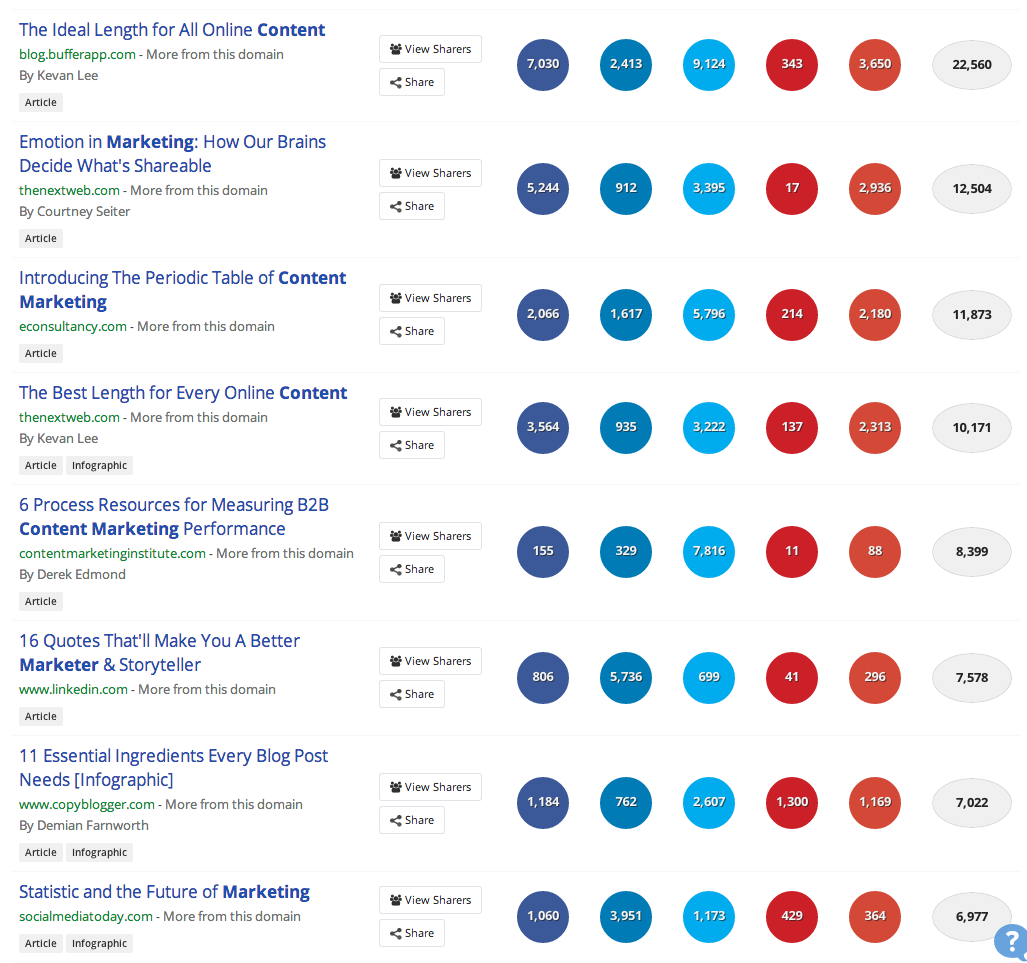
So is anyone standing out as the boss of content marketing about, well,.content marketing? The most shared individual articles on content marketing over the last 6 months came from a variety of sources as shown below. Nobody’s dominating, as you can see:
most popular content marketing
(Data on most shared articles from BuzzSumo, the free search tool that finds the most shared content for any topic or domain.)
The top 8 articles achieved between 6,900 and 22,000 shares each compared to the average of 250 shares per article.
Ok, so what does this tell us? We see a number of lessons for content marketers looking to extend the reach and impact of their content.

Where Should We Share? Everywhere

The most shared posts were shared widely across networks for example the top four all had significant shares on Twitter, Facebook and Google Plus. Interestingly other articles had more Twitter shares but the top three all had a good balance of shares across all the four main networks. They all had over 2,000 shares on Google Plus for example.
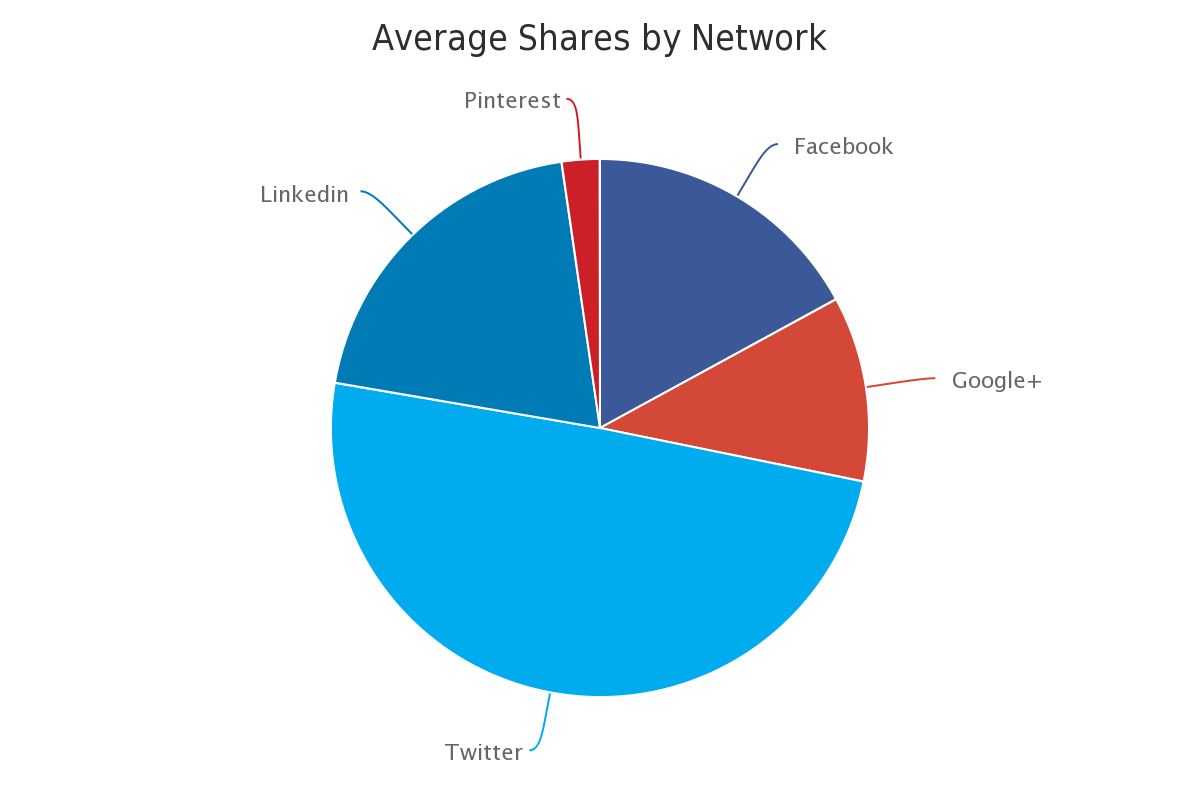
If we look across all content shares for content marketing we can see that most shares took place on Twitter.
content marketing articles at their best
However, it is clear the other networks have significant potential.  The article from the Content Marketing Institute for example had a very high number of Twitter shares but was unusual in hardly being shared at all on other networks. It would suggest little effort was spent promoting this post on other networks. However, the analysis would suggest that such content can appeal across all four of the main networks and hence it is worth investing in each channel.
Lesson 1 - Share across the top four networks
LinkedIn had the lowest level of shares of the four main networks but there is evidence that content is increasingly being shared on LinkedIn, and this will increase with the relatively new blogging platform.  There are a number of cases where content was shared more on LinkedIn than on other networks. For example the last post in the list above and the post below, both received as many shares on LinkedIn as the the other networks combined.
Screen Shot 2014-05-02 at 17.57.31.png
The recent decision by LinkedIn to allow members to publish content on the platform will increase its popularity with content marketers. Thus the potential of Linkedin as a publishing and distribution platform must be taken seriously. It will be interesting to observe whether certain types of content become more shared on LinkedIn as the blogging platform matures.
Lesson 2 - LinkedIn has significant potential as a distribution channel
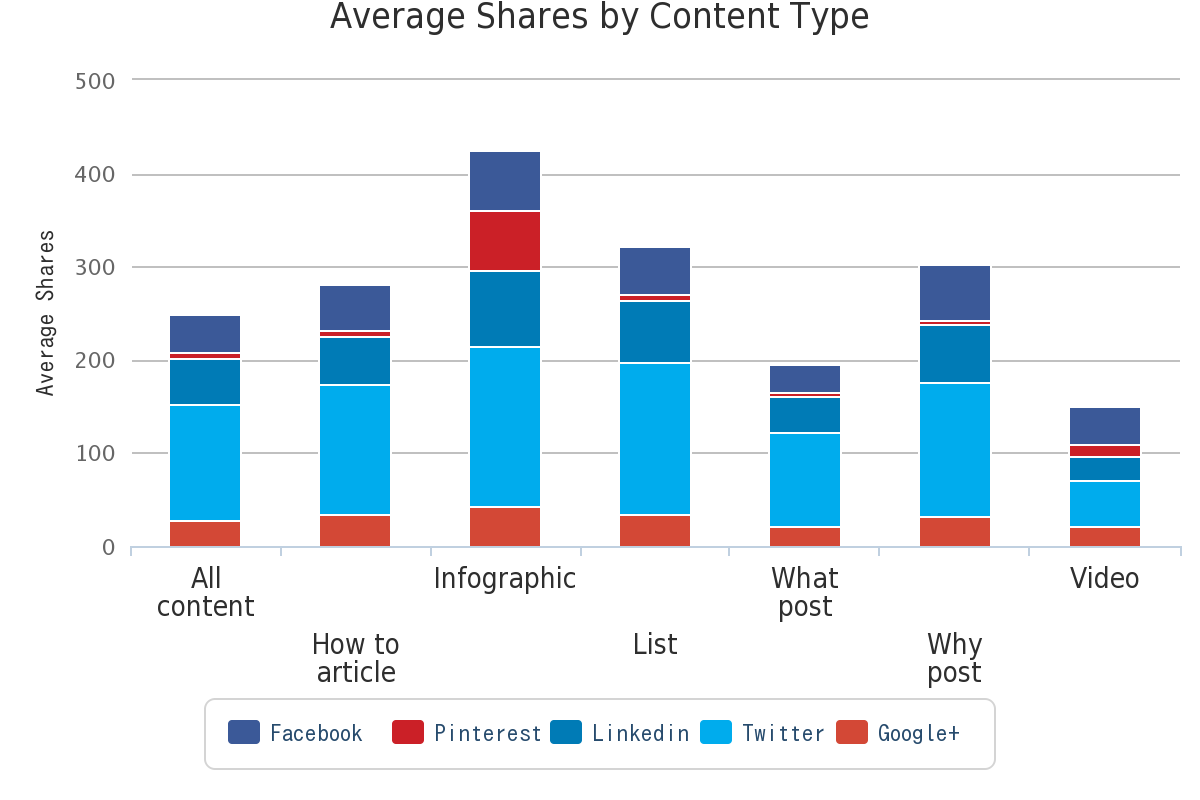
The infographic from CopyBlogger was the only content item to have a significant number of Pinterest shares with 1,169 shares. As a general observation we have seen few infographics that relate directly to content marketing. But infographics are the content type with the highest average number of shares as we can see from the breakdown of the 17,000 posts by content type below.

chart.png
So are content marketing experts not taking their own medicine and creating enough infographics?
Lesson 3 - Explore infographic options and share on Pinterest

The Importance of Authors

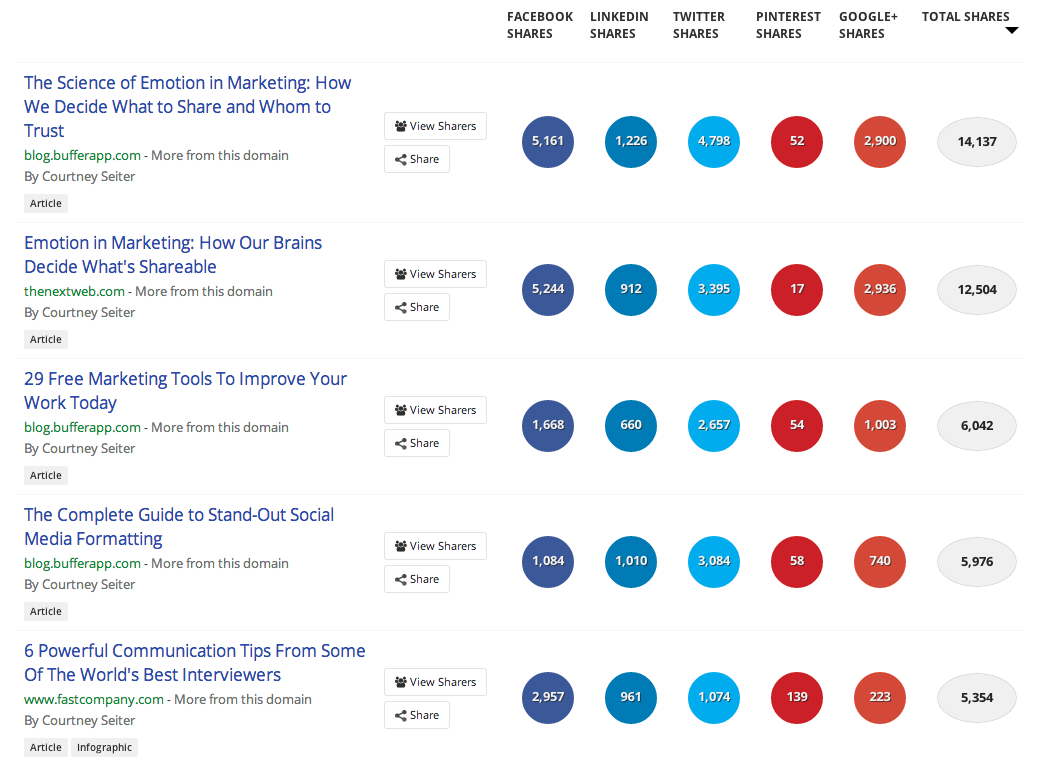
Successful content  is created by authors who have reputation and authority. It’s a virtuous circle: create insightful content, share it effectively, build a reputation, and your content will continue to be amplified through your networks (if you stay relevant and consistently insightful). If you find a useful piece of content by an author, searching for other content by that author may uncover other very relevant content. The second article on our list of most shared content marketing articles was by Courtney Seiter. Using a BuzzSumo author search I can see all the most shared content authored by Courtney shown below.
Screen shot 2014-05-12 at 20.01.45.png
As you can see, Courtney’s articles are consistently highly shared. If you want to be like her, read her headlines and see what gets shared. The first two articles here are the same content, just a different headline and site. Varying your headline style and the focus of your article can help you see what works on different sites and networks. That’s another article though.
Lesson 4: Look for other content by the well shared authors to see what works for them

Most Shared Content Sites

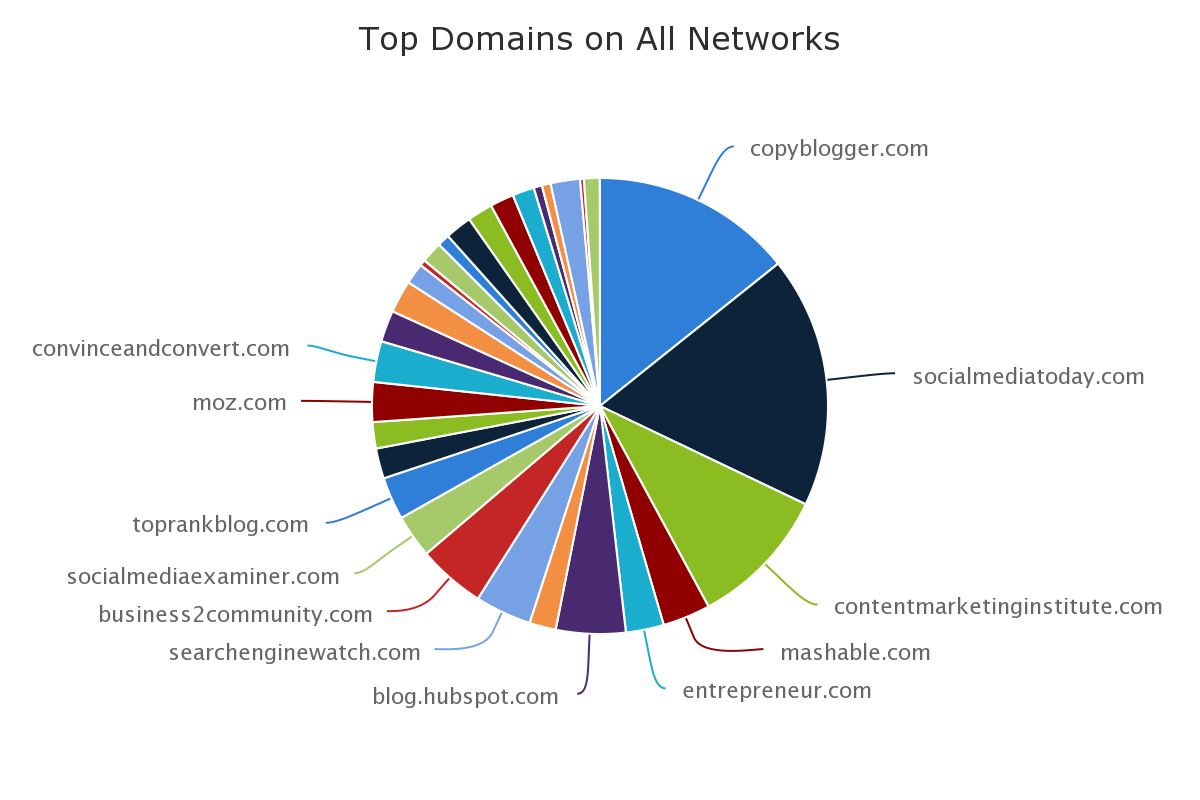
Most shares about content marketing linked to content from Social Media Today. The top three most shared content domains over the last 6 months were:
  • 560,902  Social Media Today
  • 449,312  Copyblogger
  • 315,276  Content Marketing Institute
The most shared top domains across all the five main social networks were as follows:
chart (1).png
There is a relationship as you might expect between the number of articles published and the total number of shares a domain receives. Social Media Today for example published more articles on content marketing than Copyblogger and this accounts in part for the higher total shares. However, whilst SMT had the highest number of total shares on Twitter, Copyblogger had the higher average shares per article.
Lesson 5 - Track what the big sites are writing about content marketing and where they are having success

More Followers Does Not Mean More Shares

What is interesting is the differences in shares between the networks. The details for Social Media Today and Copyblogger are below as an example. We can see that Social Media Today has far more shares on Twitter and LinkedIn but less on Facebook and significantly less on Google+.
shares
The number of shares on each network does not appear to have a direct relationship to the number of followers the publisher has on that network. For example, Copyblogger content received many more Google+ shares despite having only a third as many followers, 11,700 followers compared to SMT’s 35,000. This would suggest the degree of active promotion on a network and the quality of post can outweigh factors such as the number of followers.
Lesson 6 - Active promotion of content is important across all networks and potentially successful even where you have few followers

Thursday, May 8, 2014

Why All Brands Should be Monitoring Social Media


monitoring twitter facebook linkedin
Amongst the various debates around social media’s effectiveness as a business tool, one aspect that is undisputable is the value of social listening. After many years working in media monitoring - where clients pay a premium to track as many mentions as they can - it’s surprising to me that with so much of this data now freely available, more businesses are not listening in. It’s a great starting point for any brand looking to establish a presence in social media - if you’re not convinced social media is for you, set up basic keyword tracking and confirm one way or another. The data is there, the conversations are happening. I’m yet to see a case where a business has tried some level of keyword monitoring and come away saying there’s nothing it in for them.
One of the reasons listening is such a great starting point is that it makes it all about your business. This is not someone trying to convince you of the benefits or lauding the importance of future proofing - it’s about your brand, right now, relevant conversations are right there in front of you, ticking over in real-time. Not only does this highlight the immediate relevance, but it can also open your mind to the extended possibilities of social media marketing. With consumer reliance on social media increasing, and the means for listening readily available, there’s no reason why businesses shouldn’t, at the least, be making themselves aware of the conversations around their niche.  
What’s Being Said?
The first step of establishing a social media monitoring process is to establish your target keywords. Start by establishing a list of possible key terms, the most common words or combinations of words people would use when searching for your products and services. You want to get down as many possible options as you can - we’ll refine them in the next stage. A few notes to keep in mind:
  • Think of possible slang terms people might use for your brand and common mis-spellings of your key terms – ensure those are also included
  • If you’re using numbers, ensure you list both the numerics and actual words
  • Include competitor names and key terms also, you can list them on a separate competitor tab
  • Important that you’re also tracking their mentions to get a full overview, whilst also highlighting possible opportunities
  • Include a negative mentions listing – Brand AND fail, Brand AND bad, etc. These ones you really need to know about
Extra tip: A good way of connecting with people is by thanking them for sharing your content, but often when people share a blog, they only include the blog title with no reference to the author or source (other than the link). It’s worth setting up search streams for blog titles after you’ve posted them, enabling you to locate any shares of your content and reach out to those who’ve done so.
Refining Keywords
Once you have a listing of possible key terms, you’ll need to refine it down. Most people don’t have time to sort through thousands of mentions every day - the more specific you can get, the better. You can test your keywords in Topsy to get an understanding of how popular they are – if one of your terms is getting 30k hits per day, probably not going to be very helpful as you’ll never get through them all (it you’re brand name is getting that many hits, first, congratulations, second, it’s gonna’ take some work to stay on top of it). If a term is too broad, add in a qualifier to narrow it down:
                Instead of: Social Media
                Try: Social Media AND Consulting
Topsy will show you how popular each term is and has been over the past hour, past day, past week, etc. This will enable you to target your terms more specifically, reducing the noise so you can track your mentions in the most productive manner.
Topsy search
Extra Tip: Topsy only searches Twitter, which is generally a solid indicative measure, but if you need data from Facebook or Google+, apps like Mention, Social Mention and even  Google+ search itself will provide info to help solidify your keyword choices. You can also use Google Trends to see what people are searching for in relation to your terms, with the option to narrow it down to your region.
Putting Keywords into Action
Once you have a list, set yourself up with a social media management tool like HootSuite so you can track the conversations on all the major networks on one platform. HootSuite’s basic offering is free and allows you to establish up to 200 streams, each of which can be dedicated to a different keyword search combination, if required. This is relatively easy to setup - an experienced user will be able to put a basic monitoring system in place in less than 30 minutes. You can check it once an hour, once a day - whatever works best for you. This will introduce you to keyword tracking and highlight the potential benefits.
Extra Tip: You should prioritise your keyword lists to ensure the most important streams are checked more regularly – negative mentions, for example, will be higher priority than others.
Tracking Conversations = Blog Fuel
One of the major benefits of tracking conversations around your industry is you can get a better understanding of what questions your audience are asking. What are people concerned about? What are the common issues raised? Each of these can be noted down and expanded upon in blog posts on your website. Seeing things from your audience’s perspective is basically blog fuel. If you’re ever unsure of what to write about, a collection of suggestions and prompts will be flowing through your keyword monitoring streams, ready to be fished out anytime you need.
Geographic Targeting and Sentiment
One feature worth investigating is the ability to search for mentions within particular geographic regions. Sure, you can put in [city name], [keyword] as a search string (for most networks this is the only way to narrow down geographic mentions, though that may soon change), but for Twitter searches, you can also utilise ‘geocoding’ to search all tweets within whatever geographic range you desire. HootSuite has this built-in with a simple target icon, so you can set up the stream, click on the target, and there it is, all tweets mentioning your chosen keyword/s within the immediate vicinity (the default range is within 25km of your location).
HootSuite GeoCode option
You can also manually enter location co-ordinates to track a specific region – say, you wanted to track mentions around one of your offices in another town – you can look up the latitude and longitude details of the target site (easy to find in Google Maps or itouchmap.com) and enter them into the search string:
[search term] geocode:[latitude],[longitude],25km
You can change the range from 25km to whatever you want, miles (mi) or kilometres (km). This is a great way to filter your results and target key prospects.
Here’s a simple example of geo search in practise - a hamburger shop might set up a search string for all mentions of ‘burger’ within 10km. A person tweets ‘where’s the best place to get a burger in Sunnyside?’ The store could respond with ‘Come visit us, here’s a link to our menu, 10% off if you order via Twitter.’ While direct selling like this is not always advisable, this type of interaction would benefit the customer and the business and may help differentiate you from the crowd.
Twitter’s advanced search functionality also lets you track positive (‘[Subject] :)’) and negative (‘[Subject] :(‘) mentions. While the accuracy of automated sentiment detection is debateable (Ben Donkor wrote this excellent piece on the limitations of automated sentiment analysis), it’s worth testing to see what results you get, looking at what’s being said about your brand and your competitors.
Extra tip: There’s no way to focus geocoded searches to a specific country, but there's a way around this. By locating the central point of the desired nation and using that as the geocode base (lat + long), you can then set a search range of half the length or width of the entire nation - whichever is greater – to track all mentions within that region. So, for example, Australia’s central point is near Alice Springs and the nation is 4000km wide. I’d use:
[search term] geocode:[lat of Alice Springs],[long of Alice Springs],2000km
That code would return all matches for my term/s across Australia. You might get some overlap into neighbouring regions, but I’ve found this to be the more accurate than using the ‘Near this place’ advanced search operand in Twitter.
A Little Information Goes a Long Way
Basic keyword tracking is great for finding conversations where potential customers are looking for your product or service – these people are essentially one-step away from conversion - but what about those that are two steps away? What if you could, based on your understanding of your business, locate conversations where people were engaging in activity which was likely to lead them to becoming target customers? For example, let’s say you’re a local electronics retailer. You know, based on experience, that people who buy a Thermomix are time poor but earn a better than average income. What if you targeted graduates moving into highly paid jobs, people working in, say, medicine, who are likely to be concerned about their health, well paid, but extremely busy. You could add them to a list and track their interactions – you don’t want to go in guns blazing, telling them they’ll be seeking products from you shortly like some sort of creepy Nostradamus, but maybe you can track those potential customers who are two-steps away, ‘Favourite’ some of their tweets, interact with them in some form. Those brand awareness efforts could pay off when the time comes for them to make a purchase – who do you think they’ll go to if you’ve been able to make a connection with them ahead of time, maybe even been able to offer help on another problem at some stage? Think about the stepping stones that lead to people seeking out your products, what are the common discussions or life changes that might help you find them before they even think about coming to you.
Utilising Intelligent Data Tracking to Establish Brand Authority
The more time you spend monitoring, the more you’ll be able to track and utilise client-relevant data. This is how the social networks already market their advertising products, through the value of targeted audiences. Tracking keywords yourself allows you to locate your target groups in a more controlled and cost-effective way. What’s more, as you branch further into monitoring and learn what works and what doesn’t, you’ll be able to better establish your brand authority by making yourself part of the conversation before your services are needed. The more people are aware of your brand, the more you’re able to build trust and create lasting relationships with your target audience. The possibilities are only limited by your own creative thinking around how best to track the data. It takes time to master, but you know why people come to your company, you know the common factors that lead them to your door – you’ve been mentally tracking this data through your daily business interactions for years. Now you just need to work out how to best use it.
It takes a time to gather the necessary insights, but the value of social media monitoring will increase as you gain more information and refine the data. If you build each element, understand what people need from your business, you’ll not only set-up an excellent process for gaining insight, but you’ll also put yourself in the right frame of mind to be of best benefit to your target audience through improved comprehension of how they use your products and services. It all starts with listening, taking it in, and seeing where you can be of most benefit.