Showing posts with label Video Marketing. Show all posts

Friday, October 31, 2014

The State of Video Marketing in 2014

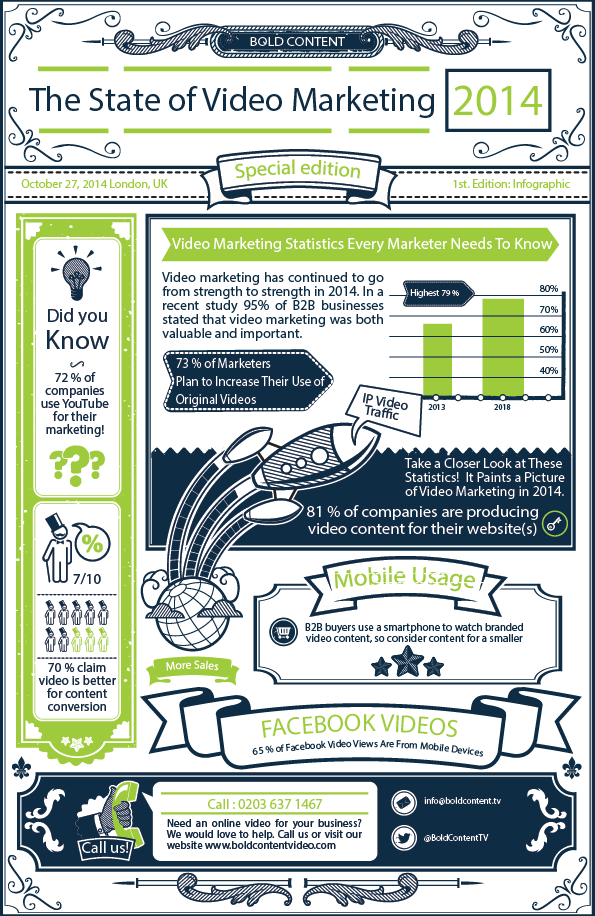
Video marketing has continued to go from strength to strength in 2014. In a recent study 95% of B2B businesses stated that video marketing was both valuable and important. The consumption of video is also on the rise. By 2018 it is predicted that 79% of all internet traffic will be video. A significant portion of that growth is coming from mobile. In fact, mobile now makes up nearly 40% of mobile watch time on YouTube and 65% on Facebook!

Another interesting development this year has been the rise of Facebook as a serious competitor to YouTube. Facebook recently stated that the site receives 1 billion views a day of their video content.
Take a closer look at these statistics, and others, in more detail to help to paint a picture of the video marketing industry in 2014.

The State of Video Marketing of 2014

(via)

Sunday, October 5, 2014

Video Marketing Must Be Tailored to Devices [Ad Week]

Global marketing executives from Facebook, Coca-Cola, Starcom MediaVest, and NBC discussed strategies for creating video content across devices and engaging audiences.
Audiences are consuming more video than ever, leaving advertisers tasked with the important challenge of creating digital video content that invites engagement across platforms and devices, according to an Advertising Week panel discussion titled "Sight, Sound, and Mobile: Video Marketing in a Digital Era."
In the panel discussion, Facebook vice president of Global Marketing Solutions Carolyn Everson said that Facebook videos receive, on average, 1 billion views a day, with 65 percent of those views happening on mobile. Furthermore, mobile and tablet viewing increased 532 percent from 2012 to 2014.
People are carving out moments during their everyday activities to consume media via mobile, rather than, for example, running home after work to catch a favorite show. Everson believes that the shift in the way audiences view video "has fundamentally changed the way consumers are discovering brands." In response, brands must focus campaigns to target customers across devices, she said.
One example of effective video marketing across devices is Coca-Cola’s "America Is Beautiful" Super Bowl campaign. In the panel, Ivan Pollard, vice president of global connection, explained that Coca-Cola released the controversial advertisement during Super Bowl XLVIII, while simultaneously using Facebook’s targeted advertising tools to deliver tailored versions of the ad to specific customers on Facebook, including members of the LGBT and Hispanic-American community.
(via)

Friday, October 11, 2013

How to Create YouTube Videos That Connect With People

Simple YouTube Strategy

Here’s a simple strategy.
Want to integrate YouTube into your online marketing strategy effectively?
Then you must create and share valuable video content that’s relevant to what your ideal customer is searching for on the Internet.
This might be an answer to a frequent question, a tutorial or a customer review of your services.
When you use video strategically, YouTube will generate leads for your business.
In this article I’ll show you five styles of YouTube videos that will get you the results you’re looking for on YouTube.

#1: Turn New Viewers Into Subscribers With a Trailer Video

YouTube Trailer Video lets you feature a video at the top of your channel when nonsubscribers visit.
Why not use this space to tell new viewers who you are, what your business is all about and what they can expect from your content?
your trailer video
Your YouTube channel and trailer video as seen by nonsubscribers.
Here is a simple, three-step outline to help you create a 45-to 60-second video that will convert viewers into subscribers who will get alerts whenever you post new video.
  • The Intro—Welcome new viewers to your channel by introducing yourself or the name of your business, then share notable credentials that will help instill confidence in the service you offer.
  • The Why—To captivate your audience, tell them what benefits they’ll receive from your videos, then share why you do what you do. This is where your personal story comes in and will go a long way toward creating a personal connection.
  • The Call to Action—Wrap up your video and tell people what to do next. Tell them how to subscribe to your channel. If you have a web page or blog you want them to visit, give them the URL!

#2: Share Stats That Matter to Benchmark Yourself

Position yourself as a reliable source of information with a video that presents numbers and niche market data in a unique, easily sharable way. People love statistics, and if you gather and present good data, they’ll share your video with colleagues who are interested.
About two years ago, I uploaded a simple two-minute video to share the latest statistics about online video, entitled YouTube and User Engagement. The original received 16,000 views and the follow-up, Video Revolution 2.0, now has close to 40,000 views.
video revolution image
Video Revolution 2.0 shares the latest statistics about online video and has close to 40,000 views.
Use these three simple steps to create your own stats video and share important, relevant information with your market:
  • Collect eye-opening figures and data about your market.
  • Find an awe-inspiring song over at Premiumbeat.com.
  • Hire an Adobe After Effects animator at oDesk to combine the facts and figures with graphics and music.

#3: Share a Customer Success Story to Establish a Good Reputation

There are few things more powerful than a first-person testimonial that tells how your product or service made a customer’s life better.
This doesn’t have to be polished and technical. You can record customer interviews with your mobile device or on a Google hangout with a simple webcam.
Better yet, ask your past customers to put their own success stories on camera and send you a link to their video so you can share it on your own channel and add it to your channel’s favorites.
alejandra costello youtube
Showcase the stories of your customers through video.
Here’s a simple formula you can use to help customers bring their stories to life for you.
  • Intro—Have your customers introduce themselves so people trust they’re real humans.
  • The before—Ask them to share what need led them to search for your product/service.
  • The shift—Remind them to tell viewers why they chose you.
  • The after—Encourage them to share how your product/service has made their life better.

#4: Answer Questions to Demonstrate Your Knowledge

Your potential customers are going straight to Google to find answers to their questions. Claim your Google Authorship, then connect your Google+ profile with your YouTube channel and use video to deliver those answers. You’ll become a go-to Q&A resource in no time.
Share your knowledge with little things and people will remember you when they need to buy big things.
marie forleo youtube
Marie Forleo of MarieTV reads and answers the questions her audience members ask.
To get a jump-start on the questions your customers ask most, use keyword research tools, review forum questions or send out a survey to your existing subscribers and customers. Use these questions to record a Q&A library of videos that are short and to the point so people get what they need quickly. Provide real value, avoid the fluff and don’t hold back!

#5: Teach People Something to Create Top-of-Mind Awareness of Your Services

If you do a quick search for “how to tie a tie,” you’ll find videos at the top of Google’s search results. Some of these videos have more than 13 million views.
Rather than writing a text-based article with a series of pictures on how to do something, record step-by-step tutorials, demonstrations and how-to videos. Your viewers can pause the video as needed and that makes their lives easier!
how to tie a tie on google
Find out which “how-to” keywords your customers are searching for on Google!
If you’re camera-shy, the good news about tutorial videos is that the “star” of your video is the product. For online or software tutorials, screen-capture software like Camtasia or ScreenFlow will record your screen and you don’t even have to be on camera!
Here’s a recap:
The ONE Element Every Video Needs
There are more than five styles of videos that work on YouTube and you don’t have to limit yourself to the options in this article. Find the best fit for your business, theninclude the only essential element every video needs: your Call to Action. 
Provide value and communicate a clear and compelling call to action that inspires your viewer to subscribe, purchase, visit your website or share the video they just watched and you’ll see results in no time.

Thursday, July 4, 2013

5 Ways to Get the Film Rolling with Instagram Videos


Image courtesy of Reuters/Antonio Bronic
By now we’ve all heard about Instagram rolling out video functionality for its users—a big move for Facebook and an obvious swipe at Twitter’s Vine platform. But it makes sense that Facebook would want to tap into video content. According to Mist Media, the average user spends 88 percent more time on a website with video, and videos embedded in emails can increase click-through rates by as much as 90 percent.
Certainly this upgrade will mean big bucks for not only Facebook—thanks to more brands investing in the platform—but also those brands looking to capitalize on social sharing to boost their referral marketing programs. And now with two big players in the video marketing arena, the time is ripe for brands to hop on board.
Here are five tips to bring about a huge ROI from video marketing on Instagram:
1. Encourage Customer Engagement
Satisfied customers are more than willing to share their experiences with friends and family. Leverage word of mouth marketing on Instagram by reaching out and asking customers to share videos of themselves using your product, interacting with your brand, etc. Remind them to include their referral links as well—the influx of shares will mean a huge boost in sales and brand ambassadors.
2. Drive Traffic to Landing Pages
Use a short video to offer a promotion or discount, and then drive traffic back to the desired landing page through a link. If you’re looking for more referral signups, include a pitch about the benefits of your program (after crafting an effective referral value proposition, of course) to get customers motivated and excited about sharing your message.
3. Provide Value to the Community
The most important part of any marketing strategy is to provide value to your online users. Video content has always been a great way to quickly and effectively educate customers on the utility of your brand. While 15 seconds may seem short, it’s definitely enough time for a quick showcase of your company’s product.
4. Keep It Short and Simple
B2B or B2C brands with more complicated value propositions shouldn’t overload users with 15 seconds of dense content. Instead, try breaking up your message into a series of videos—that will mean more content for your brand and more opportunities to incentivize social sharing.
5. Experiment and Have Fun!
If there’s one thing customers hate about online advertising, it’s being marketed at, not marketed with. You may be “selling” on Instagram, but your approach doesn’t have to be blatant. Have some fun with your customers. New platforms require new approaches, so innovate and play around with Instagram just like you would with any emerging channel.
The battle between Vine and Instagram may just be getting started. But whatever the outcome, there’s no doubt that microvideo content is a disruptive influence in the digital advertising world—one that’s here to stay.

Friday, November 9, 2012

How to Create Custom YouTube Thumbnails


Are you frustrated by the default random YouTube thumbnail option for your videos?
Do you wish you could create something custom to improve your views?
Since December 2011, YouTube has been making some radical changes to their site.
Everything from the home page layout, website colors and even the look and feel of the video players have changed dramatically.
But none of these aesthetic changes have had any real impact on the way we need to be marketing videos on YouTube.
However, this latest change may just be the biggest game-changer that savvy video marketers can take advantage of! Introducing the Custom YouTube Video Thumbnail.
From YouTube's Support Portal, instructions for uploading a custom thumbnail.

A Little Background

In April 2012, YouTube quietly rolled out the option for all YouTube channels to become “YouTube Partners.”  This original YouTube Partner Program consists of a selective club of content producers with a large audience and a ton of views.
These original partners have access to additional features and options to help market their videos that no one else had (for example, the Custom YouTube Video Thumbnail).
Then YouTube announced that anyone could become a partner, and everyone rushed to monetize their channel and fill their videos with a bunch of distracting ads and 15-second commercials that slightly annoy viewers. Yet there were still no special partner privileges like the Custom Thumbnail option… until now.
YouTube has been quietly (and selectively) rolling out the Custom YouTube Thumbnail function to some channels for the past month or so.

What Is the YouTube Custom Thumbnail?

No change or update has had me quite as excited as this one!
Until now, YouTube randomly selected (and when I say random, I really do mean completely random!) three still images for you to choose from to use as your video’s thumbnail.  This means you are probably forced to choose one of the worst screenshots possible.
video thumbnail
You can now choose your custom thumbnail.
But this is changing. Select users can now upload an image of their choosing to represent their video.  These users can now choose a thumbnail for their video and this thumbnail will be displayed in search result pages, related videos and as the start image on embedded videos.

Why Is This SO Important?

This is a powerful new functionality for YouTube marketers.
One of the easiest ways to get more views on your videos is to have an appealing thumbnail image.  When you have little control of your thumbnail selection, you leave a lot up to chance.
appealing thumbnail image
Choose thumbnail images that best fit your YouTube marketing goals.
But there’s more.  YouTube actually measures the click-through rate (CTR) of your video.
In short, if your video is ranked #3 for your prospective keyword, yet everyone is choosing to click on YOUR thumbnail over #1 and #2′s thumbnail, chances are YouTube will bump you up in the rankings!
A good thumbnail = more views

Do You Have the Custom Thumbnail Option?

How can you get the custom thumbnail option?  I don’t have an answer for you.
I’ve seen new channels, old channels, channels with a lot of views and channels with only a few videos that have this new option, while others do not.
I haven’t found a pattern, and can only assume that YouTube is slowly rolling this feature out to all (fingers crossed).
To check if you’re one of the lucky YouTubers, head on over to your Video Manager and select the Edit button on any one of your past videos.
Below the three options for thumbnails, you will discover the Custom Thumbnail button.
custom thumbnail button
Click the Custom Thumbnail button and upload a thumbnail.

What if You Don’t Have the Custom Thumbnail?

If you don’t have the custom thumbnail option just yet, my recommendation is to be patient.
In the meantime, I believe monetizing your channel helps your chances—even though I’ve found non-monetized channels with this function available.
account settings monetization
You can enable monetization on your YouTube channel.
In your YouTube Channel Settings, select Monetization and activate it.
Here is my strong recommendation: Even though you want your channel monetized, you can select which of your videos will have advertisements.  You’ll want todeselect as many as possible.  I decided to simply have three or four of my oldest videos monetized.
Unless you are bringing in millions of views, you will not see a lot of money from this.  It’s better to focus your video efforts on bringing in new leads and customers through your funnel.

What if You DO Have the Custom Thumbnail?

If you discovered that you are one of the lucky few who have already been given this powerful marketing gift, pay close attention: You need to create custom thumbnails for all of your past videos as soon as possible.
It’s my theory that this custom thumbnail option is too powerful and it will be abused.  When that happens, YouTube may just take it away for good.
Find a graphic designer to go in and add a custom thumbnail to all of your past videos.

What Should Your Custom Thumbnails Look Like?

Check out this short YouTube video on how to create the “perfect” YouTube thumbnail.
The following are a few tips to follow to make your custom thumbnails as effective as possible:

#1: Make it Relevant!

Just because cute babies and pictures of pretty women get more clicks doesn’t mean you should use them.
If your thumbnails are not relevant to your content, your new-found audience may get angry.  Not only will they “thumbs down” your video, they will leave immediately.
YouTube tracks Time on Page.  And with an average time on page of just 3 seconds, your rankings and views will plummet.
make it relevant
Make the effort to choose thumbnail images relevant to your video.

#2: Find the Perfect Still Shot

Instead of using a random image, find a still shot from your video.  Take your time andlook for the perfect shot that really describes what your video is all about.
This could be an action shot, or a close up of your face, or something that grabs people’s attention.
action shot
Choose thumbnail images that capture your viewers' attention.

#3: Add Text

Using photo editing software, add some benefit-driven text to this still shot.  People should be able to quickly read the text and know exactly what your video is all about.
thumbnail with text
This thumbnail image highlights the contents of the video.

#4: Add Color

Bright neon colors tend to stand out far more.  Incorporate bright, contrasting colors into your thumbnail so the viewer’s eye travels right over to you!
In Conclusion
Even though I’m really excited about this new feature, it doesn’t take away from the ultimate strategy for YouTube success:  Provide remarkable value!  As always, continue to deliver exceptional content to your audience and empower the viewer, and the results will come.
Go check your YouTube channel to see if you have the Custom Thumbnail option.  If you don’t, go ahead and activate the monetization feature on your account, and just be patient.
Monday, October 8, 2012

5 Reasons Why You Should Start Crafting a Video Marketing Strategy


Before a video marketing strategy is put in place, there are millions of questions you've asked yourself in order to get the ball rolling. What does video mean to my business? Will my customers actually watch my video? What will this cost me? Answering these questions should not leave you pulling your hair out; rather, it should push you to start developing that strategy.
We've been listening and commenting on forums,LinkedIn groups, Twitter and Facebook and it has become clear that what people want -- marketers in particular -- are reasons why they should be using video. To help you wrap your head around video marketing, we've put together reasons why you should consider brainstorming your first video marketing strategy.
Video elicits greater emotional responses
Viewers, consumers, visitors (however you position them) respond better to content that utilizes more than one sense. When they're reading a blog, they're utilizing sight. When they're watching a video, they are utilizing sight, sound and hearing; by using all three, your viewers are more likely to elicit an emotional and memorable connection with your message than they would with the written word. Just think, when was the last time you had an emotional and memorable connection with written ad? Books can illicit emotional connections but you don't have thousands or millions of words to convey your message -- you have 30 seconds.
Video gives you an opportunity to exercise those creative juices
Have you ever said to yourself, 'If only I could show people what I mean when I write about <enter subject matter here>'? Well, this is why we have video. Creating a video about your features, benefits or your blog allows you to once again, increase the number of senses being used by your audience, helping them to thoroughly understand your concept/message. For example, if your consumers buy your product because of it's amazing functionality, then why not SHOW your audience the benefits of what you provide instead of just writing about it?
People love to talk to people, not brands
You may have a consistent discourse in your content and you may have even personalized your Twitter account to "Nurse Betty" or what have you but the reality is, people cannot physically SEE this personality. Video allows you to tie in that consistent discourse with the "Nurse Betty" behind your Twitter account to an actual person, talking to actual customers. Although subjectivity is everywhere, there is nothing like hearing and seeing a person describe a product or feature to know what it's really about. Perhaps this said person is saying it with a smile -- you have just created an underlining sense of "happiness" associated with your brand.
You can now track and measure your videos
First there were websites and then there was Google Analytics. Now there is video and most people are unaware that there are also Video analytics! Instead of spending thousands of dollars creating an amazing video, posting that video and then crossing your fingers that people watch your video, you can track it all. Use video analytics to know who is watching your video, where they are coming from and how long they are watching for. Don't like what you see? Not satisfied with your click through rates? Not to worry. You can utilize A/B split testing to see which thumbnail receives a better response from your visitors. In addition, by customizing a Call to Action during your video or at the end, you can guide your customers to the next step in your sales cycle.
There are 60 hours of video being uploaded every minute
According to a recent Google webinar I attended, there are 60 hours of video being uploaded to YouTube every minute; this is not including all the other video hosting platforms that are out there! Now, we're not suggesting that you jump into the "I need to do it because everybody's doing " fallacy. What we are suggesting is that you analyze whether video would be valuable. How do you do this? Ask yourself the following:
· Are your competitors reaching out to YOUR customers through video?
· Are your customers utilizing video to connect with the brands/products they love and use?
· Can your products/features/benefits be properly executed through a visual platform?