Showing posts with label email. Show all posts

Thursday, December 11, 2014

Get It Right: Cart Utilization Is Not Cart Abandonment

Many consumers use the shopping cart to help them move their purchase process from one device to another. Don't treat this as shopping cart abandonment - it's shopping cart utilization.
Many marketers still follow the outdated philosophy that consumers add a few items into the cart and then freak the hell out. There's a belief that things such as total order costs, shipping fees, shipping duration, or overall indecision cause the consumer to "abandon" the cart and run for the hills like nothing ever happened. I see so many cart reminder emails built with a tone of "Stop! Come back! Please!!!" These strategies, which I have been guilty of using, sound like we are all going into battle ("Combating Shopping Cart Abandonment!") or that we are all in emotional distress ("Overcoming Shopping Cart Abandonment").
It's time to change that perspective. Need proof? A Google study reported that 84 percent of consumers will start shopping on one device and finish on another. And guess how a great deal of them are transitioning between devices? By parking items in their shopping cart! In a recent survey, we asked consumers about shopping cart usage and expectations and 40 percent told us that they always or occasionally view their cart on a different device. Thirty-six percent always or occasionally view their cart while they are in a store. This is not shopping cart abandonment. This is shopping cart utilization.
Consumers aren't scramming out of the cart because of sticker shock; they are throwing items in a cart while they are at work and then using the cart as a touchstone to pick back up when they're sofa-surfing on their tablets. The cart is revisited to connect the shopper to where they left off, not where they fled in panic.
There is no need for "combating" or "overcoming" this type of behavior. Marketers have an opportunity to connect into this consumer behavior and facilitate the experience rather than trying to instill fear that the cart will expire or to impact sales by providing a discount to complete the order. Wish list features have tried to make this connection but, from my experience, adoption rates are low. We asked consumers about wish lists and found that more than 35 percent of women and 29 percent of men would not use wish lists to store items to view later. I do believe a wish list can be effective, benefiting the consumer's shopping experience while giving marketers a way to distinguish between "wishing" for an item versus adding an item to the shopping cart. The problem is that consumers are already using carts as wish lists and marketers have not done a great job establishing a value proposition for them to change this behavior.
So, here's an easy question: Do consumers shop, check out, and buy differently during the holidays? I'm sure your answer is "Yes." There's no doubt that consumers go wild during the final months of the year.
Next question: Do you plan to modify your shopping cart reminder emails during the holidays? If you are like 20 percent of retailers in Bronto's report, "Loading the Sleigh: Marketers' Plans & Expectations for the Holiday Season," then your answer is "No, I will not change my shopping cart reminder emails during the holidays."
Ugh! Why are shopping cart reminder emails, which pack so much revenue potential and enhance customers' shopping experiences, overlooked during the holidays? This keeps me up at night.
Cart utilization will only increase as shoppers seek out the best holiday deals online and in stores. Purchase consideration for buying a gift requires more thought and research than buying for oneself. It's time to revisit your shopping cart reminder emails (don't call them "shopping cart abandonment" emails!) to see how you can more effectively speak to consumers who are clearly utilizing your shopping cart and not leaving with no plans to come back.
Include product ratings, links to reviews, additional product images, and product descriptions rather than focusing on urgency to revisit the cart. Ensure that links click through to mobile-friendly product pages where consumers who are on-the-go can easily complete their order when ready. Who hasn't made a purchase on a smartphone or tablet right before going to sleep? Include information about gift-wrapping services, return policies, and alternate gifting links such as gift guides, shop by price, or shop by recipient. Provide an easily recognizable, consistent experience for new shoppers by updating the emails design to match any holiday-centric themes.
While consumers have clearly integrated shopping cart utilization into the shopping process, there will still be consumers who truly abandon. Refocusing your shopping cart reminder theme to fit a utilization philosophy will not discourage those consumers from revisiting your site - especially if they have truly abandoned because they do not want to make the purchase. Engaging with the frenzied holiday shopper who is taking advantage of your cart to save items will only help keep the shopping momentum alive and help boost your sales.
(via)

Wednesday, November 5, 2014

6 Tips to Increase the Click through Rates of Your Marketing Emails

The advent of the internet had changed the business landscape altogether. Now, almost every business needs to have an online presence to perform better. And that’s not all. If you have a business, you need to engage in online marketing as well. Take my word for it.
So, how do you do it?
There are a number of easy steps that you can implement in your email marketing campaigns. And I can assure you, they are sure to fetch excellent results. These will increase the clicks rates for your emails and thus, will play a major role in taking your email marketing endeavors a step forward.
Here’s a quick look at the steps you can implement to maximize clicks on your emails.

Keep the Subject Line Perfect

The subject line! Well, that’s the first thing of your email marketing campaign that will catch the attention of your target audience. And it should have all the qualities to stand out in the crowd of hundreds of emails that she may have in her inbox.
An attractive subject line will surely drive the receivers of your email to open and go through it. So, take your time and decide a subject line that is sure to make the receivers feel interested to open it. Keep the subject line 50 characters or less. Adding the name of some person might not be helpful. But it has been observed that adding the name of a place plays a major role in driving the open rate up.

Help Solve Some Problem

Ask a question to yourself: what kinds of marketing emails do you open most? If you knew that an email from a certain source will help you solve some of the problems you are having, won’t you always open it? The same holds true for your audience as well.
Along with your marketing components, the links to your website and others, try to send solutions to some of the common difficulties they might face in their businesses. An example in this case is Quibb. The company’s approach has helped them gain an email open rate between 50% and 70%. This is really amazing, much above the average email open rate in North America.
Try to make your marketing email look customized for the reader. Write as if you are speaking to only one person. But remember, never be overtly promotional.

Know the Right Time

When do you send the emails to your target audience? In the middle of the night? It’s true the email remains in the inbox and she can open it later as well. But in most of the cases, the emails sent earlier are never opened. So, you need to know the right time to send the emails. Researches show that emails sent on Tuesdays, Wednesdays, and Thursdays are the most opened ones. So, choose any of these days. Do a bit of research to know what the most likely time for your potential customers to remain active is. Send during that time to achieve the best results.

Create Your Own Description for Each Mail

Almost in every mail, the reader usually is able to see the subject and a little more than that. The preview text, which is an introduction to the mail, is present just below the subject line. As the name suggests, this line will contain a few lines on the subject that the mail conveys. Thus, people will be able to see what’s there in your mail. And if they are interested, they will surely open it. And keep it short and simple, preferably within 50 characters.
Here’s how such an introduction (on the right side of the subject) will look like in Gmail, the email client of Google:
[Image Courtesy: http://cdn-static.zdnet.com/i/story/61/48/002153/gmail-inbox-5436-andrewmagergmailcom.jpg]
On the contrary, if you don’t set an introduction to the mail, a few words from the body are automatically pulled and set for preview. They hardly make any sense and hence, has every chance of deterring a target customer from opening the mail.

Include Attractive Images in the Email

Why are you performing your email marketing? What do you want to achieve through it? For most of the businesses, the primary objective is to make the readers visit their website. So, you need to send the link of that website to your readers. But adding too many links in a single email, scattering it here and there, will just make it look clumsy. Don’t you think readers would, in turn, move away from a clumsy email?
So, what can you do to solve this? An easy way out is to use images in the email. Add a catchy subject line. And along with it, attach an excellent image that will attract the viewers. Insert the link of your website to the image. So, whenever any viewer clicks on the image, she will be directed to your website.

Fit in the Social Sharing Buttons

What’s an easy way to increase clicks for your email? Surely you can do it by sharing the email. And ensure that people who receive it can share it easily as well, provided they like it. The forward option will surely be there. Moreover, integrate the social sharing buttons. You should also add a readymade email forwarding option, which will make it easier for the readers to share the email. This, in turn, will increase the click through rates. You can also add clearly visible call-to-action buttons in the email.
(via)

Tuesday, May 14, 2013

Email and Social Media: Why Marketers Need Both


Email Marketing and Social Media Marketing

Why social media marketers should focus on email marketing
DJ tells a story of when he heard Jeff Pulver talk about his famous quote, “You live and die by your database.” DJ explains how it’s a phrase that he probably says at least once a week. The reason it’s so important is because when it comes to marketing, email is your database.
You have a virtual database of social media followers, but your database is your email contacts. Email is the glue that binds everything together.
subscribe via email
Email is your database. Image source: iStockphoto
DJ doesn’t discount social media, and he uses it a lot. But he explains that if Facebook decided to change their terms of service, then the connection with your friends and followers could disappear. Email addresses stick with you.
With Facebook, there are over 100 different email notifications. Even if you turn off most of the notifications, Facebook still messages you through email and Twitter does the same.
You’ll discover how all social networks use email marketing.
Listen to the show to find out why DJ encourages people to log out of Facebook or Twitter and go back to these sites for the first time.
Why social media marketers should work email into their social media activities
DJ explains how he has heard “social media folks” talking more about email.
You’ll hear examples of how Chris Brogan and Amy Porterfield focus on how to grow their email lists.
You can take the loyal followers you have on social networks and bring them over to your email list. You’ll find out the advantages of bringing your social media connections over to your email list and why it’s easier to sell via the email channel versus the social channel.
Listen to the show to find out how at Social Media Examiner, we have about 500 new people every day come to our content.
Where email is heading in the future
DJ shares how a lot happens with email behind the scenes that the average person doesn’t necessarily see.
There has been innovation around filters impacting email deliverability. From a consumer standpoint, there is a new app called Mailbox that helps you manage all of your marketing messages in one place.
mailbox
Mailbox is an app that lets you put your email in one place.
DJ has started to see a lot more integration of email into social and can see it play out in a couple of different ways.
One of his favorite plugins for Chrome and Gmail is Rapportive. It sits on the side of Gmail and as you hover over somebody’s email address, if that email address is used publicly to tie to different social networks, it will pull in all that information.
rapportive
You can use Rapportive to find out information about your contacts right inside your inbox.
You’ll hear an example of what information it will show about that person and how salespeople can use it.
DJ explains that the advantage of this plugin is that it shows a little bit more about where he sees email going. The lines are starting to blur between social networks and email marketing.
Listen to the show to hear stats from ExactTarget on the number of people who check their email on a daily basis and the number of people who prefer to get marketing-related messages through email.
Some ways marketers can grow their email lists using social media
DJ says there are many different ways for marketers to grow their email lists using social media.
At a very basic level, if you have a strong following on Facebook, Twitter or Google+, he believes it’s important to let your community know how they can get onto your list.
You’ll hear DJ give examples of social updates you could use to get people onto your list. DJ also reveals how Chris Brogan and Pat Flynn get people onto their lists with the use of video.
On Facebook, you can build a tab that has an opt-in form and a lot of email providers will make it easy for you to create the form directly in their system. You can then drop the code into a tab on Facebook. Although DJ has seen this work, he thinks the problem is that you still put a lot on the potential subscriber.
You’ll hear what DJ recommends if someone is following you and they’re engaged on Facebook.
Listen to the show to find out why DJ would rather have people on his blog than on Facebook.
How can email be used to move your blog readers to action for social campaigns?
DJ has tried lately to practice what he preaches. Now when you opt into his list, you’ll see automated messages as well as some more personal things.
waldow social email updates
DJ Waldow's opt-in form for the "Waldow Social Weekly" newsletter.
People forget that you have to build your list first, and then build trust with your audience and community. You can’t expect somebody who just opted into your list to do something for you. You have to earn that trust over time.
DJ believes that a combination of both email and social can be really effective, once you have built sufficient trust. One way DJ has seen this work is to create a call-to-action link within your email. You can easily take that call to action and put a link next to it that says “tweet this” or “post this on Facebook.” Prepopulate the tweet or Facebook post with the exact message you want it to say.
DJ gives an example of what he does in his newsletter and where and what your call to action should say.
Listen to the show to hear how at Social Media Examiner, we used our email list for the launch of the Social Media Marketing podcast.
Once someone opts into your email list, what is the appropriate frequency for contact?
DJ advises if you start to do anything that is less frequent than monthly, your audience is not going to remember who you are. He thinks daily is great if you can manage, but a couple of times a week is probably better.
You’ll discover what the sweet spot is for DJ and when he does a sales-type email.
Listen to the show to find out why the frequency question is one of DJ’s favorites.
DJ’s top tips on email marketing
DJ shares a great service that he uses called JA.TXT. It’s an SMS-to-email service, which provides you with a dedicated SMS number.
jatxt
JA.TXT is a great SMS-to-email service.
You’ll discover how this is a great way to add email addresses to your list and why it’s really effective when you’re in front of an audience.
The second service that has been effective for DJ is LeadBrite. It’s a plugin for WordPress called Welcome Gate.
You’ll find out what happens when you’re a first-time visitor to DJ’s site and how Welcome Gate has helped him grow his list.
Listen to the show to learn why you should give visitors an opportunity to opt in right away.

Discovery of the Week

At Social Media Examiner, we have an awesome free service called the Networking Clubs.
We have made a significant investment in hiring one of the best developers on the planet to put together a social network that lives independently of all of the other social networks.
networking clubs welcome page
The Networking Clubs are a great place to connect with other social media marketers.
There are almost 12,000 social media marketers who belong to the Networking Clubs. With the click of a button, you can join using LinkedInFacebook or Twitter. It’s a place where you can lend a helping hand, connect with your peers and get help.

Thursday, April 4, 2013

How to Grow Your Email List With Facebook Promotions


 Facebook Page promotions and how companies can use them to build their email lists.

Why Email?

Email marketing continues to be a strong method digital marketers use to inform, educate and push information to opt-in recipients. It is a universally used tool that everyone sits down to check at work or home.
As outlined in a past interview with Mike Stelzner, Christopher Penn, director of inbound marketing at What Counts and co-founder of PodCamp, notes that email is an important “push medium.”
inbox
Reach people where they must take action ---> their inbox. Image source: iStockPhoto.
Email serves as one leg of a three-legged marketing tool along with a blog and social media. Within this three-pronged strategy, email is the distribution mechanism, while a blog is the content center and social media is the conversation mechanism.
When new content is posted on a blog, email can be a method of distributing notice of the new article, while social media offers a conversation mechanism for users to talk about the content.
For many companies, their email list is really the foundational marketing piece. It’s a jewel of great value containing the names and direct contact method of customers and would-be customers that enables them to “get in front of” these people regularly.

The Facebook Advantage

Facebook, with over 1 billion users, including over 680 million daily active users, has the broadest age-range diversity of any social platform.
Because of the active user base and penetration across key purchasing power demographics, it’s a very important place for companies to have an active presence.
facebook
Reach people where they spend time ---> Facebook. Image source: iStockPhoto.

When Facebook Pages use app promotions on tabs, the tandem of Facebook and email can help marketers reach people where they are (Facebook) and engage with them.

This adds value to their social media efforts, while—when done with intent—also builds their email list.
lists
Engage, Capture, Grow, Distribute = Facebook Promos + List-Building. Image source: iStockPhoto.

List-Building Facebook Promotion Examples

Facebook promotions offer marketers a powerful way to boost engagement and extend the reach of their Facebook Page. There are numerous types of Facebook promotions that can be run on Pages. Below we’ll outline a number of examples of ways a Facebook promotion can be used to grow your email list.
All of the types of promotions mentioned below must use third-party apps displayed on a Facebook Page tab. This is necessary to comply with Facebook’s promotion policy.

#1: Sweepstakes Promotion

A sweepstakes is a chance-based promotion that can be hosted on a Facebook Page tab and typically has users complete a simple form to enter. After a set date, winners are then drawn randomly from all entries.
With the form for entering the sweepstakes, those setting up the promotion canoutline in the terms that submitting their email address also is their agreement to opt-in to the associated email list. Users must click the box to accept the terms to enter.
Below are two examples of sweepstakes apps that could be used as part of a Facebook engagement strategy and email list-builder.
facebook page sweepstakes
Facebook Page sweepstakes example as potential email list-builder.
viral friend sharing
Viral friend sharing component plus simple form entry opt-in.

#2: Trivia Promotion

Another chance-based Facebook promotion that can be used to engage Facebook fans and their friends as part of an email list-building strategy is a trivia promotion. With a trivia tab, users typically must complete basic entry information, including their email address, and submit their answers to the trivia questions.
Users are intrigued by the trivia itself or the prize offered and are willing to complete to enter.
The opt-in would either need to be outlined with a checkbox to agree in the terms or upon submission an opt-in email could be sent for the user to agree to. Best practice is always to make this clear up front to ensure the greatest opt-in percentage.
Below is an example of a trivia app by the NBA’s Minnesota Timberwolves that is being used as part of a Facebook engagement strategy.
trivia tab promotion
Trivia tab promotions can help grow an email list.

#3: Facebook Contests

Contests come in all variations from photo, caption, essay or video submission contests. Each offers a great opportunity to draw entrants and voters to a Facebook Page.
contest can also be a great way to build your email list! The key is to make sure you know and focus on your primary goal. Since the primary goal of a Facebook contest typically will be engagement and expanding Page reach, the email opt-in should simply be a natural part of the entry process and not something that draws undue attention to itself.
A helpful way to incorporate email opt-in as part of a Facebook contest is toinclude information about the email list in the terms of the contest. Facebook fans then enter the contest and receive a follow-up opt-in email from your business inviting them to confirm being added to the email list.
Facebook photo contest entries can be part of an email opt-in strategy.

Saturday, December 15, 2012

15 Steps for Creating a Successful Social Media Giveaway Contest

Everyone loves getting something for free. In fact, one of the main reasons that people “Like” a brands Facebook page is so that they can either obtain a discount or win something.
15 Steps for Creating a Successful Social Media Giveaway Contest
The rise of social media allows businesses to easily create their own contests and giveaways that can:

  • Build links to your website (great for SEO)
  • Increase traffic
  • Create social engagement
This then can lead to increased brand awareness and the sharing of your contest on social networks such as Facebook and Twitter.  So giving away something for free can result in free marketing.
In this article we will go through 15 steps to set up, promote, and use “giveaways” to improve traffic and social engagement.


Step 1.  Determine the goal of the giveaway

What is the primary purpose of the Giveaway?  Is your focus to increase social engagement to your Facebook or Twitter pages? Or are you interested in using Giveaways as a link building strategy?

The goal that you choose will determine the type of contest and entries that you will run.  Additionally, you also need to determine your budget for promoting the Giveaway.

Step 2.  What will you be giving away, and how long will the contest run?

Based on the goal of the contest, your margins, and your audience, you can select a giveaway product that people will love.

If you have an obscure product, giving it away may not be a sufficient incentive for people to enter your giveaway.  In that case you may choose to give away a Visa gift card or Ipad or something that everyone will want.

Additionally, you must determine how long your contest will run.  We find that 1 month is optimal, as it gives you enough time to get the most out of the giveaway, without being much too long thus causing people to forget all about it.

 Step 3.  Create your giveaway on Rafflecopter

Why Rafflecopter?  Because it’s awesome.  It takes minutes to create a Giveaway.  It gives you the ability to create multiple entries so that through one Giveaway you can fulfill various objectives, including link building and social engagement.  It’s very inexpensive.  And it can be integrated into your page, Facebook, and other blogs.

Creating a Giveaway Contest on Raffle Copter

Some of the entries that we recommend are:
  •  Tweet about the Giveaway
  • Leave a Blog Post Comment
  • Follow @yourname on Twitter
  • Easy entry for all YourName fans on Facebook (fangate)
  • Like this post on Facebook
  • Google +1
  • Follow us on Pinterest
  • Follow us on Instagram
  • Subscribe to us on YouTube
  • Link to us from your Blog
  • Tell your Community (For 25 more entries, post a link to this giveaway on your blog,  favorite community, forum, facebook group, or any other place where you think people would like to hear about the chance to win! Note: You can do this once per day, but each entry must be a different community.)
  • Join Our Newsletter (We send the occasional newsletter with tips and specials that you’ll be the first to hear about!)

Step 4.  Add the widget to your site and to Facebook

Once the Giveaway is created, Rafflecopter will give you an embed code that you can easily copy and paste to your site.

TIP:  Upload the widget to a permanent page on your site.  After the contest is over, you remove the widget, but all of the links and publicity generated to that internal page of your site will remain.

Adding a Rafflecopter widget to your blog or website

Within Rafflecopter, you can select a button to Share to Facebook.  As easy as pie, Rafflecopter will create a Facebook app with the widget, including a disclaimer, necessary to run Giveaways on Facebook.

Be sure to create a banner on your home page or sidebar promoting the Giveaway, so all of your site visitors see the Giveaway and have the opportunity to enter.

Step 5.  Establish benchmarks

Before you launch your Giveaway, create a document for yourself with your benchmarks.  Here are a few that you can consider:

  • Number of likes on Facebook
  • Number of Google +1’s to the page
  • Number of Retweets to the page
  • Number of inbound links
  • Average monthly visitors
  • Conversion Rate

Step 6.  Create an email announcing the giveaway to your email subscriber

Reaching out to your current customers and subscribers gives you an opportunity to “seed” the giveaway with existing fans.  Additionally, this gives your customers an opportunity to engage with your brand.

Step 7.  Submit your giveaway

There are a large number of sites that can be used to promote giveaways and contests.  Most are free, and some give you the option to pay to enhance the visibility of your contest.

Here are a few to help you get started:

Step 8.  Reach out to giveaway bloggers to promote your giveaway

There are many blogs dedicated to promoting Giveaways.  These are typically run by mommy bloggers or stay at home entrepreneurs that are dedicated to finding and promoting giveaways.
There are 3 types of Giveaways that you will encounter:

3 Types of Giveaways

It’s important for you to be clear when you are reaching out to cut down on emails back and forth and maximize your response rate.

To create a list of sites to reach out to, visit the sites above and click through their giveaways.  Create a list of these sites, with their contact info.  Then, email those people asking them if they’d be willing to promote your Giveaway

Once you’ve had responses from people and have a database of potential sites, it’s important for you to validate these sites and to check out their statistics so you can select the most powerful sites to move forward with.

 LinkResearchTools.com to check for a large variety of statistics:

Link Research Tools

It measures many stats including:
  • Inbound links from Unique C classes
  • Alexa Rank
  • PageRank
  • Facebook Likes
  • Pinterest Followers
  • Stumbleupon
  • ACRank
  • TitleRank (does the site rank for the title of the home page?  If it does, it’s a healthy site.  If it doesn’t, it may be banned or penalized in Google)
  • Link Velocity Trends
There are other tools you can use, including OpenSiteExplorer and Ahrefs

Step 9.  Determine promotions budget & track your outreach

It’s important to stay organized while you go through this process!  There will be so many emails back and forth, each at different stages of the promotions process, that things can easily slip through the cracks.

PODIO to keep track of each and every single potential giveaway partner.  Within podio I created a custom app for “Inventory”.  Any one that replies, I add them to the inventory including their contact info, site statistics, and notes.
Podio
By connecting Podio with gmail, as people reply I can create tasks in Gmail that get sent to Podio so I can follow up.  I also add notes to each of the partners, thus keeping the progress of each one up to date.  By keeping all of the data in Podio I can easily compare at a glance the price and power of each site.

When choosing how to spend my marketing budget, I will sort in Podio by different factors such as Alexa, Pagerank, Inbound links and AC rank to see what sites surface to the top for each. Then I will compare the price for each to determine the best way to spend my budget.

DOCUMENT EVERYTHING!  If you do not use Podio or a project management tool, it is very easy for the project to become very overwhelming!

You may even choose to add Paypal transaction ID and other such data and then create a Cost App in Podio to track the total expenditure for the project.

Step 10.  Promote your giveaway on a daily basis

Did you know that thousands of sites host “Linkies”?  By going to these pages, you can submit your giveaway through a “Linky” form on these sites.

Here is a list of Giveaways that we’ve created based on the day of the week:


Additionally, you may choose to advertise your Giveaway on a variety of platforms.  Here are a few options:

  • Promoted Posts on Facebook
  • Use StumbleUpon’s Paid Discovery
  • Reddit’s advertising platform
  • Promoted Posts on Twitter

 Step 11.  Email the giveaway entrants to encourage them to come back

Halfway through the contest, send out an email to all of the entrants to encourage them to return to your site for more entries.

You may choose to add a new “Mega Entry” to encourage people to participate, or simply by sending them a reminder you may generate more buzz.

By sending out an email, you may get some of the existing entrants to Tweet about the Giveaway, or post on their Facebook page, or Pin your contest, which will in turn generate more exposure to your Giveaway.

Step 12.  Select your winner!

If you’ve continued advertising your giveway and submitting to Linkies, you should have several hundred entries by the end of the 15-30 day period.  Depending on how many entries you made available will determine the total number of entries.

Within Rafflecopter there is a way to select the winner.  Once you select and verify the winner, Rafflecopter will display the winner automatically through the widget.

Notify the winner immediately and ask them for permission to use their picture in an email announcing the winner of the contest.

 Step 13.   Upload emails to your email list

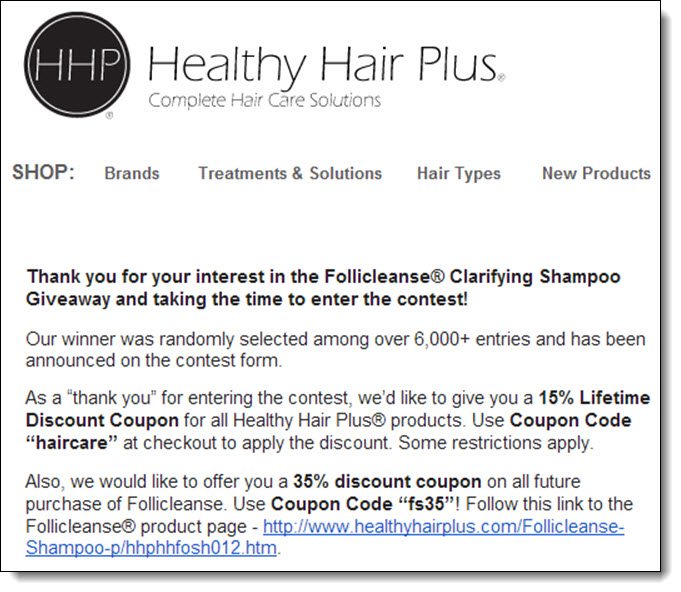
If you included an email collector as an entry, or included in the Disclosure that entrants would be added to your mailing list, download the spreadsheet from Rafflecopter and add the emails to your email list.   Send out an email to your list announcing the winner and thanking people for participating.

Creating Rapport with contests
This is a great opportunity to start the process of converting them into customers.  Give them an amazing incentive to purchase from your site, by giving them a very large coupon code, or something for free.  Your goal at this stage is to make your email so appealing that people won’t immediately unsubscribe.

Start a rapport with the contestants and start warming them up to your brand!

Step 14.  Mail out the prize

Don’t just send out the product in a boring box.  Make it beautiful!  Add a personalized letter or something that will make the winner feel special.  

Encourage the winner to share about winning the price, and to review your product on their site.


Step 15.  Remove the widget from your site


After you’ve sent out the email, remove the widget from your site.  You’re all done!

Conclusion

If you follow these 15 steps, you will be able to create a successful contest with thousands of entries.  Depending on the entries that you choose, you can easily increase your number of Facebook Likes, Twitter followers, Google +1’s, and Pinterest followers.

You can generate social engagement and buzz by having people view and follow you on your social media channels.  Additionally, you can generate links to your site by paid promotions as well as using “Link to Site” as one of the Mega Entries.

Gaining this exposure will give you an opportunity to find new Brand Ambassadors, Customers, and to increase your organic traffic from the search engines.  For a small price, you can gain an amazing number of permanent  links and followers!