Showing posts with label contests. Show all posts

Friday, January 17, 2014

15 Sweepstakes Sites To Boost Your Online Contest Entries


Image
Online contests and sweepstakes are a simple and effective way for your small business to increase brand visibility while introducing new users to your products and services. Facebook is undoubtedly the most common social media platform to run contests, but your company can also run successful giveaways on Pinterest, Google+, Twitter and of course, your blog.

Here at DigitalSherpa, we often run online campaigns and contests for our small business clientele and know a thing or two about ensuring their success. One insider secret to increasing their popularity is posting the contest or giveaway on high trafficked sweepstakes websites. 
One quick note: these sweepstakes sites work great for brands with a national, broad target audience. They are a certainly an effective way to quickly gain numerous entries to general contests, but if you have a very local and audience specific company, these websites make not be the best use of your time.
With that being said, here are 15 awesome sweepstakes websites you can submit your contest on to greatly enhance your the number of your contest entries and overall online presence!
A successful online contest is a great way to achieve your small businesses goals in social media. One successful online sweepstakes can give you the same ROI as numerous pieces of content, which will save your brand time in the long run. We know time-saving is invaluable for small business owners, so please take advantage of this list during your next online contest

Monday, September 2, 2013

Facebook Announces New Rule Changes for Contests and Promotions

LikeUsandWinWhat does Facebook define a promotion as? 

Promotions are defined by having 3 features: entry/registration, the element of chance, and a prize.

If I don’t need to make an app anymore, what do I need to do?

Since you’re no longer required to run your promotion through an app, promotions can simply be run on your page’s timeline. However, it’s important to weigh the pros and cons of each. For example, apps allow you to create a more customized experience, provide more space for content, and are able to collect participants’ data in a more secure, controlled way. On the other hand, running a promotion through your page is much faster and easier. In addition, by posting your promotion to your page’s timeline, your post will be displayed in the news feed of all your fans.
FacebookContest

Are there any restrictions on how participants can register?

Now that you’re able to run promotions directly through posts on your page, you can collect entries from likes (including using likes a voting measure), comments, or even messages to the page. However, personal timelines CAN’T be used to administer promotions. This includes asking contestants to share your post or tag themselves in your picture.

What about the fine print?

When creating a promotion, there are 2 important things you must always include:
  1. A complete release of Facebook by each entrant.
  2. Acknowledgement that the promotion is in now way sponsored, endorsed or administered by, or associated with, Facebook.

Can I notify the winners through Facebook when it’s done?

No need to beat around the bush here. Yes, yes you can.  

This all makes sense, but how can I make this promotion successful?

Before running your promotion, lay out the goals that you want it to accomplish. Are you looking to increase your likes? Are you looking to promote a new product? Maybe you want to increase your email contact list. Either way, build your contest around YOUR goals. For example, if you’re looking to build awareness around a new product, try giving some away! Not only will people be interested in learning more about it, but they’ll be itching to get their hands on one, even when the contest ends as well.
Of course, once your contest is live, it’ll be up to you to promote, promote, and promote some more. And while it’s always smart to promote the contest on your own page and other social networks, Facebook has recently made it even easier for you to promote through their ads by introducing millions of free images to use in them.
Regardless of how you promote your contest, however, it’s crucial that you follow the rules. Next time you need to run a promotion, reference these guidelines above, and watch your engagement grow.

Tuesday, May 28, 2013

Pin to Win Contest Guidelines Updated: What You Need To Know


Just as Facebook has in the past, Pinterest recently updated their contest guidelines for the popular Pin to Win or Pin It To Win It style contests. Pinterest has made it clear that they no longer want these contests to continue, and they have implemented a set of guidelines that people need to follow. Here's what you need to know:

Pin To Win - The "Dont's"

Before Pinterest introduced their new guidelines regarding promotions, it was basically a free for all with no regulation. The new guidelines are a way for Pinterest to cut back on the overwhelming Pin To Win contests in order to force people back to the roots of Pinterest, which is all about having people discover things that inspire them. This information is taken from the promotions and marketing section of Pinterest's Brand Guidelines page: Pinterest contest how-to

Don't #1:

  • Suggest that Pinterest sponsors or endorses your brand or the contest.
This is pretty self explanatory; Facebook requires the same thing. Make sure you never suggest in your contest copy or contest rules that Pinterest endorses or sponsors the contest.

Don't #2:

  • Require people to pin from a selection—let them pin their own stuff.
This new rule is a big one because almost all of the Pin To Win contests required people to pin a specific image, piece of content, or choose from a selection of things in order to enter the contest. Under the new guidelines, you can no longer require people to pin specific content for your contest.

Don't #3:

  • Make people pin or repin your contest rules. This is a biggie.
This makes sense: Pinterest doesn't want its users' pinboards flooded with contest rules from all the different contests they are entering. Re-pinning contest rules brings nothing creative or interesting to Pinterest and it can technically be seen as spam.

Don't #4:

  • Run a sweepstakes where each pin, repin, board, like, or follow represents an entry.
This is another big hit to the many brands and bloggers that run Pin To Win contests. You can no longer use these actions as a method of entry or as a form of awarding entries to contests being run directly on Pinterest.

Don't #5:

  • Encourage spammy behavior, such as asking participants to comment. 
Again, this goes back to Pinterest wanting to keep their service clean of spam. They want to steer clear of anything that doesn't bring creativity and value to the Pinterest community.

Don't #6:

  • Ask pinners to vote with pins, repins, boards, or likes. 
This restriction basically eliminates any other type of contest that you can run on Pinterest, since you can no longer use Pinterest as a voting platform where the most pins, repins, likes or comments wins.

Don't #7:

  • Overdo it: contests can get old fast.
This needs no explanation: don't use Pinterest solely to run contests. Run fewer contests and giveaways that focus on a higher value proposition (with more meaningful and significant prizes).

Don't #8:

  • Require a minimum number of pins. One is plenty.
You can no longer require people to pin a minimum number of items in order to enter. Again, Pinterest wants people to pin based on inspiration and creativity and not have users pinning multiple pieces of content just because a contest requires it.

Do #1:

  • Remember that Pinterest is all about people discovering things that inspire them. Reward quality pinning over quantity.
This goes hand in hand with many of the dont's mentioned above. Pinterest is all about sticking to their roots and they want people to remember that. They don't want it to become a hub for spam, so they want people to stay creative, especially when it comes to choosing your winners.

Do #2:

  • Make it easy to get involved with clear and simple instructions.
I'm glad they mentioned this one. Too many people are stumped as to why their contests fail (a post coming on that later), and the main reason is because they create such a high barrier of entry.
People want a quick way in and a quick way out, they don't want to jump through hoops in order to enter your contest. Follow the KISS method when running a contest and you will see an increase in participation.

Do #3:

  • Read Pinterest's anti-spam measures to keep your contest fun and useful.
As Pinterest grows, the population of spammers within Pinterest grows as well. Be sure to check out their blog post on fighting spam.

Do #4:

  • Check out their branding guidelines if you're going to reference Pinterest in any way.
The Pinterest branding guidelines are very specific, so if you plan to use the Pinterest logo or badge in any way, be sure to use them properly.

Choosing Winners

With Pinterest's new guidelines, you can no longer choose winners of your contest at random. Pinterest wants to keep everything focused on creativity, so you will have to come up with judging guidelines when creating the rules for the contest. Remember, you can't have others vote on a winner either by using pins, repins, boards, or likes.

Contest Rules

Now that you can no longer run a Pin To Win contest where you choose a winner at random, your contest rules will have to be extremely clear on the judging methods and criteria of how a winner will be chosen.

Goals with a Pin To Win contest

As we consistently say, you need to have a set of predetermined goalsin mind before running your contest. If you want to run a Pin To Win contest on Pinterest, your goal is probably going to be getting more followers and pins to grow your reach on Pinterest.
Though, with the new guidelines this will be tougher and it will require a lot more creativity on your part—which isn't always a bad thing.

All roads lead to your website

Ultimately, all roads in social media should lead back to your website. There is a current trend around growing a following on all the social networks in order to grow your business, but you don't have full ownership of your social media profiles. However, it is great to leverage these networks in building your own audience on your website or mailing list.
This is what we preach at ViralSweep. Contests should be hosted on your website, and you should be utilizing social networks like Facebook, Twitter, and Pinterest to drive traffic to your website in order to grow your audience.
A simple way to start is by utilizing the available Pinterest buttons on your website and in your contests to grow your following.

Sunday, February 24, 2013

How to Successfully Incorporate Social Media into an Online Contest


Image
Can anyone remember what it’s like to hold a contest for a brand without integrating some sort of social media aspect into the mix anymore? I guess the best example of this pre-dates the internet, where if you wanted to guess how many jellybeans were inside of a jar for a chance to win big money, you had to write your answer down and mail it in to a P.O. Box number. This was part of the same time where companies had to shell out thousands on advertising to reach the widest possible audience through newspapers, magazines, and TV and radio spots, but it always left brands wondering… did we truly reach our demographic?

Even if they did, there was no way brands could connect and interact with the wide range of contestants that submitted entries for any given contest. Social media platforms have changed the way that brands hold contests because they’re predominantly based online and participation is heavily reliant on sites like Facebook and Twitter. All it takes now is to hit “like” on Facebook once and enter in your email address for a chance to win and there’s that. Or so it would seem. Savvy brands know better today when it comes to holding online contests – the key here is all about engagement and keeping the customer interested long after they’ve followed your brand on Twitter and liked you on Facebook.
1) Once They’ve Liked You or Entered In, Start Talking
New fans and new likes means a rise in insights, but don’t feel content to ride off of the initial first wave that comes in for your brand’s page for the contest forever. Start engaging your customers and fans by asking them questions and encouraging answers. Respond back or like some of the replies back if you’re on Facebook. If you’re on Twitter, follow your fans especially the ones you engage in conversation multiple times with – don’t be a Twitter follower elitist. Answer any and all questions asked and do it thoughtfully, with a constant encouragement that if applicants have more questions they are free to ask away. Bring in an even wider audience by paying for Facebook advertising - for as little as $10 each day, your brand and its contest can reach an even bigger audience than you thought would be possible.
2) Create a Hashtag
By creating a hashtag for your contest and encouraging fans and entry applicants alike to use it when tweeting or on Instagram or Tumblr, this helps better track down who is discussing your brand and what they’re saying. It’s also a lot of fun to use, especially if it’s a particularly catchy or clever hashtag, and if you integrate a piece of your brand’s name in said hashtag it helps widen the net of who sees it and in turn, shares it with a group of online influencers.
3) Build Your Contest Link Back Into Your Website
This is a little less social media concerned but still a good practice to take into consideration for your contest. Instead of sticking the URL for your contest on a third party website, build it into your main site to better bring in more visitors and traffic. This is a little something I’m currently doing with a business contest my company MyCorporation is holding – we redirect entries to a special company contest URL in order to enter. Once you have the contest link built in, include everything else necessary as well like rules and regulations for the contest, an FAQ section, contact emails to reach out to for further questioning, and of course, all of your social media buttons.


Saturday, December 15, 2012

15 Steps for Creating a Successful Social Media Giveaway Contest

Everyone loves getting something for free. In fact, one of the main reasons that people “Like” a brands Facebook page is so that they can either obtain a discount or win something.
15 Steps for Creating a Successful Social Media Giveaway Contest
The rise of social media allows businesses to easily create their own contests and giveaways that can:

  • Build links to your website (great for SEO)
  • Increase traffic
  • Create social engagement
This then can lead to increased brand awareness and the sharing of your contest on social networks such as Facebook and Twitter.  So giving away something for free can result in free marketing.
In this article we will go through 15 steps to set up, promote, and use “giveaways” to improve traffic and social engagement.


Step 1.  Determine the goal of the giveaway

What is the primary purpose of the Giveaway?  Is your focus to increase social engagement to your Facebook or Twitter pages? Or are you interested in using Giveaways as a link building strategy?

The goal that you choose will determine the type of contest and entries that you will run.  Additionally, you also need to determine your budget for promoting the Giveaway.

Step 2.  What will you be giving away, and how long will the contest run?

Based on the goal of the contest, your margins, and your audience, you can select a giveaway product that people will love.

If you have an obscure product, giving it away may not be a sufficient incentive for people to enter your giveaway.  In that case you may choose to give away a Visa gift card or Ipad or something that everyone will want.

Additionally, you must determine how long your contest will run.  We find that 1 month is optimal, as it gives you enough time to get the most out of the giveaway, without being much too long thus causing people to forget all about it.

 Step 3.  Create your giveaway on Rafflecopter

Why Rafflecopter?  Because it’s awesome.  It takes minutes to create a Giveaway.  It gives you the ability to create multiple entries so that through one Giveaway you can fulfill various objectives, including link building and social engagement.  It’s very inexpensive.  And it can be integrated into your page, Facebook, and other blogs.

Creating a Giveaway Contest on Raffle Copter

Some of the entries that we recommend are:
  •  Tweet about the Giveaway
  • Leave a Blog Post Comment
  • Follow @yourname on Twitter
  • Easy entry for all YourName fans on Facebook (fangate)
  • Like this post on Facebook
  • Google +1
  • Follow us on Pinterest
  • Follow us on Instagram
  • Subscribe to us on YouTube
  • Link to us from your Blog
  • Tell your Community (For 25 more entries, post a link to this giveaway on your blog,  favorite community, forum, facebook group, or any other place where you think people would like to hear about the chance to win! Note: You can do this once per day, but each entry must be a different community.)
  • Join Our Newsletter (We send the occasional newsletter with tips and specials that you’ll be the first to hear about!)

Step 4.  Add the widget to your site and to Facebook

Once the Giveaway is created, Rafflecopter will give you an embed code that you can easily copy and paste to your site.

TIP:  Upload the widget to a permanent page on your site.  After the contest is over, you remove the widget, but all of the links and publicity generated to that internal page of your site will remain.

Adding a Rafflecopter widget to your blog or website

Within Rafflecopter, you can select a button to Share to Facebook.  As easy as pie, Rafflecopter will create a Facebook app with the widget, including a disclaimer, necessary to run Giveaways on Facebook.

Be sure to create a banner on your home page or sidebar promoting the Giveaway, so all of your site visitors see the Giveaway and have the opportunity to enter.

Step 5.  Establish benchmarks

Before you launch your Giveaway, create a document for yourself with your benchmarks.  Here are a few that you can consider:

  • Number of likes on Facebook
  • Number of Google +1’s to the page
  • Number of Retweets to the page
  • Number of inbound links
  • Average monthly visitors
  • Conversion Rate

Step 6.  Create an email announcing the giveaway to your email subscriber

Reaching out to your current customers and subscribers gives you an opportunity to “seed” the giveaway with existing fans.  Additionally, this gives your customers an opportunity to engage with your brand.

Step 7.  Submit your giveaway

There are a large number of sites that can be used to promote giveaways and contests.  Most are free, and some give you the option to pay to enhance the visibility of your contest.

Here are a few to help you get started:

Step 8.  Reach out to giveaway bloggers to promote your giveaway

There are many blogs dedicated to promoting Giveaways.  These are typically run by mommy bloggers or stay at home entrepreneurs that are dedicated to finding and promoting giveaways.
There are 3 types of Giveaways that you will encounter:

3 Types of Giveaways

It’s important for you to be clear when you are reaching out to cut down on emails back and forth and maximize your response rate.

To create a list of sites to reach out to, visit the sites above and click through their giveaways.  Create a list of these sites, with their contact info.  Then, email those people asking them if they’d be willing to promote your Giveaway

Once you’ve had responses from people and have a database of potential sites, it’s important for you to validate these sites and to check out their statistics so you can select the most powerful sites to move forward with.

 LinkResearchTools.com to check for a large variety of statistics:

Link Research Tools

It measures many stats including:
  • Inbound links from Unique C classes
  • Alexa Rank
  • PageRank
  • Facebook Likes
  • Pinterest Followers
  • Stumbleupon
  • ACRank
  • TitleRank (does the site rank for the title of the home page?  If it does, it’s a healthy site.  If it doesn’t, it may be banned or penalized in Google)
  • Link Velocity Trends
There are other tools you can use, including OpenSiteExplorer and Ahrefs

Step 9.  Determine promotions budget & track your outreach

It’s important to stay organized while you go through this process!  There will be so many emails back and forth, each at different stages of the promotions process, that things can easily slip through the cracks.

PODIO to keep track of each and every single potential giveaway partner.  Within podio I created a custom app for “Inventory”.  Any one that replies, I add them to the inventory including their contact info, site statistics, and notes.
Podio
By connecting Podio with gmail, as people reply I can create tasks in Gmail that get sent to Podio so I can follow up.  I also add notes to each of the partners, thus keeping the progress of each one up to date.  By keeping all of the data in Podio I can easily compare at a glance the price and power of each site.

When choosing how to spend my marketing budget, I will sort in Podio by different factors such as Alexa, Pagerank, Inbound links and AC rank to see what sites surface to the top for each. Then I will compare the price for each to determine the best way to spend my budget.

DOCUMENT EVERYTHING!  If you do not use Podio or a project management tool, it is very easy for the project to become very overwhelming!

You may even choose to add Paypal transaction ID and other such data and then create a Cost App in Podio to track the total expenditure for the project.

Step 10.  Promote your giveaway on a daily basis

Did you know that thousands of sites host “Linkies”?  By going to these pages, you can submit your giveaway through a “Linky” form on these sites.

Here is a list of Giveaways that we’ve created based on the day of the week:


Additionally, you may choose to advertise your Giveaway on a variety of platforms.  Here are a few options:

  • Promoted Posts on Facebook
  • Use StumbleUpon’s Paid Discovery
  • Reddit’s advertising platform
  • Promoted Posts on Twitter

 Step 11.  Email the giveaway entrants to encourage them to come back

Halfway through the contest, send out an email to all of the entrants to encourage them to return to your site for more entries.

You may choose to add a new “Mega Entry” to encourage people to participate, or simply by sending them a reminder you may generate more buzz.

By sending out an email, you may get some of the existing entrants to Tweet about the Giveaway, or post on their Facebook page, or Pin your contest, which will in turn generate more exposure to your Giveaway.

Step 12.  Select your winner!

If you’ve continued advertising your giveway and submitting to Linkies, you should have several hundred entries by the end of the 15-30 day period.  Depending on how many entries you made available will determine the total number of entries.

Within Rafflecopter there is a way to select the winner.  Once you select and verify the winner, Rafflecopter will display the winner automatically through the widget.

Notify the winner immediately and ask them for permission to use their picture in an email announcing the winner of the contest.

 Step 13.   Upload emails to your email list

If you included an email collector as an entry, or included in the Disclosure that entrants would be added to your mailing list, download the spreadsheet from Rafflecopter and add the emails to your email list.   Send out an email to your list announcing the winner and thanking people for participating.

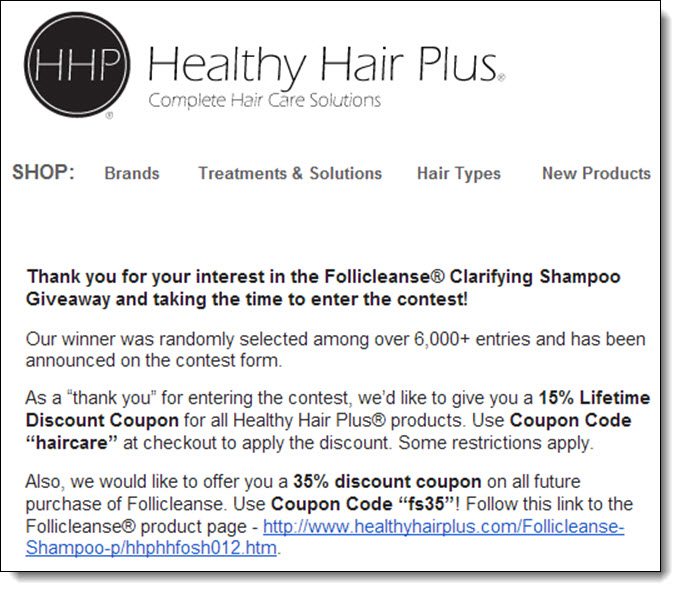
Creating Rapport with contests
This is a great opportunity to start the process of converting them into customers.  Give them an amazing incentive to purchase from your site, by giving them a very large coupon code, or something for free.  Your goal at this stage is to make your email so appealing that people won’t immediately unsubscribe.

Start a rapport with the contestants and start warming them up to your brand!

Step 14.  Mail out the prize

Don’t just send out the product in a boring box.  Make it beautiful!  Add a personalized letter or something that will make the winner feel special.  

Encourage the winner to share about winning the price, and to review your product on their site.


Step 15.  Remove the widget from your site


After you’ve sent out the email, remove the widget from your site.  You’re all done!

Conclusion

If you follow these 15 steps, you will be able to create a successful contest with thousands of entries.  Depending on the entries that you choose, you can easily increase your number of Facebook Likes, Twitter followers, Google +1’s, and Pinterest followers.

You can generate social engagement and buzz by having people view and follow you on your social media channels.  Additionally, you can generate links to your site by paid promotions as well as using “Link to Site” as one of the Mega Entries.

Gaining this exposure will give you an opportunity to find new Brand Ambassadors, Customers, and to increase your organic traffic from the search engines.  For a small price, you can gain an amazing number of permanent  links and followers!