Showing posts with label social mention. Show all posts

Friday, September 12, 2014

7 Must Use Social Media Tools


7 Must Use Social Media Tools
Social media is a huge commitment, and if you’re like me you would welcome anything that increases the return on both your time and financial investment. The problem is, there are more social media tools than you can poke a stick at- all claiming to solve world hunger. So what tools actually deliver?
Today I am going to save you some time and let you in on the best social media tools for each category.

Social Media Management

1. Hootsuite

Hootsuite is my personal favourite and arguably the best social media tool on both cost efficiency and performance. Probably the biggest reason to use Hootsuite is the ability to schedule and push content to multiple social media accounts (Facebook, Google+, Twitter, Linkedin) simultaneously all within one dashboard.
Hootsuite’s functionality doesn’t stop there. You can also measure campaign results using the custom inbuilt analytics, track conversations and delegate responses within your social media team. The only qualm I have about Hootsuite is it’s inability to preview images for twitter posts (they currentley only appear as collapsed links)

Social Media Tools

Pricing

Hootsuite offers a free version that provides more than enough functionality for beginners. For SME’s I would recommend at least Hootsuite Pro ($8.99 per month) and for marketing agencies, social media consultants and larger businesses I would recommended exploring the enterprise options.

Customer Service

2. Must Be Present

Must Be Present is my pick for the smart companies that have realised social media is more than just a marketing platform and can play a pivotal role as a customer service touch point.
The tool searches your Twitter account to find out how quickly you respond to mentions. It then uses engagement reports to compare your response rates with other users- giving you a snapshot on how you stack up. Monitoring response rates is crucial as studies have shown 42% of consumers expect a response in an hour and according to NM Incite, 71% of consumers are more likely to recommend a brand that provides a quick and effective response. Just like a call centre sets Key Performance Indicators (KPI’s) for average hold times, I would recommend setting KPI’s for social media response times and Must Be Present is the perfect tool to track your success.
Social Media Tools

Pricing

FREE

Brand Reputation Management

3. Social Mentions

Not monitoring what’s being said about your brand on social media is like entering a boxing ring without a mouthguard- not a smart idea. Social Mentions built by Sprout Social is my pick for brand reputation management on a budget. The tool prides itself on going beyond Google alerts and finding almost anywhere your brand is mentioned online. You can monitor over 100 social media channels, including all the big boys- Facebook, Twitter, Google+ and Youtube. There are also some basic analytics that allow you to measure brand sentiment, reach, strength and passion.
Social Media Tools

Pricing:

FREE

Content Creation

4. Trendspottr

A key strategy to expand the reach of your content marketing campaign is to jump on trending issues early, otherwise known as trend jacking. How do you anticipate a trend before it reaches mainstream awareness? Well that is where Trendspottre comes in. The tool mines Twitter and public Facebook data to reveal trends that will likely “go viral” over the next few hours or days allowing you to create powerful content that will snowball your brands reach. The social media tool also has the capacity to identify influencers in your industry who are on the rise, allowing you to reach out to them before your competition.
Social Media Tools

Pricing

The only problem with Trendspottre is that it comes at a cost, starting at $199 per month. If it fits in your marketing budget it is definitely worth the investment.

Twitter

5. Tweetpi
Twitter can be overwhelming to manage with its fast pace, but Tweetpi makes the job a whole lot easier allowing you to analyse the engagement and activity of your followers. Within the platform you can remove unfollowers, clean up dormant followers and reciprocate by following users who follow you. Tweetpi is the perfect tool for keeping your twitter account tidy and ensuring you are only engaging with relevant users.

Social Media Tools

Pricing

The entry level edition starts at $7.49 per month and has more than enough features to get the job done.

Facebook

6. Facebook Custom Audiences
I touched on the power of Custom Audiences in my post “3 super effective Facebook Advertising strategies“. If you’re advertising on Facebook, this tool is a must use. You can upload email lists from an excel file or directly from your mail chimp lists. You can also create audiences from Google+ circles, app users, Facebook Id’s and even website visitors which you can use to serve advertising too. Mastering this tool will no doubt increase the return on your Facebook advertising campaigns.
Social Media Tools

Pricing
FREE

Instagram

7. Iconosqaure
Iconosquare is like the Facebook insights of Instagram. The tool has a comprehensive analytics dashboard that allows you to view follower engagement, most engaging media, growth history, trending hashtags, average media life span, follower demographics and more. Just like Facebook Insights Iconosquare provides the perfect data to assess what content is and isn’t resonating with your target audience. You can then adjust your content marketing accordingly. You can also review unfollowers, people you follow who don’t follow you back and remove inactive followers- allowing you to keep your Instagram account tidy.


Social Media Tools

Pricing
The analytics function within Iconosquare is free but you can also run competitions and promote your Instagram account within the app at an additional charge.

Thursday, May 2, 2013

5 Free Tools to Manage Your Online Reputation

5 Free Tools to Manage Your Online Reputation


With a strong reputation, you attract new clients, keep the ones you have, and grow. And while in the old days, managing a company reputation meant managing public perception across geography, today the Internet adds another important layer.
Is your brand being talked about on blogs and social media? Do you know what people are saying about you online? You should.
Here’s a look at five of the top tools for managing your online reputation:

1. Google Alerts

Every business should set up Google Alerts for its brand name, if only because the process is so easy and convenient. Simply go to google.com/alerts and fill out your search query (company name) and how you want results delivered. You can filter results to include only certain forms of media (such as blogs or news or video), and you can have results sent to your email address or a feed reader. The results update you every time your brand is mentioned.
Online Reputation - Google Alerts

2. TweetBeep

What Google Alerts is to the Internet, TweetBeep is to Twitter. Sign up for the free version of this service, and get updated hourly every time you’re mentioned on Twitter. TweetBeep searches for Tweets linking to your website or blog (even within shortened URLs), replies and mentions, brand mentions, etc. It also comes in a premium version for $20/month that provides 200 alerts, a 15-minute-update option, and no ads.
Online Reputation - TweetBeeps

3. Social Mention

SocialMention gathers an enormous amount of data regarding how and where your brand is mentioned online. You give the tool a keyword (your brand name) and it reveals a host of mentions, ranking each one as either positive, negative, or neutral. The only problem is that because the data pull from such a wide breadth of sources, irrelevant results do appear. Therefore, Social Mention is most useful if you’re a huge, recognized brand or have a particularly unique name.
Online Reputation - SocialMention

4. Kurrently

Think of Kurrently as a search engine to check from time to time for brand mentions. As simple and user-friendly as Google, this tool provides real-time results for the keyword you give it (your brand name). Kurrently won’t email updates the way Google Alerts does, but its results are immediately updated and relevant, making it worth a visit.
Online Reputation - Kurrently

5. MonitorThis

MonitorThis is a particularly interesting tool that tracks the mention of your brand name on over 20 different search engines. Simply enter your name in the search box and click the “make monitor.opml” button; the tool then generates a file to import into your feed reader. From that point forward, all mentions of your brand that come up in search results go straight to your feed.
Online Reputation - MonitorThis

via

Monday, April 29, 2013

5 Advanced Social Media Metrics for 2013


As any metrics-obsessed marketer can attest, a campaign is only as successful as you can prove it to be. But beyond flaunting your progress for the benefit of hovering clients and executives, social media reporting can lead to valuable insights to inform not just your social campaigns, but your marketing strategy as a whole.
Read on to learn five advanced tracking techniques that may be missing from your current reporting strategy and how they can serve to improve your overall campaign.

1. Define and Track Conversions

Although I always remind clients that social media is a way to connect with users first and score conversions second, it’s never long into our dialog before the conversation reroutes to the question decision-makers love to ask: “What’s the bottom line?”
So, let’s begin with the basics: What’s a conversion, and how do you track it?
A conversion occurs anytime a consumer or client does what you want them to do. This could be buying an item from your site, visiting your brick-and-mortar store, joining your mailing list, watching the video on your homepage, or calling your 800 number, among other possibilities.
Some conversions are easier to track than others; while it’s pretty easy to set up eCommerce and Goal Tracking on Google Analytics, finagling a brick-and-mortar customer into remembering where they heard about your deal on widgets is another story.
Some ideas to step up your tracking game:
A. Conversion Paths
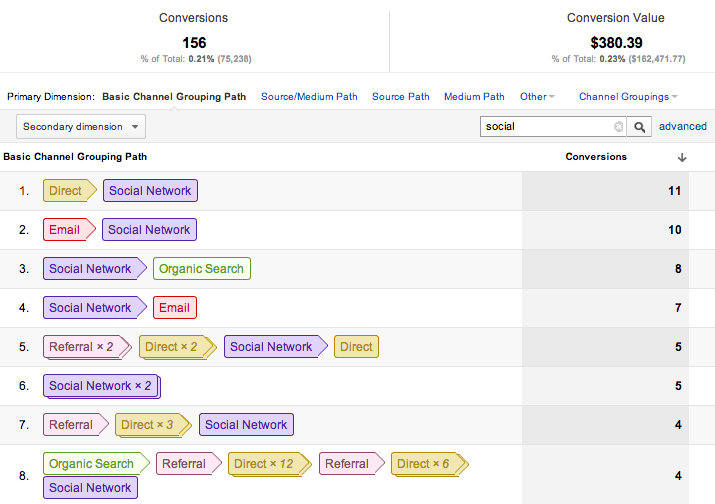
Google Analytics’ Top Conversion Paths feature (found under Conversions > Multi-Channel Funnels) makes it easy to see contributing sources to your tracked conversions, not the just the direct source they visited right before converting. This is a great way to appreciate the value of a strategy like social media, which can be an important component to the conversion process.
In the screenshot below, I searched “social” on analytics to bring all of the social networking results to the top of the list. Now, I can see that my website has received 156 conversions with social media components in the last month for a total profit of $380.
Analytics

B. Outside the Box
Just because a conversion cannot be monitored on Google Analytics does not mean it cannot be monitored at all. For brick-and-mortar scenarios, consider providing a printable coupon that can be tracked in the store, or simply imploring shoppers to say “Facebook” at checkout for a small discount. You can also try marketing for one location at a time so your other locations can serve as control cases.

2. Segment Your Ad Data

When my company was just getting started with Facebook advertising, the barrage of data was understandably overwhelming and we tended to cling to certain critical stats, which are indications of success: Cost Per Fan (CPF), Cost Per Click (CPC), Click-Through Rate (CTR), etc. However, each campaign has its own distinct challenges, variables, and success rates, and lumping them together into net data points can lead to some deceiving results.
For example, assume you have a CPF of $.35 for your current ads. This is a pretty good rate, but when you look further, you realize that your ads targeting women in their twenties rake in a CPF of $.05, while your campaign for middle-aged men has a CPF for $.70. In this scenario, it would make sense to put more of your budget to the $.05 CPF ads (assuming you’re OK with an influx of chicks) while continuing to experiment with your $.70 CPF ads on a smaller budget.
You can segment your ads by many different factors, including age, gender, location, interest, product line, and landing page/app.

3. Harness Your Email Service Provider (ESP)

One of my favorite things to do with a social media campaign is to collect email addresses through a promoted giveaway. It works like this:
Step 1: Pick a prize at least $200 in value of interest to your target demographic.
Step 2: Create targeted ads that promote said giveaway.
Step 3: Ads lead users to a custom application (example pictured) requesting their name and email. The app should include a checkbox where users can indicate that they would like to sign up for email marketing updates.*

Daily Buy
At the end of your giveaway, which I recommend you run for about a month, you should have a collection of targeted email addresses for your marketing pleasure. If you’re new to email marketing, try out MailChimp, which is free for up to 2,000 email addresses.
Why email? Email marketing continues to have the highest ROI in online marketing, because when a user opts in to your email list, they are giving you a major vote of confidence. Store your social media campaigns as distinct lists on your ESP to compare your return from various demographics, while benefiting from additional data points such as open rates and clicks.
This same method can be used on social networks beyond Facebook as well, as long as you are leading users to an email opt-in entry form.
*This last part is important! It’s better to have a smaller list of prospects interested in your email blasts than a sprawling array of people who only wanted to win a free whatever.

4. Leverage Advanced Tracking Tools

Share of Voice (SOV) and Influence are two of the newest — and most important — metrics in social media.
A. Share of Voice
SOV calculates your company’s slice of your industry’s social media pie. This metric concerns brand mentions, so it incorporates content authored by you and your competitors, along with content by the general public. To calculate your SOV, take the quotient of your brand’s total mentions over the total mentions of all the brands in your industry.
Browsing your general SOV across social channels can be a good way to get a sense how you’re stacking up against competitor groups. For even more telling results, partition your SOV by network to review missed opportunities on a site-by-site basis. As an example, you might have a 20% SOV in general, but only 5% on YouTube, which would mean you need to step up your video game.
To monitor your SOV, consider paid solutions such as Radian6Spiral16, or Scoutlabs, or get started with SocialMention, which is free.
B. Influence
Influence is essentially the PageRank of the social media world, and it serves as an important statistic, especially in the context of the bottom line. Measured for both users and brands, Influence quantifies the extent to which an entity’s shared content can affect the behavior of other users.
There are a couple major players in the Influence world, each of which measures things a bit differently. Compare yourself and your brand with competitors on KredKlout, and PeerIndex to see what insights can be gained.
Other potential metrics in the Influence vein include community sentiment (are your fans and followers happy? sad? neutral?), community size, and level of engagement.

5. Invest in PPC Remarketing

Remarketing — or as I like to call it, legal stalking — is one of Google AdWords’ coolest innovations to date, but a lot of marketers forget to incorporate it into their social media strategies. In case you are unfamiliar, remarketing is a way to reach out to users that have previously visited your website using visual ads on the Google Display Network. This is accomplished by embedding Google’s Remarketing tag on the pages of your site; you can have one general tag for your whole site, or correlate specific ads with specific pages — so people who visit your digital camera page can see more ads about digital cameras, for example, rather than ads cover all of your products.
Since Facebook applications are just iFrames (i.e., external pages coded and designed by you), these can also be used to house Remarketing code, allowing you to turn visitors to your Facebook page into visitors to your site.
Google AdWords offers a host of its own metrics; you can try out different Remarketing lists with different apps and demographics, and compare your results and conversions to shape your strategy moving forward.

Monday, January 28, 2013

5 Social Media Tools to Help Manage Your Online Reputation 30 Minutes a Day


Social media has become an integral part of a business’ marketing strategy. Reaching out to hundreds and thousands of your audience in a matter of seconds has been made possible by the power of a tweet or wall post.
The idea of managing social media profiles of your business is to maximize interaction with potential clients and increase sales.
However, there comes a time when your social media activity can get overwhelming. Aside from keeping up with the different social media channels you have registered for, you need to deal with posting timely messages on your feed and replying to disgruntled customers to control your online brand reputation. Thus, managing all your online accounts on a regular basis takes up hours of your time at work, leaving you with little for your other tasks.
Ideally, there’s no reason you should spend more than 30 minutes replying and posting on your online profiles. To do this, you will need the help of free social media tools and services to organize your workflow. Below are five highly recommended social media services to make your online work much more efficient.

Hootsuite

One of the problems why people take so long in messaging on social media is because they have to sift through different windows and interfaces just so they can send out messages to their audience.
With Hootsuite—arguably one of the most useful social media tools out there—you can register up to five of your social media profiles so you can interact with your Twitter,FacebookGoogle+, and LinkedIn followers with ease.
Interface on all accounts is streamlined, so you won’t get confused with the different designs of each site. If you need to dispatch the same message on all your profiles, Hootsuite lets you do that in just one click after selecting the profiles where you intend for the message to appear.
Another advantage of using this tool is the ability to schedule your posts to appear at specific dates and times in the future. This proves very useful especially if you won’t be able to tend to your online profiles due to other commitments. Once you’ve set up the message, they will be posted on the social media sites even if you don’t log in.

InboxQ

There are Twitter users who are simply waiting to become your followers, if not clients or brand advocates. The problem is just they don’t know it yet. These people ask questions about products and services that your business offers such as “What’s the best X?” or “What Y should I buy?” InboxQ, arguably the most helpful when it comes to generating leads for your business, lets you find them.
The app can be installed on your Internet browser or Hootsuite dashboard. Once installed, enter the keywords relevant to your business and InboxQ will search for questions on Twitter. You can input as many keywords as possible, as long as they help return more questions. From there, you can answer questions relevant to your business.

Commun.it

This social media service lets you build more Twitter leads to increase your sales by focusing on your list of high-value members. Users who mention your name will appear on the list, making it easier for you to engage with them and strengthen your relationships. The tool will also automatically populate your different followers into groups for segmentation purposes. Similar to InboxQ, you can list down keywords that will be used to discover new leads for your business.
A free account allows you 30 times to engage with a single user, so be judicious with the posts you will make using this service.

Topsy and Social Mention

Social media is breeding grounds for customer feedback. This will prove valuable to possible clients of your business since they research on the Internet before they do any purchases. Positive reviews draw them in to your business, while negative repels them. What you want is to augment positive feedback, which is why searching for posts on Topsy and Social Mention and retweet, like, and comments on said posts.
For negative comments, make sure to provide answers to the issues they raised on their posts. If possible, find a way to correct your mistakes. This way, even if you received negative feedback on social media, the manner in which you addressed their concerns speaks volume of your customer support.

Wednesday, July 11, 2012

6 Free Tools for Social Media Monitoring (plus 6 more)


Everyone loves lyrical wax, so you’ll love to read that we’re about to wax lyrical about Brandwatch.
We can’t help it, it’s literally the best tool available for social media monitoring. However, we do know that our services are out of the price range for many one-person businesses and small companies that don’t quite have the budget.
We’ve tried to put together a short list of the basic tools that you can get your mitts on for free, for those needing an introduction to SMM. Of course, we’ll tenderly ease you into the world of SMM too, but this selection will give you an idea of the basics of what can be done.
Do remember though, that although some of these tools claim to be comprehensive, none of these tools are even close to what Brandwatch and other Enterprise-level tools can provide, and they’re not an alternative. There’s a gaping chasm in quality, range and quantity of features – the return really does justify the cost. If you’d like to find out any more about us you can have a poke around on our website or in our brochure.
One of the better free tools available, Social Mention offers a wide range of information on your brand or search term of choice.
Using automated sentiment analysis, topic clouds (or rather, a list), key users, filtered real-time search results and other useful data, Social Mention is a fairly comprehensive portal for keeping track of mentions across the web.
The tool also provides some fairly arbitrary scores, which can also be useful for tracking purposes, including a sentiment ratio and a score for passion, reach and strength.
One drawback is that the results aren’t very consistent. Scores can change rather dramatically even when performing two identical searches within the same hour.
Verdict: Probably the best free tool available
How Sociable
How Sociable is specifically designed with brand impact in mind. They’ve measured over 250,000 brands for users over the past couple of years in a purely automated process that sees a brand assigned a score across different social networks.
It takes 36 different sites into account when evaluating each brand’s figure, though deeper analysis requires a sign-up fee.
How useful it is beyond that is in question. Like Klout, it appears to be a site that offers you a quantifiable score, then little more incentive to stay on the site.
Verdict: About as useful as the left side of the Countdown clock
Twitter Streamgraphs
More of a data visualisation than a useful day-to-day tool really, Streamgraphs takes the past 1000 tweets on any topic of your choice, then visualises them over the time period for the tweets.
What’s more is that it features a topic extractor, dividing the tweets into different keywords in the process. It’s a fancy little thing, but looks like it hasn’t been updated since 2009. It presumably uses the Twitter API too, so it’s unlikely 100% of tweets are assessed for the streamgraphs.
Verdict: An interesting way of visualising data and valuable to get a glance at the topics of your tweets. Not very valuable for company-level monitoring though.
Monitter
This browser-based monitoring solution is laid out like Tweetdeck, where your searches are split into columns and the data streams in in real time.
The platform does offer cool things like free widget downloads and some customisation, though ultimately it’s not offering much more than a Twitter search would do, albeit side-by-side.
Verdict: Like Tweetdeck but without engagement. More effort than worth really, a bit like a pedal-powered wheelchair.
Omgili
Standing for ‘Oh My God, I Love It’, Omgili offers a number of handy things to play with. One of the nicest features it has is its ‘Answers Snippets’, where it extracts the main point from forum posts about your query. It seems particularly good at finding social media mentions across forums and blogs, and has a useful graph plotter for comparing your searches.
The confusing interface is a small price to pay for a decent all-round monitoring tool.
Verdict: Oh my god, I like it.
Samepoint
Annoyingly you have to sign up before you can use Samepoint, though for freebie standards it’s a fairly comprehensive tool for keeping track of your brand across Twitter, Facebook and LinkedIn, as well as ‘thousands of others’. It also looks at Blogspot sites and does a bit of sentiment analysis for you too.
It also allows you to engage a tiny bit from within the site, and has some basic analysis tools available too. Based in New York, Samepoint has been around since 2009.
Verdict: one of the better ways to get your monitoring done for free
Here’s the verdict on a few more…
Keotag – claims to offer comprehensive coverage of lots of different searches, but many of the streams just don’t work
Mention – good platform, solid email alert system. However, the freemium model means paid upgrades are all but essential
Topsy – more of a search engine than a monitoring tool, it’s really one of the best ways to search through tweets. Claims to have access to the firehose too.
Google Alerts/Trends – nice to have the alerts delivered straight to your inbox, but seems to miss way too much to be valuable as a reputation tracker.
Hootsuite/Tweetdeck – these two are more of a management and engagement system than a monitoring tool, though both include some basic firehose-enabled search features
Twilerts – Like with Google Alerts, it’s lovely having them sent right in your inbox; useful if you’d like to be alerted to particular searches that you may not be able to anticipate.
The final word is to again reiterate that while many of these tools could provide you with some degree of a solution to your social media monitoring needs, the top-end tools do everything these ones do much, much better and a thousand things more too.

Thursday, May 3, 2012

What is Social Mention?


What is Social Mention?

Social Mention is free, real-time social media search and analysis. You can explore or opt to receive social media alerts (similar to Google Alerts but for social media only.) You can choose to receive free daily email alerts of your brand, company, CEO, marketing campaign, or on a developing news story, a competitor, or the latest gossip on a celebrity. 

Targeted Searches

SocialMention.com can be used to locate mentions across the board or you can choose to search specifically for keywords identified in video, blogs, microblogs, events, bookmarks, comments, news, Q&A format, and audio media.
Social Mention Tools Explained
Sentiment: Indicates if mentions are positive, negative, or neutral. This is not entirely scientific data, but it gives a nice overall view at how your company or search query is being talked about in social media.
Top Users: Reports who is talking about the subject the most.
Top Hash Tags: Hash tags are used in Twitter tweets to categorize what the tweet is about. This feature reports what, if any, popular hash tags are being used in association with your search query.
Post Rank: PostRank is a measure of social engagement (degree of interest and importance) using proprietary algorithms. PostRank.com describes their ranking system this way:
"PostRank is a scoring system developed by PostRank (formerly AideRSS) to rank any kind of online content, such as RSS feed items, blog posts, articles, or news stories. PostRank is based on social engagement, which refers to how interesting or relevant people have found an item or category to be. Examples of engagement include writing a blog post in response to someone else, bookmarking an article, leaving a comment on a blog, or clicking a link to read a news item."
Sources: Indicates where the blog sources are coming from (the search engines where SocialMention.com found information.).

Information Delivery Options

You can opt to receive information via an RSS feed, email, or CSV/Excel file (spreadsheet.)

Setting Up RSS Feed for Google Reader

Click on the "RSS" option. Cut and paste the new SocialMention.com URL that appears in your browser into Google Reader to start getting RSS feeds from SocialMention.com.

Searching for Twitter Tweets on SocialMention.com

Enter in your search query, then select "Microblogs" and hit "search." You will be returned with information about who is tweeting using the search terms you entered. Study these folks - some may be business owners you want to network with, or loyal customers you want to thank personally. And, if someone is tweeting negative thoughts about your business, you may be able to reach out to them and give them a better impression of your business.