Showing posts with label . twitter. Show all posts

Wednesday, November 26, 2014

Are Brands Wasting Money on Facebook and Twitter?

Are Brands Wasting Money on Facebook and Twitter?
Following announcements from Facebook that they are going to limit overly promotional posts on newsfeeds, a report from Forrester says that brands might be wasting their time and money on networks like Facebook and Twitter. Analyst Nate Elliot, says that these changes make it even less likely that brands posts will be seen by their fans and that, in effect, the network will become full of display advertising.
For Forrester, brands will be better served if they stop making Facebook the centre of their marketing activity and instead focus on more niche networks and on using social tools on their own sites.
There is little new in this advice – Facebook is (and has always been) a difficult place for many brands to get right. Brands have invested considerable amounts of time and money on building audiences, but have not always focused on how or why they might have a sustainable relationship with this audience on this channel rather than any other. This behaviour leads to a situation where some brands spend even more time and money crafting the ‘perfect’ post – typically one that performs well against Facebook’s own metrics.

But in none of this are we really thinking about the audience, or the story, or questioning exactly what role a channel like Facebook or Twitter can play in the relationship between a brand and an audience. We’re just playing the game that Facebook has made for us – attracting audiences, writing posts, and using their analytics to measure success. It is only when the rules of these games change that brands step back and question why they are playing in the first place.
Facebook and Twitter are hard for brands to get right. They are not always the right channel. And rather than putting considerable time, effort and money into trying to make them work, brands should go back to basics. Think what we want to communicate, and to whom, and then to use the right channels for the right purpose. Sometimes this will involve channels like Facebook and Twitter, other times it won’t. But rather than blindly trying to make these channels work with endless streams of content, brands should let the message and the story guide what channels are used.
It’s not that this kind of thinking is new or different. But too often networks like Facebook and Twitter drive unusual behaviour in brands and the agencies they hire. Of course they have a role to play in the comms mix, and of course brands shouldn’t abandon them. But they probably are wasting money – trying to make Facebook and Twitter work for them, when other channels would be much better.
(via)

Sunday, April 13, 2014

5 Tips for Brands to Get the Most Out of Twitter's Latest Update

As you have likely already seen, Twitter began implementing a new design this week that has a major impact both on the interface and functionality of the site. The new look shares many similarities with Facebook and focuses more on improving the overall user experience while making it easier to navigate and filter through tweets.
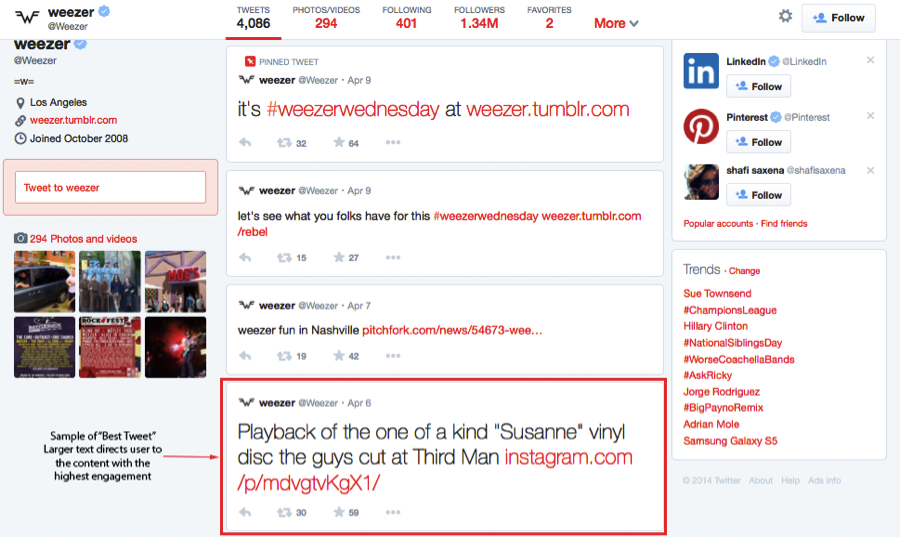
weezer best tweet - new layout
The most visible area of the latest Twitter upgrade are the changes to profile and cover images. The new cover photo spans the entire header of the profile page and replaces the background image used in the previous version of Twitter. The look is very clean and offers users the ability to focus on a single image for their profile page. In addition, users profile images are larger making it easier to see the individual.
From a functional perspective, Twitter has also introduced new functionality to improve the user experience by focusing on the most important content. The three areas with the biggest functional impact are:
  • "Best Tweets": This feature is interesting because it will help profile visitors sort through the noise of Twitter profiles by highlighting the tweets that have generated the most engagement. Content with the highest engagement will appear with larger text, making it easier for users to find and engage with.
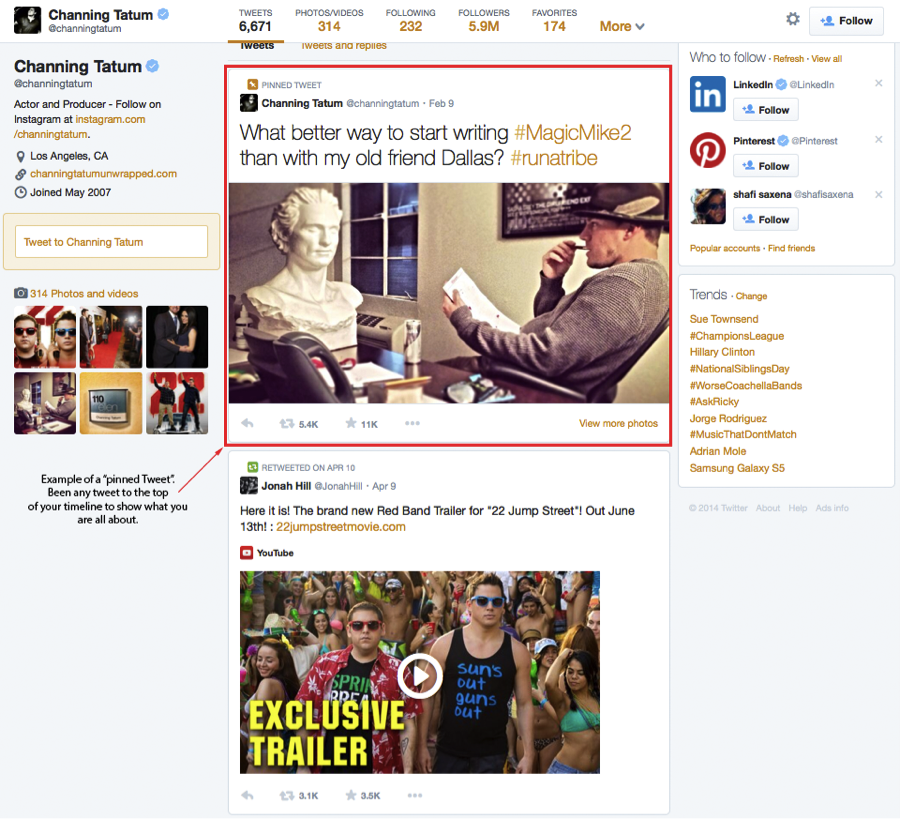
  • "Pinned Tweets": I really like this feature because it offers a lot of potential for brands as well as individual users (more on this below in the tips section). This gives you the ability to "Pin" of feature one of your tweets at the top of your profile stream so visitors to your profile see it immediately.
Example of a Pinned Tweet from @channingtatum
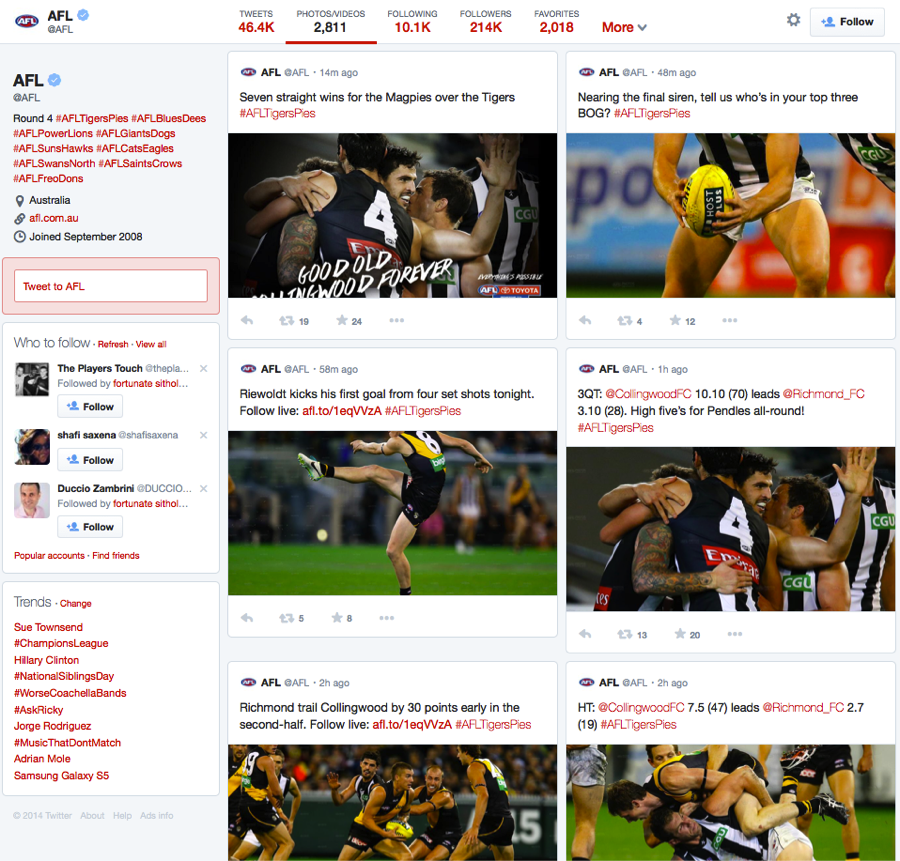
  • Filtered Tweets: This is another cool feature that improves the overall user interface and makes it more user friendly. Twitter now gives visitors the option of choosing which timeline to view when checking out profiles. Users can select: a basic Twitter stream, a stream of only photos and videos, or tweets and replies.
  twitter filtering
photo list
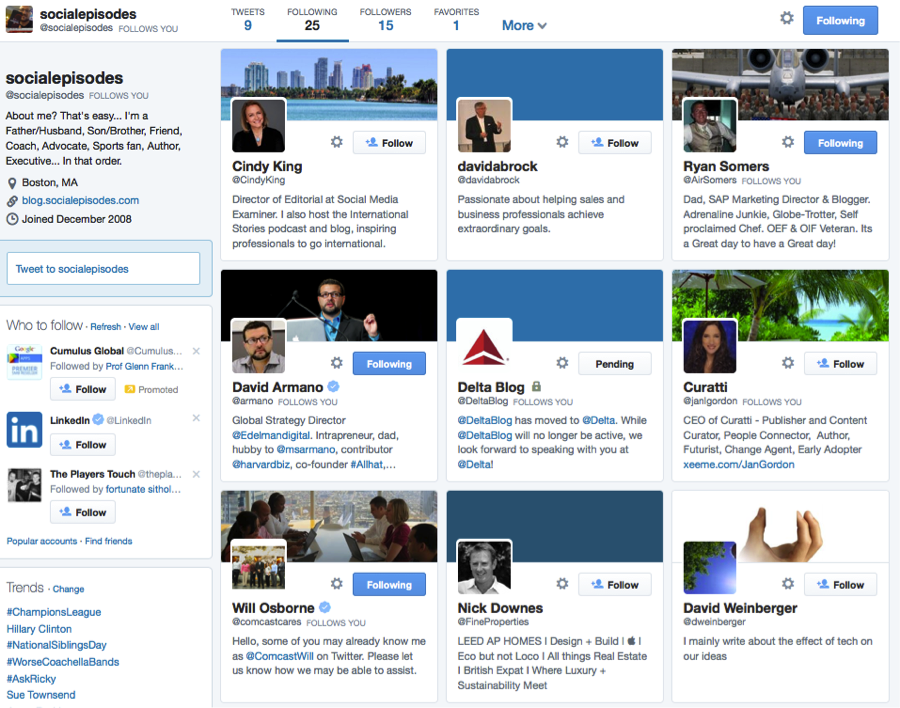
  • Finally, the new follower & following list: Twitter has made the following/followers lists much more graphically orientated. You can now go visually see who is following a profile and who they are followers of through an easy to understand graphical interface.
New Following/Follower List View

Latest Mobile Functionality

In addition to the upgrades made this week on Twitter.com, Twitter has also rolled out some significant upgrades to their mobile interface for photo sharing. The new functionality has made the Twitter mobile client more dynamic for photos and includes:
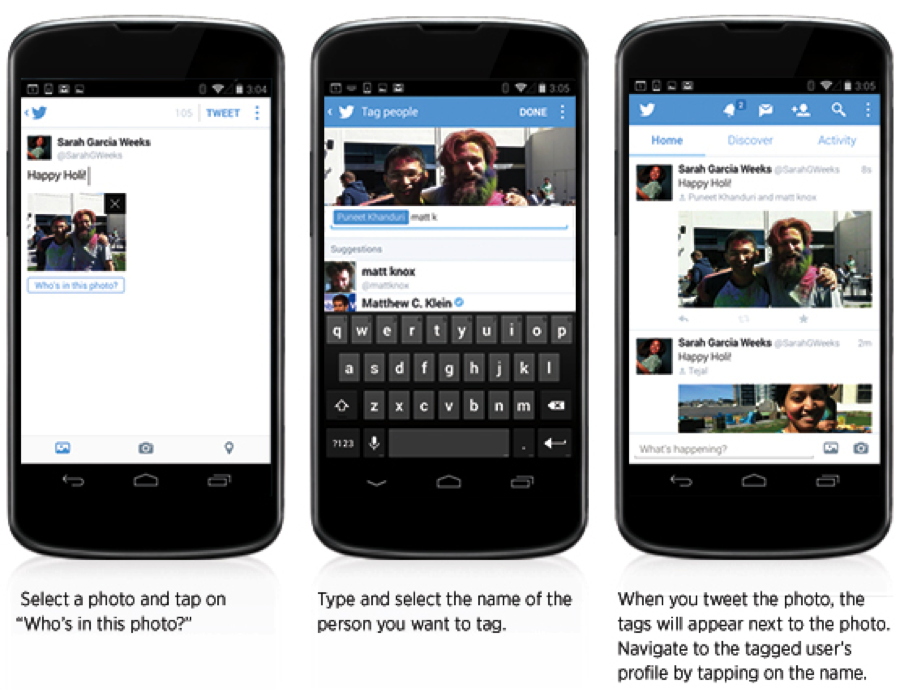
  • Support for tagging up to 10 people in a photo – without impacting the 140 character limit Through the mobile interface you can now tag photos with up to 10 individuals and the best part is the number of individuals tagged in a photo does not impact the 140 character limit.Twitter's blog offers the instructions below:
Photo Tagging on Twitter
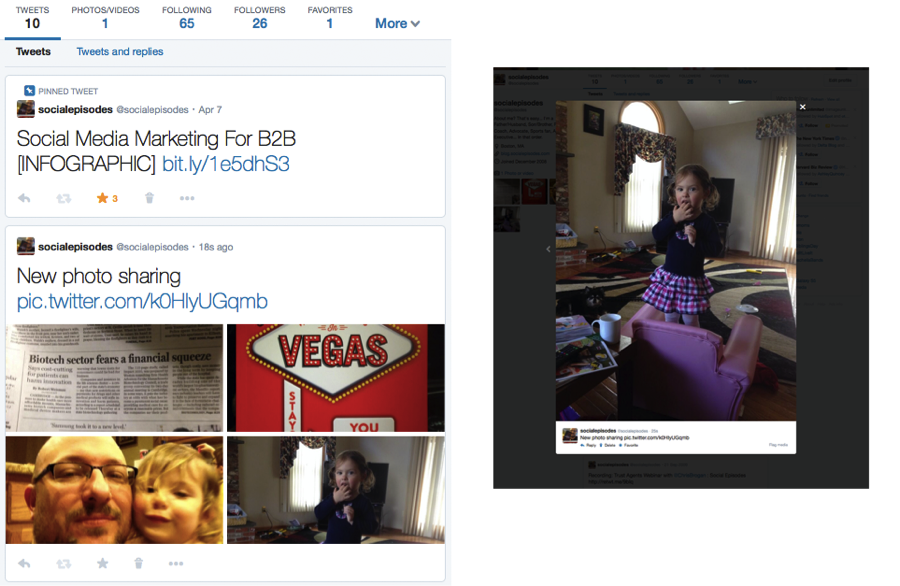
  • Share Multiple Photos in a Single Tweet Twitter has implemented the ability to add multiple (up to four) photos to a single tweet. This features automatically creates a collage that visitor can scroll through as they view the tweet. Below is an example showing the four photos and the lightbox that appears for the gallery.


Sharing Multiple Photos on Twitter

Tips for Brands Looking to Leverage the New Functionality

Twitter will begin rolling out the new change to Profile Pages to users over the next few weeks. In the meantime, it’s a good time for brands to begin thinking about how they will leverage this new functionality. Here are some tips to help get you started:
  1. Plan Your New Profile and Cover Images: There is no better time than now to begin designing and developing your new cover photo and profile image to meet the new Twitter requirements. Twitter recommends dimensions for header photo of 1500px in width × 500px in height.
  2. Offer Specials with Pinned Tweets: You now have the opportunity to feature a specific tweet a the top of your profile page to let new visitors get a better sense of who you are and what your profile is all about. One thing for brands to consider is featuring a tweet that offers an exclusive piece of content to visitors. For example, feature a tweet that offers a white paper, eBook or Infographic to help get visitors engaged.
  3. Use the Mobile Features for Photo Sharing: Tagging multiple people and posting multiple photos is a great way for brands to better engage with their audience. Consider posting multiple photos that illustrate a story or message to your audience and tag individuals that you think would appreciate the message.
  4. Larger Profile Image: The larger profile image on the new version of Twitter gives users more real estate to set the tone of their page. Consider changing profile photos on an ongoing basis to help keep users coming back.
  5. Make your Photos Count: This new version of Twitter places a deep emphasis on photos and video. Publish photos that are bold and catch peoples attention. This will help to increase engagement when visitors choose to filter your tweets using the photo/video filter.
Finally, brands can expect to see more changes from Twitter in the not-so-distant future. Just last week,Vivian Schiller, Twitter’s head of new partnerships shook the "twitterverse" by suggesting that hashtags and @replies are "arcane" and could possible be a thing of the past. When asked to clarify the remarks, Twitter representatives had this to say: "By bringing the content of Twitter forward and pushing the scaffolding of the language of Twitter to the background, we can increase high-quality interactions and make it more likely that new or casual users will find this service as indispensable as our existing core users do. And we took initial steps in that direction with the introduction of media forward timelines and in-line social actions in October, and we're already starting to see early signs that those initiatives are working well."
What do you think about the new changes to twitter? Are you, or your brand, looking forward to them?

(via)

Thursday, April 12, 2012

Know the Best Social Media Optimization Techniques

A year or so ago just using social media would have been great – nowadays it is necessary to optimize your content and website when it comes to getting the most out of your social media. There is no debating the importance of social proof and social searches. Search engines such as Google, Yahoo, and Bing are increasingly using social networks such as Google+Twitter, and Facebook when it comes to ranking websites. This is another reason to be aware of some of the best social media optimization techniques.

Make sure your content is easy to share


You want others to see and experience your content; it is essential that you make sharing your content as accessible as possible. If someone has to jump through a thousand hoops before they can share something, chances are that they will not do it. Make sure that you have an easy system in place that allows others to share your content.


Social media are great, but do not forget about your website


Truth is that if your business only has a Facebook account instead of an actual website, it is going to look rather cheap. Do not forget about your website, in fact it needs to be a centralized hub where people can gather to find information about your brand. Incorporate your Facebook content and Twitter feeds into your website, link to your YouTube videos but give end-users a single URL to bookmark.


Do not be afraid of feedback


How many times have we seen it in the last few months? A company representative makes a snide remark on Facebook or Twitter and someone ends up taking a screenshot. We have also seen large companies censor legitimate complaints from their Facebook page. If you want to know exactly how people feel about your company or services, offer them a chance to provide feedback. 


If the message is positive, be sure to respond – you may just have made a lifelong fan. If the comments are critical, a quick response is not only the best way to react but also unexpected. If someone has a complaint and they feel that they are being taken seriously, chances are they are willing to give you another chance. This does not mean that you do not have the right to censor those messages that just seem to be hell-bent on spewing venom onto your page.


Reward inbound links


This does not mean that you have to promise a free flat screen television for anyone who sends someone a link. It means that you have to encourage people to want to come to your website. It does not matter if you have funny Facebook status updates, if you provide hints through Twitter, if you have a YouTube channel that introduces people to your company, as long as you make it appealing for people to want to come back.


Acquire (and display) social proof


Social proof not only encourages people to want to read your content, but it also makes them want to share it with friends and family. Social proof means that people tend to assume that the actions of other people provide us with the correct behavior in a given situation. The reasoning behind this is that others probably possess more information about the situation. This means that as humans, we are programmed to learn from the actions of others. Real life examples would be a velvet rope at a nightclub, an exclusive restaurant that does not allow you to make reservations for weeks, or a movie theatre where people are waiting outside to get in. People passing by want to know what could possibly be worth the wait.


This adds to your online credibility. It is normal for most people to want to learn more about what is already popular. Ask yourself, which link would you click – the one with four Facebook likes or the one with several thousand likes that also comes recommended by at least two of your Facebook friends?


Instant Social Media Connectivity


There are many desktop applications for always on or instant access to social media accounts. Popular ones are TweetDeck, Seesmic or Hootsuite. These applications allow fast access to many social accounts within one application. You can view all your social media accounts under one roof in order to manage or distribute your messages. You would also need fast internet connections to access, download or upload messages and content. AT&T is offering great discounts on their internet services you can easily get an ATT uverse coupon and save on your internet service.


(Via)


Tuesday, April 10, 2012

Why Bother Monitoring Social Media?


Even if you or your clients have "decided" not to actively participate in social media,it’s really not a choice. Nature abhors a vacuum, and so does social media. Either you can fill the vacuum with your perspective, or your customers and competitors will fill it for you. The choice is clear.
Monitoring helps with branding and marketing and can help identify quality control or customer care problems that may have gone unnoticed.
Monitoring is only one piece of the puzzle, however. It’s important to find out who is saying what, and where the conversation is happening so you can respond appropriately.

Terminology

There are few terms you’ll need to be familiar with before we talk about the tools, so let’s take a moment to cover them before we jump into the details.

Influence

If you find there are customers who have a strong opinion of your brand, it’s important to understand the influence of those customers.
  • How many followers do they have?
  • Do they get retweets?
  • How many external links point to their blog?
  • How many comments do their blog posts attract?
Several of the free tools listed below include this measurement to assist in your monitoring and response efforts. All of the paid options include it.

Sentiment

Are the comments positive or negative? Most current tools attempt to assign sentiment to a post automatically. While this is helpful for brands with tons of mentions, it’s only about 70% accurate in most cases[1], so manual verification and spot-checking is encouraged across the board before making any decisions based on influence data.

Volume

This is simply the amount of "buzz" that exists. Many monitoring tools give the ability to chart volume for specific keywords over time. This gives you a great way to measure the impact of your marketing efforts and social media campaigns, especially when combined with sentiment. A lot can be learned about your brand and your customers by investigating spikes in social media volumes.

Workflow

Workflow is the process of assigning, tracking and responding to social media, typically in a team environment. An effective workflow can prevent double responses and missed opportunities.

Monday, April 9, 2012

Social Media Facts

Social media is a place to share, so here is a breakdown of 23 high-level numbers and statistics that can make jaws drop, and get the hamsters in their heads turning the wheel.  If you are asking why 23, well I was watching the NBA with my nephew when thinking up this post and figured I would pay homage to Jordan. Feel free to share in presentations as you like.

  • In the US, there are 149M active Facebook users, 70% log in once a day – Ogilvy; BuddyMedia
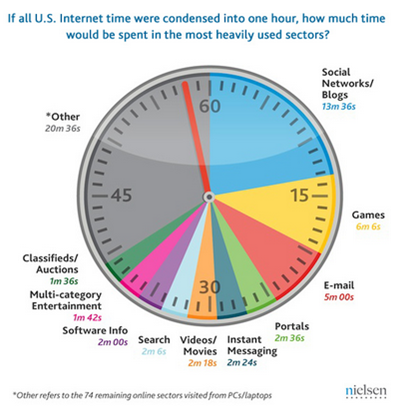
  • Social media accounts for ~ 25% of all time spent online over 35 minutes per hour –Nielsen
  • Facebook accounts for 8.93% of all website visits in the US. All of Google’s properties including YouTube, Gmail, Google accounts for 9.85% – Experian Hitwise
  • 64% of Facebook users have liked a brand on Facebook - ExactTarget
    How much time is spent on social media
  • By 2012, half of the world’s Internet users, 1 billion people, will have a Facebook account – TIME (12/7-1/3 edition)
  • Facebook’s fastest growing demographic is 17-35 year olds – TIME
  • 43% of Facebook users who “unlike” a brand do so because of too much push marketing – Exact Target
  • 46% of Internet users worldwide interact with social media on a daily basis -TNS
  • 25% of social media users are more likely to look into a brand advertising on social media – Adology
  • 15% of these users are more likely to purchase from social media advertisers – Adology
  • 38% of Small  Micro Businesses would use social media more if they had more time or a convenient management solution –  Vistaprint
  • 46% of micro business owners utilize social media – Vistaprint
  • $4.26 billion will be spent on social media marketing globally in 2011 – eMarketer
  • 17% of US online consumers have created a Twitter account – ExactTarget
  • 48% of Twitter users check their account at least once a day – Exact Target
  • 71% of Twitter users expect to receive marketing messages via the platform – Exact Target
  • 41% of users who have unfollowed a brand on Twitter did so because they were over-marketed to – ExactTarget
  • 46% of Twitter users meet with friends more in person over 2009 – Social Mythbusting
  • 78.6% of consumers have joined a company’s community to get more information on the company – Universal McCann
  • 71% of community members say they are more likely to purchase from brand – Universal McCann
  • 66% of company community members note that the community has made them more loyal to a brand – Universal McCann
  • 63% of corporate community members note that they will recommend brand to friends/family – Universal McCann
  • Ford’s 2011 Explorer launch on Facebook generated a 200% greater return than a Super Bowl ad.

Sunday, April 8, 2012

5 Steps To Expand The Business Value Of Social Customer Engagement

Community-based knowledge creation for customer service and sales is not that new. However, enabled by the ubiquity and ease of use of the Web and the availability of social networking tools, it has gone to a whole new level, leading to the creation of the term “social knowledge.” While more prevalent in B2C sectors, social knowledge is also starting to matter in B2B sectors.

How can companies harvest the best of social knowledge for pre-sales and after-sales customer service they offer through their own contact centers? How should they engage with customers on social websites? The following five-step plan will help increase the odds of success in harvesting social knowledge for customer service and sales.

1. Assess the opportunity

Companies need to first assess the opportunity for social knowledge harvesting in the context of the nature of their business (e.g. B2B, B2C etc.) and the customer queries they get (simple vs. complex).
Social knowledge creation has been more common in B2C sectors because it is easier to attain “critical mass” with more contributors and less specialized knowledge. This means a bigger harvesting opportunity in B2C than in B2B.
Customer inquiries fall broadly into four categories—informational, transactional, diagnostic, and purchase advice. Generally, informational and transactional queries tend to be of low-to-moderate complexity while diagnostic and advice-seeking queries are of moderate-to-high complexity. Informational and transactional queries, therefore, are more likely to be resolved by social knowledge, although social knowledge (e.g. product review sites) has become an important influencer, especially in B2C commerce.
2. Identify high-value knowledge
Social knowledge contributors have varying levels of reputation, prolificacy, and influence, which most social networking tools measure (number of posts, acceptance rate, number of connections, etc.). The Social Knowledge Value™ (SKV) of contributors can be estimated by using a combination of these metrics. Knowledge from high-SKV contributors is ideal for “deep dive” harvesting, while that from low-SKV contributors can be ignored or skimmed.

3. Engage current customers

Customers are key to the initiative – as knowledge contributors, posters of queries and brand advocates on social sites. Businesses need to make sure that queries posted on social sites are resolved in a timely manner, especially if they are from high lifetime financial value customers, whom you usually provide “platinum service” (e.g. proactive offer to chat, rapid service levels, etc.). The risk of non-resolution of customer queries is high on social sites because of broad market exposure.
If high-financial-value customers are also high-SKV contributors, they not only present an opportunity for deep-dive knowledge harvesting but are also important for collaborative product development and social brand building. See Figure 2 for a framework for knowledge harvesting as part of customer service strategy.
4. Harvest and unify
Contact centers need to make sure that social knowledge goes through the same robust quality control processes as internally-generated knowledge, so that it can be made part of a trusted multichannel knowledge base. Likewise, social customer interactions should be added to other multichannel interactions as part of a unified customer interaction hub, which consolidates interactions, knowledge, business rules, analytics, and administration in one place for better customer experience, service consistency, context continuity, and process efficiencies. The hub approach allows agents to view customers’ social interactions, in addition to traditional one-to-one interactions with the business, for full context and rapid resolution.

5. Account for sector-specific and legal factors

Social monitoring tools, social knowledge, and robust customer service compliance workflows can help businesses in sectors such as pharmaceuticals and personal care products to track adverse incident reports and act on them rapidly in compliance with regulations.
All businesses should make sure they are not violating copyright laws while harvesting content from social websites.
When this step-by-step approach is implemented, social knowledge is bound to add significant value to any enterprise in the form of improved customer loyalty, enhanced brand equity, expanded knowledge ROI, and reduced customer service costs.